
How to Create Professional Invoices in 2026

Sending a sloppy invoice is like showing up to a client meeting in pajamas. It signals that you don't take your business seriously — and your client won't take your payment request seriously either. Learning how to create professional invoices is one of the most practical steps you can take to protect your cash flow and build credibility.
A 2024 study found that 61% of late payments trace back to administrative errors on invoices themselves. Missing details, vague line items, and unclear payment terms give clients a reason to delay. The fix? A clean, complete invoice that leaves zero room for confusion.
Why Professional Invoices Matter for Your Business
Your invoice is more than a payment request. It's a business document that reflects your brand, protects you legally, and sets the tone for your client relationship.
Here's what a professional invoice does for you:
- Gets you paid faster. Clients who receive clear, itemized invoices pay an average of 2 weeks sooner than those who get vague billing emails.
- Reduces disputes. When every charge is documented with descriptions, quantities, and rates, there's nothing to argue about.
- Keeps you tax-compliant. Many countries require specific invoice elements (tax ID, sequential numbering) for legal compliance. A proper invoice template covers all of them.
- Builds your brand. A polished invoice signals professionalism and makes clients more likely to refer you.
Essential Elements Every Invoice Needs
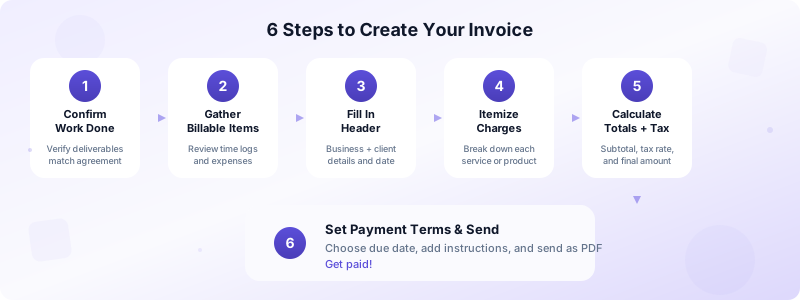
Every professional invoice should include these 10 elements. Skip any one of them, and you risk delays or disputes.
- Your business name and contact info — Full name or company name, address, email, and phone number.
- Client's name and contact info — Company name, billing address, and contact person.
- Unique invoice number — Sequential numbering (INV-001, INV-002) keeps your records organized and satisfies tax authorities.
- Invoice date — The date you issue the invoice.
- Due date — When payment is expected. Be specific: "Due April 20, 2026" beats "Net 30."
- Itemized line items — Each service or product listed separately with description, quantity, rate, and subtotal.
- Subtotal, tax, and total — Show the math clearly so the client can verify amounts at a glance.
- Payment terms — Late fees, early payment discounts, accepted payment methods.
- Payment instructions — Bank details, payment link, or other method. Make it easy to pay.
- Notes or thank-you — A brief, professional note adds a human touch.
Step-by-Step Guide to Creating Your First Invoice
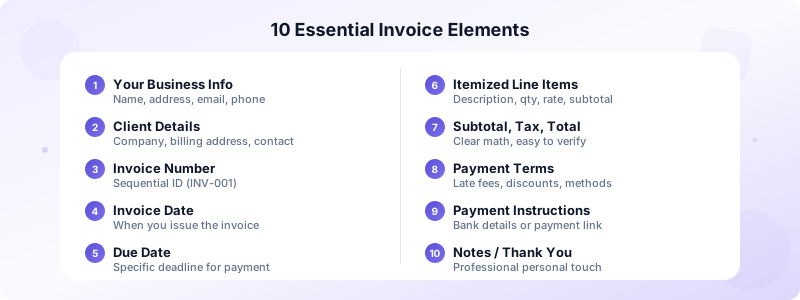
Follow these 6 steps to create professional invoices from scratch — or use an invoicing app to automate most of them.
Step 1: Confirm the work is complete. Never invoice before delivery unless you're billing a deposit. Verify that all deliverables match what was agreed upon.
Step 2: Gather your billable items. Review your project notes, time logs, and any reimbursable expenses. Missing a line item means leaving money on the table.
Step 3: Fill in the header. Add your business details and the client's billing information. Double-check spelling — a misspelled company name can delay payment processing.
Step 4: Itemize every charge. Don't write "consulting services — $2,000." Instead, break it down:
- Strategy workshop (4 hours x $150/hr) — $600
- Brand audit and report — $800
- Implementation plan — $600
Specificity eliminates questions.
Step 5: Calculate totals and tax. Add your subtotal, apply the correct tax rate for your jurisdiction, and show the final amount due in bold.
Step 6: Set your payment terms and send. Choose your due date, add payment instructions, and send the invoice as a PDF. PDFs can't be accidentally edited and look consistent on every device.
With Invoices Customers, you can complete all six steps on your iPhone in under 60 seconds — no account required, no internet needed.
Invoice Design Tips That Build Trust
A well-designed invoice doesn't need to be fancy. It needs to be clear, scannable, and on-brand. Think of your invoice as a mini marketing piece — it's often the last document your client sees before deciding how quickly to pay you.
Use consistent branding. Add your logo, use your brand colors, and pick one clean font. Clients should recognize your invoice before they read a word. Branded invoices also look more legitimate, which matters when your invoice reaches an accounts payable department that processes hundreds of documents per week.
Prioritize visual hierarchy. The total amount due and the due date should be the two most prominent elements on the page. Use bold text, larger font sizes, or color to make them stand out. A client scanning your invoice should find the amount and deadline within 3 seconds.
Keep it clean. White space isn't wasted space. Cramming every inch with text makes your invoice harder to read and easier to ignore. Group related information together — your details in one block, client details in another, line items in the middle, and totals at the bottom.
Choose the right file format. Always send invoices as PDFs. PDFs preserve your formatting across every device and operating system. They also prevent accidental edits that could change amounts or terms.
Use a template or app. Starting from a blank document every time wastes hours over a year. If you create 10 invoices per month, that's 120 per year. Professional billing templates or invoicing apps ensure consistency and save you from forgetting essential fields. Most entrepreneurs find that switching from manual invoicing to an app cuts their invoicing time by 80%.
Common Invoice Mistakes to Avoid
Even experienced business owners make these errors. Each one can delay your payment by days or weeks. According to industry data, over 55% of invoices in the US are paid late — and many of those delays start with the invoice itself.
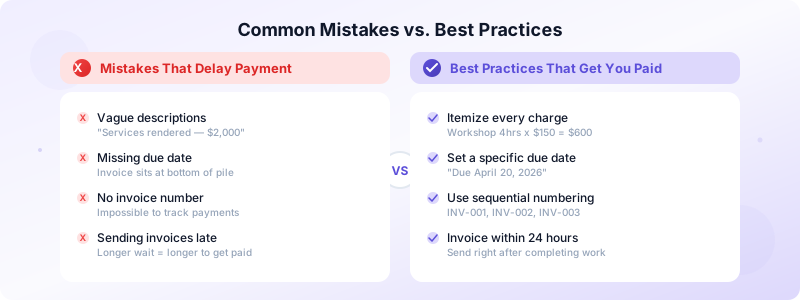
- Vague descriptions. "Services rendered" tells the client nothing. Be specific about what you delivered, how many hours it took, and what rate you charged. Specificity builds trust and eliminates back-and-forth questions.
- Missing due date. Without a deadline, your invoice goes to the bottom of the pile. Always include a specific date like "Due April 20, 2026" rather than just "Net 30."
- Wrong client details. A misspelled name or incorrect address can route your invoice to the wrong person or department. In larger companies, this alone can delay payment by 2-3 weeks.
- No invoice number. Without sequential numbering, tracking payments becomes a nightmare — for you and your client. Tax authorities in many countries also require sequential invoice numbers.
- Sending late. The longer you wait to invoice after completing work, the longer you wait to get paid. Send within 24 hours of completing a project or reaching a milestone.
- Forgetting tax. Omitting required tax calculations can create legal issues and force you to absorb the cost. Check your local tax requirements and apply the correct rates every time.
- Not following up. Sending an invoice is only half the job. Set a reminder to follow up 3 days before the due date and again on the day it's due. A polite reminder can cut late payments by 30% or more.
Simplify Invoicing with the Right Tools
You don't need expensive software or an accounting degree to create professional invoices. The right tool makes the entire process painless.
Look for an invoicing solution that offers:
- Fast invoice creation — Fill in details once, reuse them for future invoices.
- Professional PDF generation — Send polished documents that look great on any device.
- Client management — Store client details so you never retype an address.
- Status tracking — Know which invoices are outstanding, overdue, or paid.
- Offline functionality — Create and manage invoices even without an internet connection.
Invoices Customers checks every box. It's built for entrepreneurs who need to create professional invoices quickly, manage client information, and generate polished PDFs — all from your iPhone. Your data stays on your device, no sign-up is required, and it works offline.
Download Invoices Customers and start sending professional invoices in seconds.
