
Sales Tax on Invoices: A Practical Guide
Sales tax on invoices is one of the most confusing compliance topics for small business owners and freelancers — not because the rules are hard to understand, but because they vary so significantly by state, product type, and customer type. Getting it wrong means either undercharging (and owing the difference yourself) or overcharging (and owing refunds).
This guide covers when sales tax applies, how to show it on an invoice, what "nexus" means for your obligations, and the key distinctions between products, services, and digital goods.
Do You Need to Charge Sales Tax?
Whether you need to charge sales tax depends on three questions:
1. Do you have nexus in the customer's state? Nexus means a sufficient business presence in a state to create a tax collection obligation. You have nexus in a state if you:
- Are physically located there (home office counts)
- Have employees or contractors there
- Exceed the state's economic nexus threshold (typically $100,000 in sales or 200 transactions per year in that state)
After the 2018 South Dakota v. Wayfair Supreme Court decision, most states established economic nexus rules. If you sell across state lines and exceed these thresholds, you may owe sales tax in multiple states even without a physical presence.
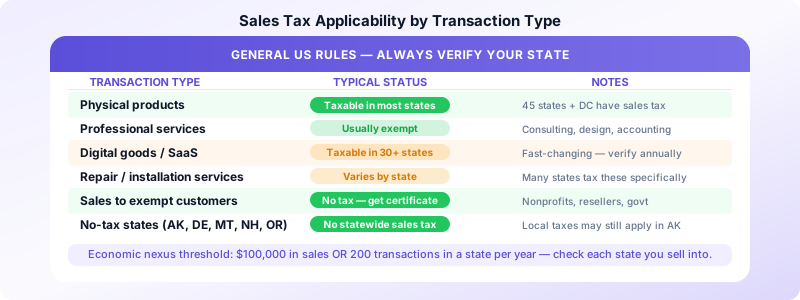
2. Is what you're selling taxable in that state? Physical products are taxable in most states. Services are more complex:
- Most states do not tax pure services (consulting, design, accounting, coaching)
- Some states tax specific services: repair services, digital services, photography, software-as-a-service
- The trend since 2020 has been toward more states taxing digital goods and services
3. Is the customer tax-exempt? Resellers, nonprofits, and government entities are often exempt from sales tax. They should provide you with a valid exemption certificate. Keep these certificates on file.
If all three questions align — nexus, taxable product/service, non-exempt customer — you're required to collect and remit sales tax.
The Five No-Sales-Tax States
Alaska, Delaware, Montana, New Hampshire, and Oregon have no statewide sales tax. If you're based in one of these states and selling only to customers in these states, you likely have no sales tax obligation (though some Alaska localities have local taxes).
Products vs. Services vs. Digital Goods
Physical products: Generally taxable in all states that have sales tax. The rate varies by state and sometimes by product category (groceries may be taxed differently than clothing).
Services: Taxability varies widely. Most states exempt pure professional services. But states like New Mexico, South Dakota, and Hawaii tax most services. Check your specific state's Department of Revenue for the current rules.
Digital goods and SaaS: This is the fastest-moving area. Software subscriptions, digital downloads, online courses, and streaming services are now taxable in over 30 states. If you sell anything digital, verify your state's current rules — they change frequently.
Mixed transactions: If you sell a product and a service together (e.g., equipment plus installation), the taxability depends on whether the contract is "lump sum" or itemized. Separate line items for taxable and non-taxable items can reduce your tax exposure.
How to Show Sales Tax on an Invoice
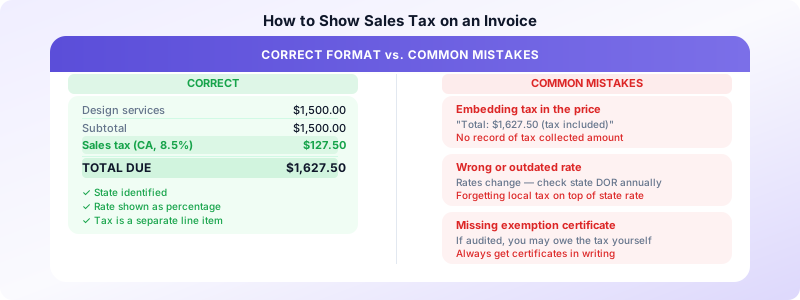
When you're required to collect sales tax, it must appear as a separate line item on your invoice. Never embed it in your price.
Correct format:
- Design services: $1,500.00
- Sales tax (CA, 8.5%): $127.50
- Total due: $1,627.50
What to include:
- The state (and locality if applicable)
- The tax rate as a percentage
- The tax amount in dollars
- The taxable base (which line items tax applies to, if not all)
If some items on your invoice are taxable and others aren't (e.g., services + physical deliverables), show tax only on the taxable portion and note which items it applies to.
Where to find your rate: State Department of Revenue websites publish current rates. For multi-state sellers, tools like TaxJar and Avalara automate rate lookup and calculation.
Economic Nexus Thresholds to Know
For sellers operating across state lines, the most common economic nexus threshold is $100,000 in sales or 200 transactions in a state per calendar year. Once you cross this threshold, you must register for a sales tax permit in that state and begin collecting.
Key 2026 updates:
- Illinois: economic nexus threshold is $100,000 in sales only (200-transaction threshold removed)
- Most states maintain the $100,000 / 200 transaction standard
If you're approaching these thresholds in multiple states, consult a tax advisor before you cross them — retroactive compliance is more expensive than proactive registration.
Registering and Remitting Sales Tax
Before collecting a single dollar of sales tax, you need a seller's permit from the state's Department of Revenue (also called a sales tax license or sales tax permit). Collecting without a permit exposes you to penalties.
Once registered:
- Collect the correct rate at the time of sale
- Keep records of all taxable sales by state
- File returns on the schedule the state requires (monthly, quarterly, or annually, depending on your volume)
- Remit the collected tax by the due date
Most states now allow online registration and filing through their Department of Revenue portals.
Invoices Customers lets you add a separate sales tax line to any invoice with custom rate — keeping your billing compliant and your records clean for remittance. For guidance on invoice legal requirements more broadly, see our guide on invoice legal requirements for US businesses.
Common Sales Tax Mistakes on Invoices
Embedding tax in the price: "Total: $1,627.50 (tax included)" doesn't tell the client what they paid in tax, doesn't give you a clear record of tax collected, and may not satisfy state documentation requirements.
Using the wrong rate: Sales tax rates change. A rate that was accurate last year may have been updated. Check rates at the start of each year and when you expand into new states.
Forgetting local rates: Many states allow counties and cities to add local sales tax on top of the state rate. The combined rate in some California localities exceeds 10%. Always use the destination-based combined rate.
Not keeping exemption certificates: If you don't collect sales tax from a customer because they're exempt, keep their exemption certificate. If you're audited and can't produce it, you may owe the tax yourself.
Ignoring digital product taxability: If you sell online courses, software subscriptions, or digital downloads and haven't reviewed your state's current rules recently, do so now. This area changes faster than any other.
When in Doubt, Get Professional Advice
Sales tax compliance is state-specific and fast-changing. This guide covers general principles, but your specific situation — your state, your product or service type, your customer locations, and your revenue level — determines your actual obligations.
For straightforward cases (one state, physical products, clear nexus), the state's Department of Revenue guidance is usually sufficient. For multi-state sellers, digital goods, or significant revenue thresholds, a tax professional familiar with your state's rules is worth the investment.
Download Invoices Customers to create invoices with separate sales tax line items, custom rates per invoice, and clean records for tax filing — all from your phone without a monthly subscription.
