
How to Add a Discount on an Invoice
Adding a discount to an invoice is straightforward once you know the standard formats. Whether you're offering an early payment incentive, rewarding a long-term client, or applying a promotional reduction, the principle is the same: show the original amount, show the discount clearly, show the final total. No ambiguity.
This guide covers the main discount types, how to format them on an invoice, the math behind common discount terms, and when discounts actually improve your cash flow vs. when they just reduce your income.
Types of Invoice Discounts
Early Payment Discounts
An early payment discount rewards clients who pay before the due date. The most common format is:
"2/10 Net 30" — the buyer gets 2% off if they pay within 10 days; otherwise the full amount is due in 30 days.
Other examples:
- 1/10 Net 30 — 1% discount if paid within 10 days
- 2/10 Net 14 — 2% discount if paid within 10 days (shorter standard terms)
- 3/5 Net 30 — 3% off for payment within 5 days (aggressive acceleration)
Early payment discounts work well when your goal is faster cash flow, not just getting paid eventually. A 2% discount on a $2,000 invoice costs you $40 but might accelerate payment by 20 days — for a freelancer with tight cash flow, that tradeoff is often worthwhile.
Volume Discounts
A volume discount rewards clients who commit to larger quantities or ongoing work:
- 10% off for booking 10 sessions in advance
- 5% off orders over $5,000
- 15% discount for a 6-month retainer prepaid upfront
Volume discounts appear on the invoice as a line-item reduction after the subtotal, or as a reduced unit price if negotiated upfront.
Promotional or Loyalty Discounts
One-time promotional reductions for new clients, referrals, or seasonal offers. These are straightforward percentage or flat reductions applied to the invoice total.
Trade Discounts
Common in product businesses — a standard reduction given to resellers, wholesale buyers, or trade partners. These are usually applied to the unit price before the invoice is generated rather than shown as a separate line item.
How to Format a Discount on an Invoice
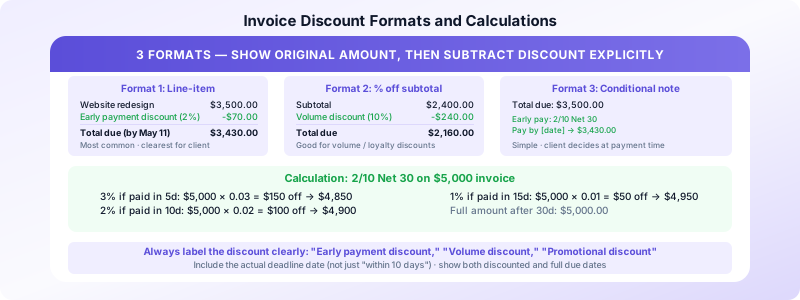
The key rule: show the original amount before the discount, then subtract the discount explicitly. Never just invoice a lower amount without showing what was discounted — it creates confusion and undermines the perceived value of your work.
Format 1: Line-item discount (most common)
Website redesign                   $3,500.00
Early payment discount (2%)          -$70.00
─────────────────────────────────────────────
Total due (if paid by May 11)      $3,430.00
Full amount due (after May 11)     $3,500.00
Format 2: Percentage off subtotal
Subtotal                           $2,400.00
Volume discount (10%)               -$240.00
─────────────────────────────────────────────
Total due                          $2,160.00
Format 3: Conditional early payment (shown as note)
Some freelancers prefer to show the full amount and add a note:
Total due: $3,500.00
Early payment terms: 2/10 Net 30 — pay by [date] to pay $3,430.00
All three formats are acceptable. Format 1 is clearest for the client.
Calculating Common Discount Terms
Flat percentage discount:
- Original amount: $2,000
- Discount rate: 5%
- Discount amount: $2,000 × 0.05 = $100
- Amount due: $1,900
2/10 Net 30 calculation:
- Invoice amount: $5,000
- Discount if paid within 10 days: $5,000 × 0.02 = $100
- Amount due within 10 days: $4,900
- Amount due after 10 days: $5,000
Layered/sliding scale:
- 3% if paid within 5 days: $5,000 × 0.03 = $150 off → $4,850
- 2% if paid within 10 days: $5,000 × 0.02 = $100 off → $4,900
- 1% if paid within 15 days: $5,000 × 0.01 = $50 off → $4,950
- Full amount after 30 days: $5,000
Always calculate discounts on the pre-tax subtotal, then apply tax to the discounted amount — or clarify in your invoice whether tax applies to the original or discounted price.
What to Write on the Invoice
The discount line item on your invoice should clearly state:
- What type of discount it is — "Early payment discount," "Volume discount," "Promotional discount"
- The percentage or amount — "10%" or "$200 off"
- Any conditions — "If paid by May 11, 2026" for early payment discounts
Avoid vague language like "special rate" or "courtesy reduction" — be specific about what the discount is and why it's being applied.
For early payment discounts, also include:
- The discount deadline date (not just "within 10 days" — spell out the actual date)
- The full amount due if the discount is not taken
- Both the discounted and full due dates
This prevents confusion when clients pay late and then expect the discounted rate.
When Discounts Make Sense
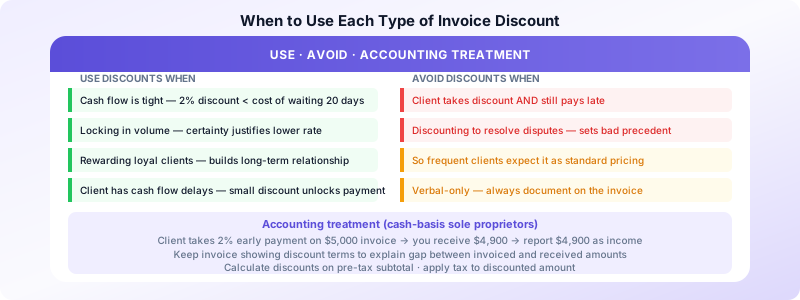
Early payment discounts improve cash flow when:
- You have immediate expenses or tight cash flow
- The cost of the discount is less than what you'd pay for a business credit line
- You're dealing with clients who reliably pay on time when incentivized
- The discount is small (1–2%) relative to the acceleration benefit
Early payment discounts don't make sense when:
- Your cash flow is healthy and you don't need early payment
- Clients take the discount and still pay late (the worst outcome)
- The discount erodes margin significantly on low-rate projects
Volume discounts make sense when:
- You want to lock in predictable work from a client
- The certainty of the volume justifies a lower per-unit rate
- Upfront payment of the volume reduces your administrative overhead
Discounts to avoid:
- Discounting after-the-fact to resolve disputes — this sets a precedent
- Offering discounts without documenting them on the invoice — verbal-only discounts create accounting problems
- Discounting so frequently that clients expect it — reserve discounts for genuine incentives
Accounting for Discounts
When a client takes an early payment discount, your actual income is the discounted amount. Record:
- Income: $4,900 (amount received)
- The $100 discount is recorded as a sales discount (a contra-revenue account in accounting software, or simply a reduction in income for sole proprietors on Schedule C)
For cash-basis sole proprietors: you received $4,900, so that's what you report as income. The original $5,000 invoice amount is irrelevant for tax purposes if the discount was taken.
Keep copies of invoices showing the discount terms so you can explain any discrepancy between invoiced amounts and received payments if ever queried.
For a complete approach to invoice record-keeping that covers discounts and adjustments, see our guide on invoice record keeping best practices. For invoicing structure fundamentals, see how to send your first invoice.
Invoices Customers lets you add discounts directly to your iPhone invoices in seconds — specify the amount or percentage and it calculates the adjusted total automatically. No spreadsheet math required.
Sources:
