
Invoice Workflow Automation for Small Businesses
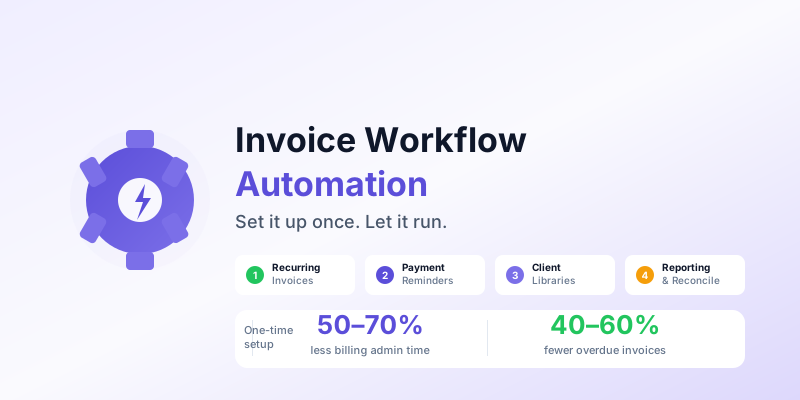
Most small business owners think about invoice automation as a feature for large companies with finance departments. In reality, the biggest efficiency gains from invoice automation happen at the small end — a freelancer or 5-person business that manually handles 20–50 invoices per month has far more to gain from automation than an enterprise that already has staff dedicated to billing.
Invoice automation doesn't require expensive enterprise software. The core automations — recurring invoices, payment reminders, and follow-up sequences — are available in most modern invoicing apps, including free and low-cost options. This guide explains what to automate, in what order, and what stays manual.
The Four Automation Layers
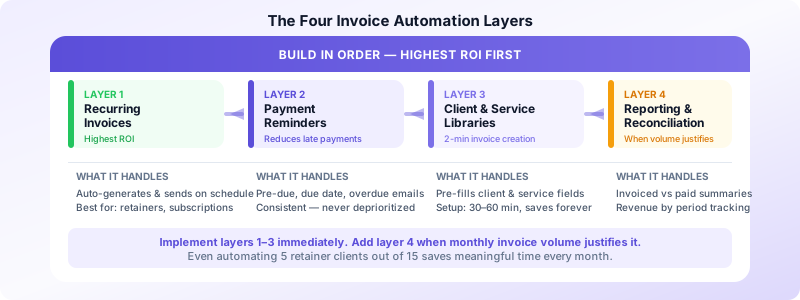
Effective invoice workflow automation builds in four layers, from simple to sophisticated:
Layer 1: Recurring invoices — Invoices that generate and send automatically on a schedule. Highest ROI automation for any business with retainer clients, subscriptions, or regular services.
Layer 2: Payment reminders — Automated emails that trigger when an invoice is coming due or overdue. Removes the awkward follow-up call and catches most late payments without effort.
Layer 3: Client and service data — Saved client profiles and service item libraries that pre-fill invoice fields. Reduces per-invoice creation time from 5–8 minutes to under 2 minutes.
Layer 4: Reporting and reconciliation — Automated summaries of invoiced vs. paid, overdue balances, and revenue by period. Replaces manual spreadsheet tracking.
Most small businesses should implement layers 1–3 immediately and add layer 4 when volume justifies it.
Recurring Invoice Automation
For any client you bill on a regular schedule — monthly retainer, weekly service, quarterly project — a recurring invoice is the highest-value automation available.
How it works: You set up the invoice once — client, service description, amount, billing interval — and the system generates and sends it automatically on schedule. You receive a notification that it was sent; you do nothing else unless the client has a question.
What to set up recurring invoices for:
- Monthly retainers (most common)
- Weekly or biweekly service clients
- Annual subscriptions or membership fees
- Regular maintenance contracts
- Any client billed the same amount on a predictable schedule
What to keep manual:
- Project-based invoices where amount varies
- Invoices requiring client approval before sending
- Complex invoices with variable line items
Even partial automation — automating 5 monthly retainer clients out of 15 total — saves meaningful time and eliminates the risk of forgetting to invoice a regular client.
Automated Payment Reminders
Late payment is often not intentional — it's an oversight. A well-timed automated reminder resolves most overdue invoices without any human involvement.
Standard reminder sequence:
- 3 days before due date: "Just a reminder that invoice INV-2026-042 is due on Friday."
- On the due date: "Invoice INV-2026-042 is due today."
- 3 days after due date: "Invoice INV-2026-042 is now 3 days past due. Please let us know if you have any questions."
- 7 days after due date: "Invoice INV-2026-042 is now 7 days past due. A late fee of $X applies per our payment terms."
Most invoicing software lets you configure this sequence once and apply it to all invoices or specific clients. The reminders send automatically; you only get involved if a client responds or remains unpaid after the full sequence.
Results: Automated reminders typically reduce overdue invoices by 40–60% compared to manual follow-up, because they're consistent, timely, and never get deprioritized when you're busy.
Customization tip: Turn off automated reminders for clients you know pay early or who would find reminders inappropriate. Keep them on as the default for everyone else.
Client and Service Libraries
This is the fastest-ROI automation that requires no "automation" features at all — just a well-maintained database of client and service data in your invoicing app.
Client library: Store each client's billing name, contact, email, address, payment terms, and any custom notes. When creating an invoice, you select the client and all fields pre-fill. Never retype an address.
Service item library: Store your recurring services as named items with default descriptions and rates. "Brand identity package: $3,500" as a saved item means you select it from a list rather than typing the description each time.
The setup cost: 30–60 minutes to enter your active clients and services once. The time savings persist indefinitely.
The ongoing habit: Add new clients and services to the library before creating their first invoice, not after. This discipline keeps the library useful rather than partially outdated.
Invoices Customers stores your client data and service items so invoices pre-fill from saved information — cutting per-invoice creation time to under 2 minutes for repeat clients. For the batch invoicing workflow that pairs with this, see our guide on batch invoicing tips.
Building Your Invoice Automation Workflow
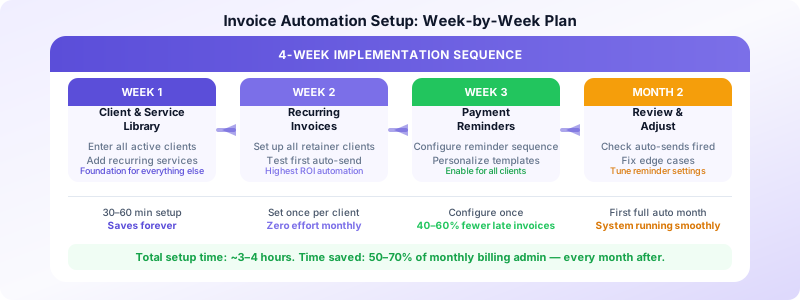
A practical implementation sequence for a small business or freelancer:
Week 1: Set up client and service library Enter all active clients and recurring services. This is the foundation everything else builds on.
Week 2: Configure recurring invoices Identify all clients on regular billing schedules. Set up recurring invoices for each. Test that the first automated invoice generates correctly.
Week 3: Set up payment reminders Configure your reminder sequence (pre-due, due date, post-due). Review the message templates and personalize if needed. Enable for all clients.
Month 2: Review and adjust After your first full automated month, check: Did recurring invoices send correctly? Did reminders trigger on schedule? Did any clients need reminder settings adjusted? Fix edge cases.
Ongoing: Maintain the system Add new clients to the library before their first invoice. Update service prices in the item library when rates change. Review the reminder sequence annually.
What Not to Automate
Automation handles the routine; judgment handles the exceptions.
Don't automate invoices to unhappy clients. If a project went over scope or there's an unresolved dispute, review before sending. An automated invoice arriving while a client is waiting for a response to a complaint escalates the problem.
Don't automate variable-amount invoices without review. If a retainer client has variable overages or you're billing time-and-materials, review the draft before it sends. Most invoicing apps have a "draft and review" mode for recurring invoices.
Don't let automation replace relationship. For your largest clients, a personal email with the invoice attached builds more trust than an automated send. Use automation for routine billing; add personal touch for key relationships.
Measuring the Impact
After one month of automated workflows, measure three metrics:
Time spent on billing: Compare hours before and after automation. Most businesses see 50–70% reduction in billing admin time.
Days to payment (average): Compare average days from invoice sent to payment received, before and after automated reminders. Expect 15–25% improvement.
Overdue invoice rate: What percentage of invoices are paid late? Automated reminders typically drop this by 30–50%.
These metrics tell you whether your automation is working and where to focus next. If reminders aren't reducing late payments, the message timing or content may need adjustment. If billing time is still high, there may be more to automate in your client/service data setup.
Download Invoices Customers to set up client profiles, build your service library, and streamline your invoicing from your phone — giving you the foundation of an automated billing workflow without a monthly subscription. For a complete record-keeping system to complement your workflow, see our guide on invoice record keeping best practices.
