
Invoicing Checklist Before Sending
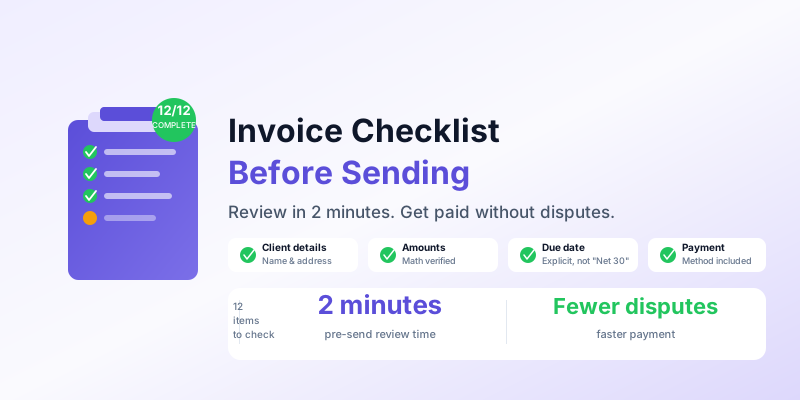
A single error on an invoice — wrong amount, missing payment terms, incorrect client name — can delay payment by days or weeks. The client needs to contact you, you need to issue a corrected invoice, and the payment clock resets. For a freelancer or small business sending 10–20 invoices per month, even one error per month has a meaningful impact on cash flow.
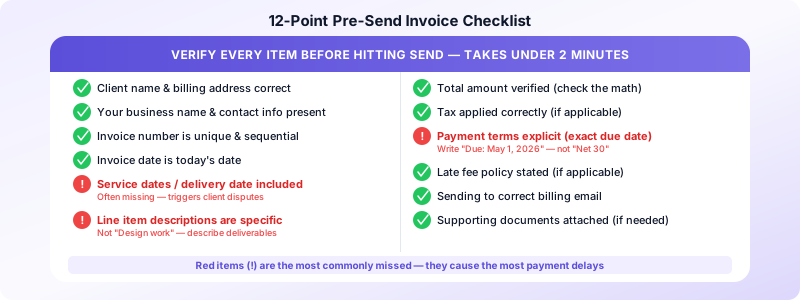
A pre-send checklist takes under two minutes and eliminates the most common invoice mistakes. Here are the 12 items to verify before every invoice goes out.
The 12-Point Pre-Send Checklist
1. Client name and billing address are correct
Verify the client's legal business name (not just their trading name) and current billing address. These need to match what their accounts payable department expects — a mismatch can cause the invoice to be rejected or returned.
For individual clients, confirm the name matches how they've asked to be invoiced (some clients want invoices addressed to a specific person or department).
2. Your business name and contact information are present
Your invoice should include your full name or business name, address, email, and phone number. If you're registered for sales tax, your registration number must appear. Clients can't pay you if they don't know who to pay, and missing contact information is a common reason invoices get lost in an approvals queue.
3. Invoice number is unique and sequential
Every invoice needs a unique number. Check that this invoice number follows sequentially from your last one and hasn't been used before. If you're issuing INV-2026-043 but your last invoice was INV-2026-041, investigate the gap — you may have skipped an invoice that was never sent.
4. Invoice date is correct
The invoice date is the date you're issuing the invoice — not the date work was completed or the due date. This date matters for your records, for the client's records, and for calculating the due date from your payment terms.
5. Service dates or delivery date is included
List when the work was performed or delivered. "Brand identity design, March 10–April 2, 2026" is better than just "Brand identity design." Specific dates reduce disputes about whether work was completed and help clients match your invoice to their project records.
6. Line items are correct and complete
Review every line item:
- Description is clear and specific (not just "Design work" but "Homepage redesign — 3 rounds of revisions, final files delivered April 10")
- Quantity is accurate
- Unit rate matches your agreement
- Line item total = quantity × rate (check the math)
Vague descriptions are one of the top reasons invoices get questioned. A client who doesn't immediately recognize what they're being charged for will pause before paying.
7. Total amount is correct
Verify the invoice total by adding up line items manually, separate from whatever your software calculated. This catches data entry errors that automated totals miss.
If you're applying a discount, confirm the discount amount and that it's been subtracted correctly. If multiple line items have different rates, double-check each one.
8. Tax is applied correctly (if applicable)
If you're required to collect sales tax, verify:
- The correct tax rate is applied for your jurisdiction
- Tax is calculated on the right line items (some items may be exempt)
- Your tax registration number appears on the invoice
If you're not required to collect sales tax for this client or transaction, confirm tax is not included. See our guide on sales tax on invoices for when tax applies.
9. Payment terms are explicit
Your invoice must state the due date clearly. "Payment due: May 1, 2026" is unambiguous. "Net 30" requires the client to calculate the date themselves and is frequently misinterpreted.
Also confirm your accepted payment methods are listed: bank transfer (with account details or reference), credit card (with a link if you use an online payment processor), check (with address if applicable).
10. Late fee policy is included (if you have one)
If your agreement includes late fees, the invoice is the place to state them: "Invoices unpaid after 15 days accrue a 1.5% monthly fee." Clients who see this on every invoice are more likely to pay on time, and you have a paper trail if you need to enforce it.
If you don't have a late fee policy, consider adding one — it's one of the most effective tools for reducing late payments without the awkwardness of a personal follow-up.
11. The correct client email address is in the To field
Before hitting send, verify you're sending to the right person at the right address. Invoices sent to the wrong contact — a project manager instead of accounts payable, or an old email address — get delayed or lost.
For new clients, confirm the billing contact during or immediately after project kickoff so you have the right address before the first invoice is due.
12. Any supporting documents are attached
Some clients require supporting documentation with their invoices: a signed purchase order, a time tracking report, a delivery confirmation, or a contract reference number. Confirm whether this client needs anything attached before sending.
For project-based invoices, attaching a brief deliverables summary or the final approved files alongside the invoice reduces back-and-forth and speeds up approval.
Common Errors That Delay Payment
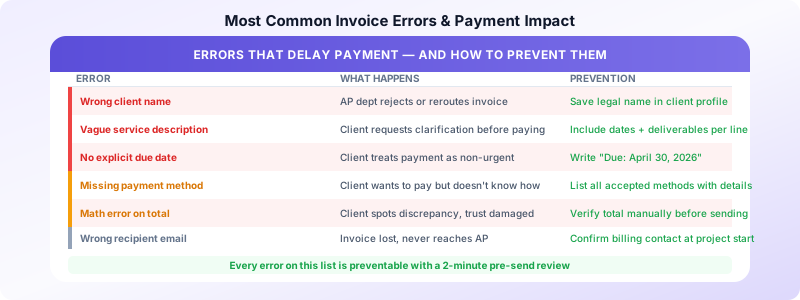
According to QuickBooks' 2025 Small Business Late Payments Report, 60% of small businesses with longer payment terms experienced cash flow issues compared to 40% with immediate terms. Beyond payment terms, these specific errors cause the most payment delays:
Wrong client name: Invoice routed to wrong department or flagged as incorrect by accounts payable.
Missing invoice number: Client can't reference the document in their payment system.
Vague service descriptions: Client needs clarification before approving payment.
No payment method details: Client wants to pay but doesn't know how.
Missing due date: Client assumes payment isn't urgent.
Math errors: Client catches a discrepancy, contacts you, trust is damaged.
Building the Checklist Into Your Workflow
The most effective approach is to treat this checklist as a literal step — not a mental review. Print it and keep it at your desk, or add it as a note in your invoicing app workflow. The two minutes it takes is consistently worth it.
For invoices you create frequently (same client, same service), the checklist becomes faster over time because most items will be pre-filled correctly. Focus your attention on the items that change: dates, amounts, and line item details.
Invoices Customers pre-fills client names, addresses, and service descriptions from saved profiles — eliminating the manual entry errors that most of this checklist is designed to catch. With accurate data pre-filled, your pre-send review focuses only on the variable items: dates, amounts, and project-specific details.
For a complete guide to the fields every invoice must legally include in the US, see our guide on invoice legal requirements.
Sources:
