
Time-Saving Invoicing Tips for Freelancers
Freelancers lose more time to invoicing than most realize. Between creating invoices from scratch, chasing late payments, re-entering client data, and following up on overdue balances, billing can consume 3–5 hours per month for someone with 10–20 active clients. That's time not billed and not spent on actual work.
The good news: most of that time disappears with a handful of simple habits. None of these require expensive software. Most take under an hour to set up. Here are ten tips that compound into a significantly leaner billing process.
1. Use Templates for Every Client Type
The single highest-impact change most freelancers can make is saving client and service data as reusable templates. If you're typing the same client address, service description, and rate every time you create an invoice, you're doing manual data entry that your invoicing app should be doing for you.
Save each client as a profile: name, billing address, email, payment terms. Save each service you offer as an item with a default description and rate. Creating an invoice then becomes a two-step process — select client, add service items — rather than typing everything from scratch.
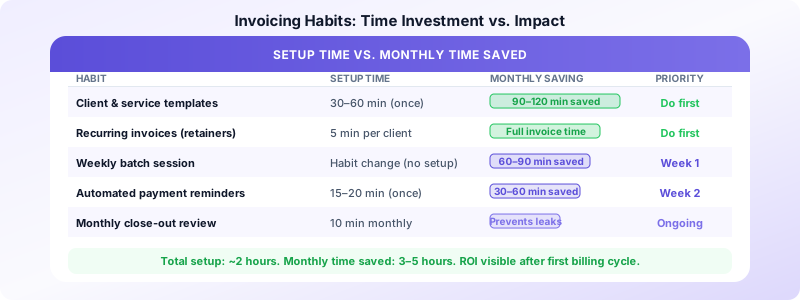
Time saved: 5–8 minutes per invoice. For 15 invoices per month, that's 1.5+ hours monthly.
2. Batch Your Invoices Once a Week
Sending invoices one at a time as projects finish creates constant context switching. Every time you stop billable work to create an invoice, you pay a cognitive restart cost of 10–15 minutes. Across a month, this adds up fast.
Instead, maintain a running list of work completed and invoice everything in a single weekly session. Pick a consistent time — Friday afternoon is popular — and spend 20–30 minutes creating and sending all invoices for the week.
The secondary benefit: when all invoices go out together on a Friday with Net 7 terms, payments cluster at the end of the following week, creating a predictable cash flow pattern instead of a random trickle. For more detail on this approach, see our guide on batch invoicing tips.
3. Set Up Recurring Invoices for Retainer Clients
If any client pays you the same amount on a regular schedule — monthly retainer, weekly services, quarterly review — that invoice should be automated. Set it up once in your invoicing app with the client, amount, and send date, and it generates and delivers without you touching it.
Forgetting to invoice a retainer client is embarrassingly common among busy freelancers. Automation eliminates that risk entirely. You get a notification that it sent; your only job is to check if payment arrives.
When to automate: Any fixed-amount, predictable-schedule invoice. Monthly retainers are the most common case.
When to keep manual: Project invoices where the amount varies, or invoices that need your review before sending.
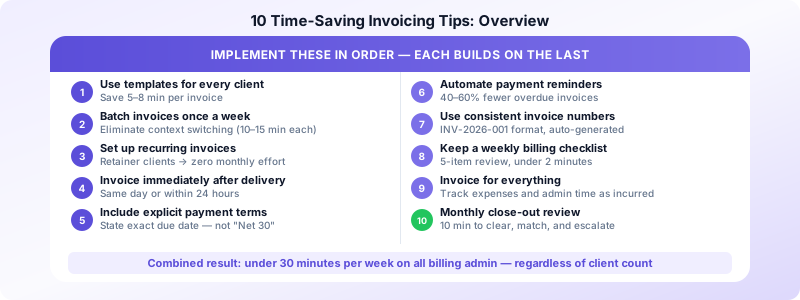
4. Invoice Immediately After Delivery
Delayed invoicing is one of the most common freelancer billing mistakes. When you finish a project and think "I'll send the invoice later," that delay signals to the client that payment isn't urgent — and they'll treat it accordingly.
The best practice: send the invoice the same day you deliver the work or within 24 hours. The client has just received your deliverable and approved it; payment is front of mind. Waiting a week or more lets the project slip out of their immediate attention.
If you're batching weekly rather than invoicing immediately, add the project to your invoicing list the moment you deliver it so nothing falls through.
5. Include Clear Payment Terms on Every Invoice
Vague payment terms are one of the top reasons invoices go overdue. If your invoice says "payment due upon receipt" without specifying a date, clients interpret "receipt" loosely. If it says "Net 30" without context, some clients assume that means they can take up to 30 days from when they get around to processing it.
State the due date explicitly: "Payment due: April 28, 2026." Add your accepted payment methods. Include any late fee policy ("1.5% monthly on balances more than 15 days overdue"). Explicit terms prevent the most common payment delays.
Shorter terms mean faster cash: Net 7 or Net 14 is standard for freelance work. Net 30 is common in B2B but unnecessarily long for most freelance client relationships. Switching from Net 30 to Net 14 effectively doubles the speed of your cash cycle.
6. Automate Payment Reminders
Most late payments aren't intentional — clients get busy, invoices fall out of their inbox, or payment gets accidentally queued and forgotten. A well-timed automated reminder resolves most of these situations without any involvement from you.
Configure a reminder sequence in your invoicing app:
- 3 days before due date: friendly heads-up
- On the due date: "Invoice due today"
- 3–5 days after due date: first overdue notice
- 7–10 days after due date: second overdue notice with late fee reminder
Once set up, this sequence fires automatically. You only get involved if a client responds or remains unpaid after the full sequence. Automated reminders typically reduce overdue invoices by 40–60% compared to relying on manual follow-up.
7. Use Short Invoice Numbers
Freelancers often over-engineer invoice numbering. A system like INV-2026-042 works fine. What doesn't work is having no system at all — invoices labeled "Invoice for Sarah" or left unnumbered create chaos when you need to reference a specific document in a payment dispute or for tax purposes.
Pick a format and use it consistently. Sequential numbers (INV-001, INV-002) or year-prefixed (2026-001) are both fine. The key is consistency. Your invoicing app should handle numbering automatically if you let it. For a full system, see our guide on invoice record keeping best practices.
8. Keep a Weekly Billing Checklist
A 5-item mental checklist at the end of each work session prevents the most common billing oversights:
- Did I complete any billable work today that isn't yet on an invoice or my invoicing list?
- Are any invoices due this week that I need to send?
- Did any invoices become overdue this week that need follow-up?
- Did I receive any payments that need to be recorded?
- Did any new clients or services get added that I need to save to my library?
This takes under 2 minutes and eliminates the "I forgot to invoice that project" problem entirely.
9. Invoice for Everything — Including Small Items
Freelancers routinely under-invoice by absorbing small costs they don't bother to bill. Stock photos bought for a client project. Rush shipping on printed materials. Extra revision rounds outside the original scope. Software licenses for client-specific tools.
These feel small individually, but they accumulate. Track every reimbursable expense as it occurs — a note in your phone is sufficient — and include it on the next invoice with a receipt attached.
The same applies to time: quick emails, short check-in calls, project management overhead. These are billable if they're within scope of your services. If you bill hourly, log them. If you bill flat-rate, factor them into your rate rather than silently absorbing them.
10. Review and Close Out Invoices Monthly
Once a month, spend 10 minutes reviewing your invoice status:
- Which invoices were issued this month?
- Which are paid? (Mark them closed)
- Which are unpaid and due? (Trigger follow-up)
- Which are significantly overdue? (Escalate)
- What's the total outstanding balance?
This monthly close-out prevents invoices from getting lost in the shuffle and gives you a clear picture of your receivables. It also feeds directly into accurate income tracking for tax purposes.
Invoices Customers on iOS supports all ten of these habits — client profiles, service item libraries, recurring invoices, automated reminders, and a clean invoice status dashboard — in a single app without a subscription fee. Build your billing system once and run it in minutes per week.
The Compounding Effect
Each of these tips saves a small amount of time individually. Combined, they're transformative:
- Templates eliminate per-invoice data entry (save 5–8 min each)
- Batching eliminates context switching (save 10–15 min per invoice)
- Automation eliminates manual reminder follow-up (save 30–60 min monthly)
- Immediate invoicing and clear terms reduce late payments (save 1–2 hr of chasing monthly)
A freelancer doing all ten of these things consistently spends under 30 minutes per week on all billing administration — regardless of how many clients they have. Most freelancers who implement them report getting that time back within the first month.
Sources:
