
Digital Receipt vs Paper Receipt for Business
You hand a customer their change and a long curl of thermal paper rolls out of the register. They fold it into a pocket, and within a week it has faded, crumpled, or disappeared entirely. Meanwhile, you have no searchable record of the transaction and no easy way to follow up. That scenario plays out millions of times a day, and it is exactly why more small businesses are switching to digital receipts.
But does going fully digital make sense for every business? The answer depends on your sales model, your customers, and the tools you already use. In this guide you will get a side-by-side comparison of digital receipts and paper receipts so you can make the right call for your situation.
What Is a Digital Receipt?
A digital receipt is an electronic record of a transaction delivered by email, text message, or through a mobile app. It contains the same core information as a paper receipt — date, items purchased, amounts, taxes, and payment method — but it lives in your customer's inbox or cloud storage instead of their wallet.
Digital receipts can take several forms. Some businesses send a simple PDF attachment. Others use an HTML email with branding and links. If you use an invoicing app like Invoices Customers, you can generate polished PDF receipts and send them directly from your phone within seconds.
The key distinction is that a digital receipt is searchable, shareable, and permanent. It will not fade in a drawer or get lost in a pile of papers on your desk.
Paper Receipts: Strengths and Limitations
Paper receipts have been the default for decades, and they still serve a purpose in certain contexts. They require no technology on the customer's end — you hand them a slip of paper and the transaction is done.
However, the drawbacks are significant for a modern small business.
Fading ink. Thermal paper receipts lose their print within months. If a customer needs to make a return or file an expense report six months later, the receipt may be unreadable.
Storage headaches. Keeping paper records organized for tax season or audits requires physical filing space and discipline. A shoebox full of receipts is a bookkeeping nightmare.
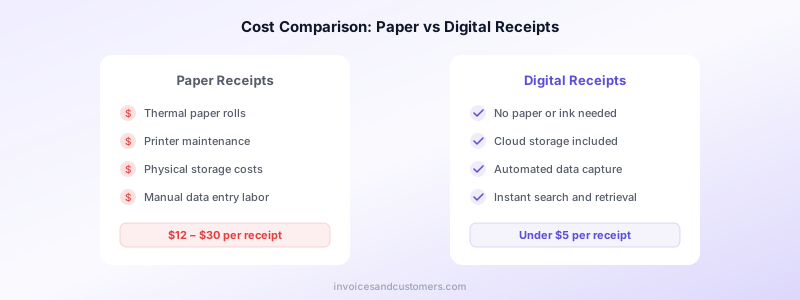
Higher costs. Thermal paper rolls, printer maintenance, ink, and the time spent managing physical documents all add up. Industry research estimates the full cost of processing a single paper receipt at anywhere from twelve to thirty dollars once you factor in labor and storage.
No data insights. A paper receipt is a dead end. It does not feed into your accounting software, give you customer analytics, or help you spot purchasing trends.
For a deeper look at what every receipt and invoice should contain, see our guide on what to include on an invoice.
Digital Receipts: Why Businesses Are Switching
The shift toward digital receipts is accelerating, and the reasons go beyond simply saving paper. Here is what makes digital receipts compelling for small businesses and freelancers.
Lower Operating Costs
When you eliminate paper rolls, printer upkeep, and manual filing, the per-receipt cost drops dramatically. A digital receipt can cost under five dollars to process — and with the right app, closer to zero. For a business that handles dozens or hundreds of transactions per month, the savings compound quickly.
Faster Record Keeping
Every digital receipt is automatically date-stamped and stored. You can search by customer name, date range, or amount in seconds. When tax season arrives or a client questions a charge, you pull up the exact record instead of digging through folders.
Better Security
Paper receipts can be altered, lost, or stolen. Digital receipts can be encrypted, backed up, and protected behind authentication. If you use a tool that stores data locally on your device — like Invoices Customers — you also avoid the risk of a third-party data breach.
Customer Preference
Consumer surveys consistently show that the majority of customers now prefer digital receipts. They are easier to store, impossible to misplace in a coat pocket, and simple to forward to an accountant or expense system.
Environmental Benefits
Paper receipts contribute to deforestation, water consumption, and chemical waste from thermal coatings. Going digital is one of the simplest sustainability steps a small business can take, and it signals to customers that you take environmental responsibility seriously.
If you are already thinking about going paperless with your invoices too, our post on paperless invoicing benefits covers the full transition.
Side-by-Side Comparison
Here is how paper and digital receipts stack up across the categories that matter most for small businesses.
| Factor | Paper Receipt | Digital Receipt | |---|---|---| | Cost per receipt | $12–$30 (with labor) | Under $5 | | Delivery speed | Instant at point of sale | Instant via email or app | | Durability | Fades within months | Permanent digital record | | Searchability | Manual lookup only | Keyword search in seconds | | Storage | Physical filing required | Cloud or device storage | | Security | Can be lost or altered | Encrypted and backed up | | Environmental impact | Paper, chemicals, waste | Minimal | | Customer experience | Familiar but inconvenient | Preferred by most buyers | | Data integration | None | Feeds into accounting tools |
For most small businesses, digital receipts win on nearly every metric. The main exceptions involve cash-only transactions where no customer email is available or specific legal situations requiring a physical document.
When Paper Receipts Still Make Sense
Going fully digital is not realistic for every business or every transaction. There are a few scenarios where paper receipts remain practical.
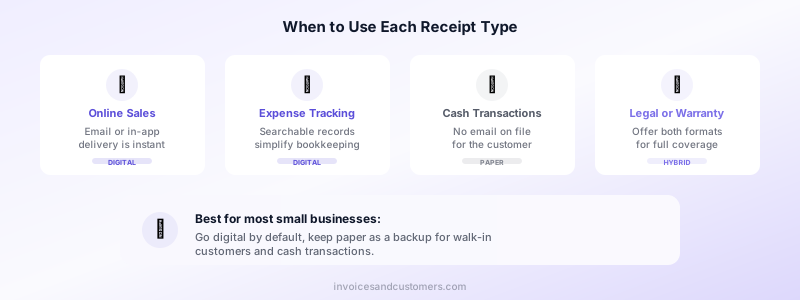
Walk-in cash customers. If someone pays cash and you have no email address, a printed receipt is the simplest proof of purchase. Some businesses address this by offering a QR code the customer can scan to access a digital copy.
Low-connectivity locations. If you operate at outdoor markets, job sites, or areas with unreliable internet, paper provides a reliable fallback.
Regulatory requirements. Certain industries or jurisdictions require a physical receipt for specific transaction types. Check your local regulations before eliminating paper entirely.
Customer preference. Some customers — particularly in certain demographics or industries — still prefer a physical document. Offering both options keeps everyone happy.
The best approach for many small businesses is a hybrid model: default to digital and keep a paper option available for the situations that demand it.
How to Start Issuing Digital Receipts
Transitioning from paper to digital receipts does not require an expensive point-of-sale overhaul. Here is a practical path to get started.
Step 1: Choose your delivery method. Email is the most common channel for digital receipts. Text messages work well for quick retail transactions. An invoicing app lets you generate and send professional PDFs on the spot.
Step 2: Collect customer contact info. Start asking for an email address at checkout. Many customers will happily provide one to avoid carrying paper. Keep a simple sign or prompt at your register.
Step 3: Pick the right tool. You do not need complex software. Invoices Customers lets you create professional receipts and invoices from your iPhone, save client details for future transactions, and send polished PDFs — all without needing an internet connection or an account.
Step 4: Keep paper as a backup. Do not throw out your receipt printer on day one. Offer customers a choice and gradually shift the default toward digital as your workflow stabilizes.
Step 5: Update your record-keeping process. Once most receipts are digital, adjust your bookkeeping routine. Set aside time each week to review digital records instead of sorting through paper stacks.
Protect Your Records and Get Paid Faster
Whether you issue receipts, invoices, or both, the format you choose shapes how efficiently your business runs. Digital receipts reduce costs, speed up your record keeping, and give customers the experience they expect in 2026.
If you are ready to move beyond paper, Invoices Customers makes it easy. Create professional invoices and receipts on your phone, store client information securely on your device, and send polished PDFs in seconds — no signup required. Download Invoices Customers free on the App Store and start simplifying your billing today.
