
Paperless Invoicing Benefits for Small Business
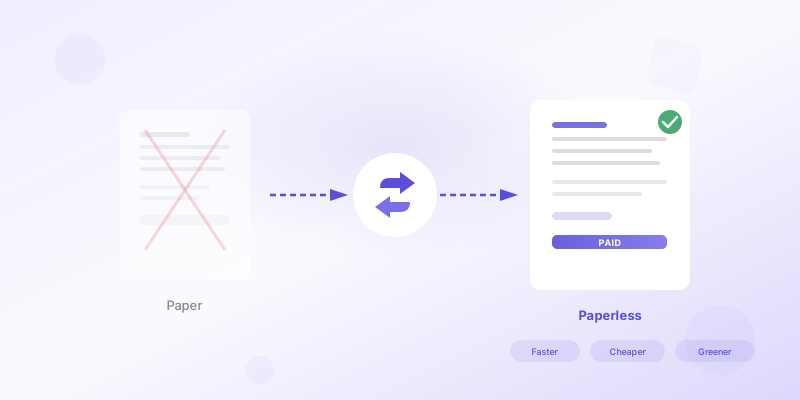
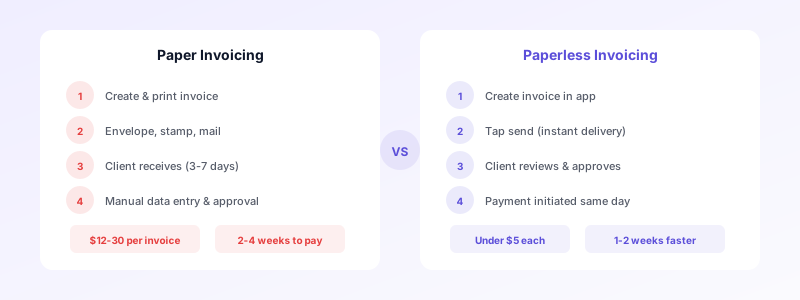
You print an invoice, stuff it into an envelope, stick on a stamp, and drop it in the mailbox. A week later your client finally opens it, and another two weeks pass before the check arrives. That cycle eats into your cash flow, wastes your time, and costs more than you probably realize. Paperless invoicing eliminates every one of those friction points, and small businesses that make the switch rarely look back.
Despite the clear advantages, studies suggest that up to 70 percent of small businesses still rely on paper invoices and manual processing. If you are one of them, this guide walks you through the concrete benefits of going paperless, the practical steps to get started, and how to address the concerns that might be holding you back.
Why Small Businesses Still Use Paper Invoices
Most small business owners are not clinging to paper out of stubbornness. There are real reasons behind it.
Familiarity. You have been printing and mailing invoices for years. The process is comfortable, and changing feels risky when cash flow is tight.
Client expectations. Some clients — especially in construction, trades, and local services — still expect a physical document. You worry that switching formats might confuse them.
Perceived complexity. Digital tools can feel overwhelming when you are already juggling project work, client calls, and bookkeeping.
Cost concerns. You might assume that invoicing software requires an expensive monthly subscription you cannot justify yet.
These are understandable hesitations. But paperless invoicing has become simpler and more affordable than ever — especially for businesses that send even a handful of invoices each month.
Six Key Benefits of Going Paperless
Switching from paper to digital invoicing delivers measurable improvements across your entire billing workflow. Here are the benefits that matter most for small businesses.
1. Lower Costs Per Invoice
Paper invoicing carries hidden expenses. Printing supplies, envelopes, postage, and the time spent assembling and mailing each invoice all add up. Industry estimates put the cost of processing a single paper invoice between twelve and thirty dollars when you factor in labor. A digital invoice costs a fraction of that — often under five dollars, and sometimes nothing at all.
For a small business sending 20 invoices per month, the annual savings can easily reach several thousand dollars.
2. Faster Payments
Paper invoices travel through the mail, sit on desks, and wait for someone to process them manually. Digital invoices arrive instantly. Your client can review the details, approve the amount, and initiate payment from the same screen.
Businesses that switch to paperless invoicing typically see payment cycles shorten by one to two weeks. When you are watching your bank balance between projects, those extra days matter. For more strategies, read our guide on how to get clients to pay on time.
3. Fewer Errors and Disputes
Handwritten or manually typed invoices are prone to mistakes — transposed numbers, missing line items, incorrect tax calculations. Each error triggers a conversation with your client that delays payment further.
Digital invoicing tools calculate totals and taxes automatically. They pull client details from saved records so you do not retype addresses and tax IDs every time. The result is cleaner invoices that get approved on the first pass.
4. Better Organization and Record Keeping
Paper invoices end up in filing cabinets, desk drawers, and shoe boxes. Finding a specific invoice from six months ago means digging through stacks of paper.
Paperless invoicing keeps every document searchable and organized. You can filter by client, date, status, or amount in seconds. Learn how this fits into a broader system in our post on tracking business expenses effectively.
5. Professional Image
A clean, well-designed digital invoice signals that you run a serious operation. It shows clients you have invested in your business processes. Branded invoices with your logo, consistent formatting, and clear line items build trust — especially when you are competing against larger firms.
Paper invoices, by contrast, often look inconsistent. Handwritten notes, photocopied templates, and smudged print jobs do not inspire the same confidence.
6. Environmental Impact
Going paperless reduces your use of paper, ink, and fuel for postal delivery. Multiplied across hundreds of invoices per year, the difference adds up. Clients who value sustainability will appreciate the choice.
How Paperless Invoicing Improves Cash Flow
Cash flow is the number one financial concern for most small businesses. Paperless invoicing addresses it from multiple angles.
Speed of delivery. Your invoice reaches the client the moment you send it. No transit time, no lost mail, no sitting unopened in a mailroom.
Status visibility. Digital tools show you when an invoice has been sent, viewed, and paid. You do not have to wonder whether your client received it. If payment is overdue, you know immediately and can follow up. For a deeper look at e-invoicing features, see our guide on what e-invoicing means for small business.
Faster dispute resolution. When both you and your client can view the same digital invoice, disagreements get resolved faster. You can annotate, adjust, and resend without reprinting anything.
Recurring invoices. If you bill the same clients monthly, digital tools let you automate recurring invoices. The invoice goes out on schedule without you lifting a finger, which means you never forget to bill and never delay your own payment.
The combined effect is a shorter cash conversion cycle. Money reaches your bank account faster, and you spend less time chasing payments.
Steps to Switch from Paper to Digital Invoicing
Transitioning to paperless invoicing does not require a massive technology overhaul. Here is a practical approach.
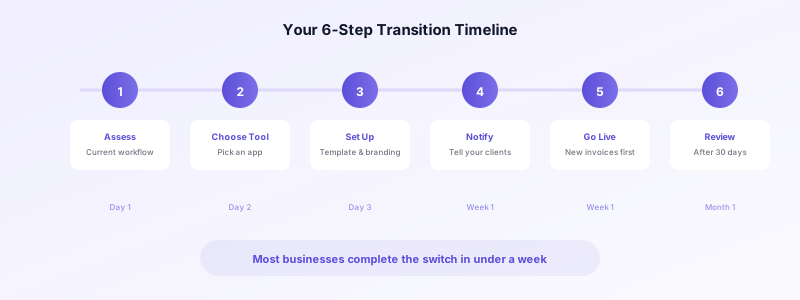
Step 1 — Assess your current workflow. Count how many invoices you send per month. Note how you currently create them (Word document, spreadsheet, handwritten) and how you deliver them (mail, hand-delivery, email attachment). This gives you a baseline.
Step 2 — Choose a simple tool. You do not need enterprise software. Invoices Customers lets you create professional invoices on your iPhone, manage client details, and generate polished PDFs — no account or subscription needed. It even works offline. See how easy it is to send an invoice from your phone.
Step 3 — Set up your invoice template. Enter your business details, logo, and default payment terms once. Every future invoice will carry consistent branding.
Step 4 — Notify your clients. A brief email letting clients know you are switching to digital invoices prevents confusion. Most prefer it.
Step 5 — Start with new invoices. You do not need to digitize your history. Begin using paperless invoicing for new work and keep paper records for existing projects until they close out.
Step 6 — Review after 30 days. Check your average payment time and the time you spend on invoicing. Compare to your baseline. The improvements will reinforce the habit.
Common Concerns About Going Paperless
"My clients prefer paper." Some do — but fewer than you think. Most clients appreciate receiving a clear digital invoice they can process quickly. For the few who genuinely need paper, you can always print a copy from your digital file.
"I am not tech-savvy." Modern invoicing apps are designed for people who are busy running a business, not managing software. If you can send a text message, you can create a digital invoice. The best apps have no learning curve — you fill in the details and tap send.
"What about my old invoices?" You do not need to scan and digitize years of paper records right away. Keep your existing files as they are and start fresh with digital invoicing going forward. Over time, your digital archive will grow and your paper dependence will naturally shrink.
"Is it secure?" Digital invoices stored on your device are more secure than paper that can be lost, stolen, or damaged. Apps like Invoices Customers keep everything on your iPhone with no cloud upload, giving you full control over your data.
"What if I need a legal copy?" Digital invoices are legally valid in virtually every jurisdiction. Many countries are now mandating electronic invoicing formats. A well-structured PDF meets the same legal requirements as a printed copy.
Start Your Paperless Invoicing Journey Today
The benefits of paperless invoicing are clear: lower costs, faster payments, fewer errors, better organization, and a more professional image. You do not need to change everything at once. Start with your next invoice, see the difference firsthand, and build from there.
Ready to make the switch? Download Invoices Customers and create your first professional digital invoice in seconds — no account needed, no subscription required, and all your data stays on your device.
