
How to Get Clients to Pay Invoices on Time
It's 45 days past the due date, and your biggest client still hasn't paid. You've sent two polite reminders, and each time they promise "it's in processing." Meanwhile, your own bills are stacking up. If this sounds familiar, you're not alone — nearly 9 in 10 businesses regularly deal with late payments.
The problem isn't just slow clients. In most cases, the root cause is your invoicing process. The right systems, terms, and follow-up habits can dramatically reduce late payments and help you get clients to pay on time consistently.
Why Clients Pay Late (And How to Fix It)
Understanding why clients pay late is the first step to fixing it. The most common reasons aren't malicious — they're structural.
They forgot. Your invoice arrived during a busy week, got buried in email, and slipped through the cracks. The fix: send reminders before the due date, not after.
The invoice was confusing. Missing details, vague descriptions, or unclear payment instructions create friction. The client sets it aside to "deal with later," and later never comes. The fix: send complete, error-free invoices every time. Avoid common invoicing mistakes that trigger delays.
No urgency. If your invoice doesn't include a specific due date or late fee, there's no consequence for paying late. The fix: set clear payment terms with specific deadlines and penalties.
Cash flow issues. Sometimes clients are genuinely short on funds. The fix: offer payment plans for larger invoices, or request deposits upfront to reduce your exposure.
Bureaucratic delays. Larger companies have approval chains. Your invoice might sit with three different people before payment is authorized. The fix: ask your contact who handles payments and what information they need to process your invoice quickly.
7 Strategies to Get Paid on Time Every Time
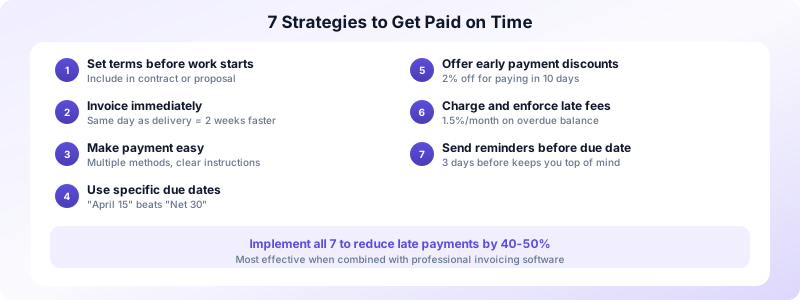
These tactics work across industries, client sizes, and project types. Implement all seven for the best results.
1. Set Payment Terms Before Work Begins
Don't wait until the invoice to discuss when and how you'll be paid. Include your payment terms in your contract, proposal, or service agreement. When a client agrees to Net 15 terms before the project starts, they expect to pay within 15 days — and they do.
2. Invoice Immediately After Completing Work
Send your invoice the same day you deliver. Freelancers who invoice within 24 hours get paid an average of 2 weeks faster than those who wait a week or more. The work is fresh in the client's mind, and the connection between value delivered and payment requested is clear.
3. Make Payment Ridiculously Easy
Accept multiple payment methods — bank transfer, credit card, PayPal, or payment links. Include clear instructions on every invoice. The fewer steps between "I should pay this" and "done," the faster you get paid.
4. Use Specific Due Dates, Not "Net 30"
Write "Payment due by April 15, 2026" instead of "Net 30." A specific date creates a concrete deadline. "Net 30" requires the client to do math (invoice date + 30 days = ???), which adds friction.
5. Offer Early Payment Discounts
A "2% discount if paid within 10 days" incentive works especially well for invoices over $2,000. The client saves money, and you get cash 20 days sooner. Display both the discounted and full amounts clearly on the invoice.
6. Charge Late Fees (And Enforce Them)
A 1.5% monthly late fee on overdue balances signals that you're serious about your payment terms. State the fee on every invoice and in your contract. Apply it consistently — making exceptions trains clients to pay late.
7. Send Reminders Before the Due Date
Don't wait for an invoice to become overdue before following up. Send a friendly reminder 3 days before the due date: "Just a heads-up that Invoice #FI-015 is due on Friday." This keeps your invoice at the top of the client's to-do list.
How to Follow Up Without Damaging Relationships
Following up on unpaid invoices feels uncomfortable, but it doesn't have to be adversarial. The key is being professional, direct, and consistent.
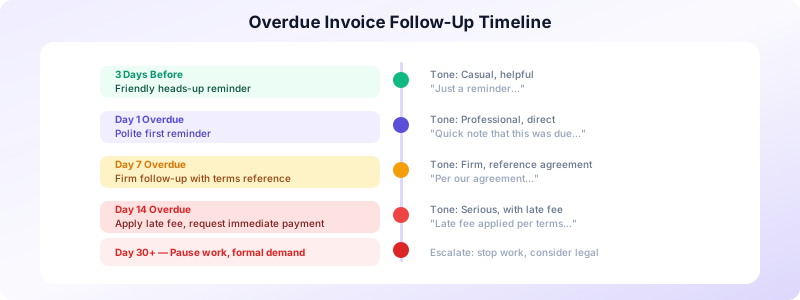
Use a tiered approach. Start friendly, get progressively firmer. Day 1 overdue: casual reminder. Day 7: direct reference to payment terms. Day 14: apply late fee and request immediate payment. Day 30+: pause work and send a formal notice.
Always reference specific details. Include the invoice number, amount, and original due date in every follow-up. Generic "you owe money" messages are easy to dismiss. Specific details prompt action.
Keep emotions out of it. Late payments are frustrating, but angry emails damage relationships and rarely speed up payment. Stick to facts: the amount, the due date, and what happens next.
Automate what you can. Set up calendar reminders for follow-ups, or use an invoicing app that sends automatic payment reminders. Automation removes the awkwardness of manual follow-ups and ensures nothing falls through the cracks.
Know when to escalate. If a client consistently pays 30+ days late despite clear terms and follow-ups, it's time for a serious conversation. Either renegotiate the terms (shorter deadlines, deposits) or stop taking on new work from that client.
Document everything. Keep records of every invoice, reminder, and client response. If a payment dispute ever escalates, you'll need this paper trail. A simple spreadsheet or invoicing app that tracks status changes gives you everything you need. Good documentation also helps you identify patterns — if three out of ten clients consistently pay late, your terms might need adjusting.
Build a Payment System That Works Automatically
The best way to get clients to pay on time isn't chasing individual invoices — it's building a system that prevents late payments from happening in the first place.
Your system should include:
- Contracts with payment terms signed before work begins
- A reliable invoicing process that sends invoices the same day work is delivered
- Automatic reminders at 3 days before, on the day, and weekly after the due date
- Status tracking so you always know which invoices are outstanding
- A client database so you never retype details or send to the wrong address
Invoices Customers gives you all of these tools in one app. Create invoices in seconds, track payment status, and manage your client database — all from your iPhone. No account required, works offline, and your data stays private.
Download Invoices Customers and build a payment system that gets you paid on time, every time.
