
10 Invoicing Mistakes That Cost You Money
A single invoicing mistake might seem harmless — a missing date here, a vague description there. But multiply that across dozens of invoices per year, and those small errors add up to thousands of dollars in delayed or lost payments. The good news? Most invoicing mistakes are easy to fix once you know what to look for.
Research shows that 61% of late payments stem from administrative errors on invoices. That means the problem isn't your client being slow — it's your invoice giving them a reason to delay. Let's walk through the 10 most common invoicing mistakes and how to eliminate each one from your billing process.
Why Invoicing Mistakes Cost More Than You Think
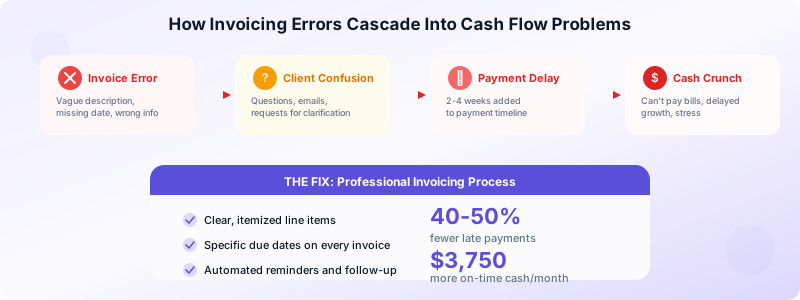
Every invoicing error triggers a chain reaction. A missing due date means the client doesn't know when to pay. An unclear description prompts questions, which require emails back and forth. A wrong amount leads to disputes that can take weeks to resolve.
Here's the real cost of sloppy invoicing:
- Late payments. The average small business has $17,500 in outstanding invoices at any given time. Many of those delays start with invoice errors.
- Lost revenue. Some clients use invoice errors as an excuse to negotiate down. If your invoice says "design services" without specifics, they might dispute the amount.
- Damaged relationships. Constant billing corrections make you look disorganized. Clients notice — and they refer business to people who run tight operations.
- Tax problems. Missing invoice numbers, incorrect amounts, or absent tax calculations create headaches during tax season and can trigger audit flags.
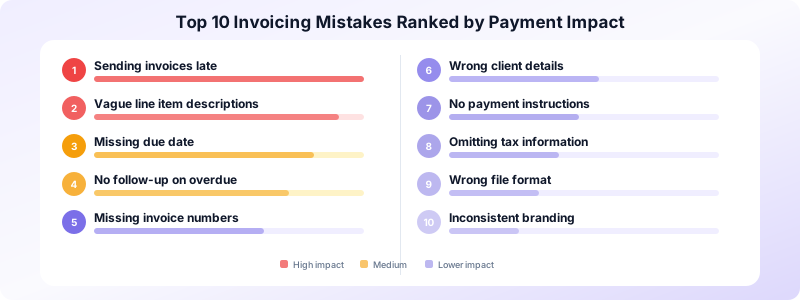
10 Invoicing Mistakes Every Business Should Avoid
1. Sending Invoices Late
The longer you wait to invoice after completing work, the longer you wait to get paid. Research indicates that invoices sent within 24 hours of project completion get paid an average of 2 weeks faster than those sent a week later.
Fix: Send your invoice the same day you deliver final work. Set a recurring calendar reminder if you need to.
2. Using Vague Descriptions
"Consulting services — $5,000" doesn't tell the client what they're paying for. Vague line items invite questions, disputes, and delays.
Fix: Itemize every deliverable. Instead of "consulting," write "Strategy workshop (4 hours x $200/hr) — $800" and "Market analysis report — $1,200."
3. Missing the Due Date
Without a specific payment deadline, your invoice goes to the bottom of the client's to-do list. "Net 30" is standard, but a concrete date works better.
Fix: Write "Payment due by April 20, 2026" instead of just "Net 30." For guidance on choosing the right deadline, read our guide on invoice payment terms.
4. Forgetting Invoice Numbers
Sequential invoice numbers (INV-001, INV-002) aren't just for organization — they're a legal requirement in many countries. Without them, tracking payments becomes chaotic.
Fix: Use a consistent numbering system. Many invoicing apps assign numbers automatically, so you never skip or duplicate one.
5. Getting Client Details Wrong
A misspelled company name or wrong billing address can route your invoice to the wrong person. In larger organizations, this alone can delay payment by 2-3 weeks.
Fix: Verify client details before sending. Keep a client database so you don't retype information each time. Invoices Customers stores all your client info so you can reuse it instantly.
6. Not Including Payment Instructions
You'd be surprised how many invoices tell the client what they owe but not how to pay. Missing bank details or payment links create friction.
Fix: Include your payment method on every invoice — bank account, PayPal, payment link, or whatever you accept. Make paying as easy as possible.
7. Omitting Tax Information
Forgetting to charge applicable sales tax or VAT creates two problems: you either absorb the cost yourself, or you have to send a corrected invoice (which delays everything).
Fix: Set up your tax rates once in your invoicing system and apply them automatically. Check your local requirements — they vary by jurisdiction.
8. Sending the Wrong File Format
Invoices sent as Word documents or spreadsheets look unprofessional and can be accidentally edited. An altered invoice can create payment and legal issues.
Fix: Always send invoices as PDFs. They look consistent across every device, can't be accidentally modified, and feel more professional.
9. Not Following Up on Overdue Invoices
Many business owners send an invoice and then wait, hoping the client will pay. Over 55% of invoices are paid late. Without follow-up, that number gets worse.
Fix: Set up reminders: 3 days before the due date, on the due date, and every week after. A polite nudge can reduce late payments by 30% or more.
10. Inconsistent Branding
Invoices without your logo, brand colors, or consistent formatting look generic and forgettable. Clients process hundreds of documents — yours should stand out.
Fix: Use a freelance invoice template with your branding built in. Consistency across all your business documents builds trust and recognition.
How These Mistakes Affect Your Cash Flow
Let's put real numbers to these errors. Imagine you're a freelancer who sends 10 invoices per month averaging $2,500 each. That's $25,000 in monthly revenue.
If 30% of your invoices are delayed by 2 weeks due to errors, that's $7,500 sitting in limbo every month. Over a year, that's $90,000 in delayed payments — enough to cause serious cash flow problems.
Now imagine fixing just the top 3 mistakes (late sending, vague descriptions, missing due dates). Industry data suggests this alone could reduce your late payments by 40-50%. That means an extra $3,000-$3,750 flowing into your account on time every month.
A Quick Invoicing Checklist to Prevent Errors
Before you hit send on any invoice, run through this checklist:
- Your business name, address, and tax ID are correct
- Client name and billing address are spelled correctly
- Invoice has a unique sequential number
- Issue date and specific due date are included
- Every line item has a description, quantity, rate, and subtotal
- Tax is calculated and displayed separately
- Total amount is clear and prominent
- Payment terms state the due date and late fee policy
- Payment instructions include method and account details
- Invoice is formatted as a PDF with your branding
This 60-second check prevents 90% of common invoicing mistakes. Print it out, tape it next to your monitor, and use it every time.
Bonus tip: create a review buddy system. If you have a business partner or virtual assistant, have them review invoices over $1,000 before sending. A fresh pair of eyes catches errors that you've gone blind to after staring at the same document. For solo freelancers, simply waiting 10 minutes and re-reading the invoice with fresh eyes works almost as well.
Set up templates for repeat clients. If you bill the same client regularly for similar services, create a template with their details pre-filled. This eliminates the chance of mistyping their information and speeds up your invoicing workflow. A good freelance invoice template saves you from reinventing the wheel every billing cycle.
Fix Your Invoicing Process for Good
Most invoicing mistakes share a common root cause: manual processes. When you create every invoice from scratch, errors are inevitable. You'll forget a field, mistype a number, or skip the follow-up because life gets busy. The best way to eliminate invoicing mistakes is to stop creating invoices manually. When you use an invoicing app, most of these errors become impossible — numbers are assigned automatically, client details are stored and reused, tax rates are calculated correctly, and PDFs are generated with professional formatting.
Invoices Customers helps you create professional invoices without the risk of manual errors. Your client database, invoice numbering, tax calculations, and status tracking all happen automatically. No account needed, works offline, and your data stays private on your device.
Download Invoices Customers and stop losing money to invoicing mistakes.
