
Freelance Invoice Template: What to Include
You just finished a two-week design project, and now it's time to get paid. But instead of sending a quick, professional invoice, you spend 45 minutes fiddling with a blank spreadsheet, second-guessing which details to include. Sound familiar? A solid freelance invoice template eliminates that friction and helps you get paid faster, every single time.
Over 74% of freelancers experience late payments at some point in their career. A big contributor? Incomplete or unprofessional invoices that leave clients confused about what they owe and when. Having a reliable freelance invoice template you can reuse project after project is one of the simplest ways to protect your income.
Why Freelancers Need a Professional Invoice Template
As a freelancer, you don't have an accounting department sending invoices for you. Every billing task falls on your shoulders — and every minute spent on admin work is a minute not spent earning money.
A professional freelance invoice template solves three problems at once:
- Saves time. Fill in the project-specific details and send. No starting from scratch each time. If you invoice 10 clients per month, a reusable template saves you 5-8 hours per year.
- Looks professional. Clients take polished invoices seriously. A well-formatted document with your branding signals that you run a real business, not a hobby.
- Reduces errors. Templates include all required fields by default, so you never forget a tax ID, invoice number, or payment deadline. Fewer errors mean fewer payment delays.
Think of your freelance invoice as your business card for billing. It's often the last impression a client has before deciding how quickly to pay you.
What Every Freelance Invoice Must Include
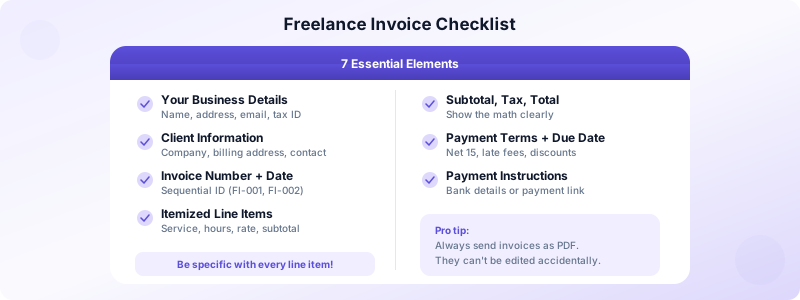
Whether you're a designer, writer, developer, or consultant, every freelance invoice needs these elements. Miss any of them and you risk delays, disputes, or tax issues.
Your business details: Full name (or business name), address, email, phone number, and tax ID if required in your jurisdiction. Place these at the top of the invoice for easy identification.
Client details: The client's name, company name, billing address, and contact information. Double-check spelling — one typo can route your invoice to the wrong department.
Invoice number and date: Use sequential numbering (FI-001, FI-002) for easy tracking. Include the date you're issuing the invoice. Many accounting systems won't process an invoice without a unique number.
Detailed line items: Break down every service separately. Instead of "web design — $3,000," list each deliverable:
- Homepage design (20 hours x $100/hr) — $2,000
- About page design (5 hours x $100/hr) — $500
- Contact form setup — $300
- Image optimization — $200
Specificity prevents questions and disputes.
Subtotal, tax, and total: Show the math clearly. If you charge sales tax or VAT, display it as a separate line. The total should be the most prominent number on your invoice.
Payment terms and due date: State exactly when payment is due and what happens if the client pays late. For guidance on choosing the right terms, check our guide to invoice payment terms.
Payment instructions: Tell the client exactly how to pay — bank transfer details, PayPal address, or payment link. The easier you make it, the faster you get paid.
Freelance Invoice Examples by Profession
Your freelance invoice template should reflect the type of work you do. Here's how billing differs across common freelance professions.
Designers and creatives typically bill by project with milestones. Include the number of concepts delivered, revision rounds included, and file formats provided. Add a line item for any additional revisions beyond the agreed scope.
Writers and editors often bill per word, per article, or per hour. Specify word counts, article titles, and any research or interview time. If you bill hourly, include exact hours worked per task.
Developers and engineers usually bill hourly or by sprint. Include task descriptions that match your project management tool entries. Reference ticket numbers or user stories so the client can cross-reference your work.
Consultants and coaches bill by session, retainer, or project. Include session dates, duration, and topics covered. For retainer billing, list the retainer period and any overage hours.
Contractors and tradespeople bill by project with materials. Separate labor costs from material costs. Include material receipts or markup percentages so the client can verify amounts.
No matter your profession, the key is specificity. The more detail you provide, the fewer questions your client will have — and the faster they'll pay.
Common Freelance Invoicing Mistakes
Even experienced freelancers make these billing errors. Each one costs you time, money, or both.
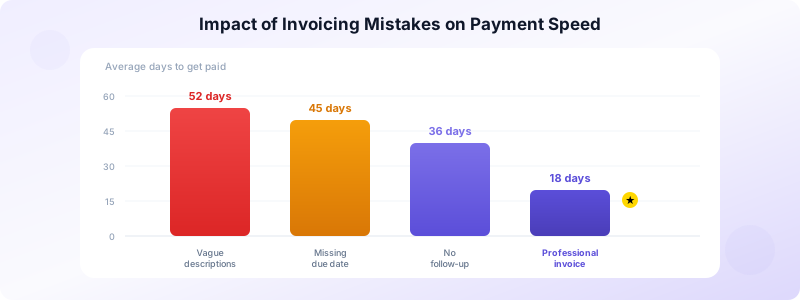
- Waiting too long to invoice. Send your invoice within 24 hours of completing work. The longer you wait, the less urgency the client feels to pay. Freelancers who invoice immediately get paid an average of 2 weeks faster.
- Using vague descriptions. "Consulting services" doesn't tell the client what they're paying for. Be specific about deliverables, hours, and rates.
- Forgetting to include payment terms. Without a clear deadline, your invoice joins the pile of "someday" tasks. Always include a specific due date.
- Not numbering invoices. Tax authorities in most countries require sequential invoice numbers. Skipping this creates headaches at tax time.
- Mixing estimates and invoices. These are different documents with different purposes. Send an estimate before work starts and an invoice after you deliver.
- Not following up. If a client misses the due date, send a polite reminder immediately. Waiting weeks to follow up signals that you're not serious about collecting.
How to Send Your Freelance Invoice
The delivery method matters almost as much as the invoice itself. Here's the best approach.
Send as a PDF. PDFs look professional on every device, can't be accidentally edited, and are universally accepted. Never send an invoice as a Word doc or spreadsheet — they look amateur and can be modified.
Use email with a clear subject line. Format your subject as: "Invoice #FI-023 from [Your Name] — Due April 15." This makes it easy for the client to find your invoice later.
Follow up strategically. Send a reminder 3 days before the due date and another on the day it's due. If it goes overdue, follow up weekly with increasing firmness.
Keep records. Store a copy of every invoice you send. Track the status — sent, viewed, paid, overdue. This is essential for tax filing and for knowing which clients need a nudge.
Include a personal note. A brief "Thank you for your business" at the bottom of your invoice adds a human touch that strengthens client relationships. Some freelancers also include a one-line summary of the project outcome, like "Homepage redesign delivered — 40% improvement in page load speed." This reminds the client of the value you provided, right at the moment they're deciding when to pay.
Set up recurring invoices for retainer clients. If you bill the same client monthly for the same amount, set up a recurring invoice template rather than creating a new one each month. This ensures you never forget to bill and keeps your cash flow predictable.
The Fastest Way to Create Freelance Invoices
Building a freelance invoice template in a spreadsheet works — but it's slow, error-prone, and hard to track. The modern approach is to use an invoicing app that handles the formatting, numbering, and tracking for you.
Invoices Customers is built specifically for freelancers who want to create professional invoices without the overhead. Save your client details once, add line items, and generate a polished PDF in seconds — all from your iPhone.
What makes it ideal for freelancers:
- No account required — start invoicing immediately
- Works offline — invoice from anywhere, even without Wi-Fi
- Client management built in — store all your client details in one place
- Status tracking — see which invoices are outstanding, overdue, or paid
- Data stays on your device — your business data is private and secure
Download Invoices Customers and start using a freelance invoice template that actually saves you time.
