
Estimate vs Invoice: Key Differences Explained
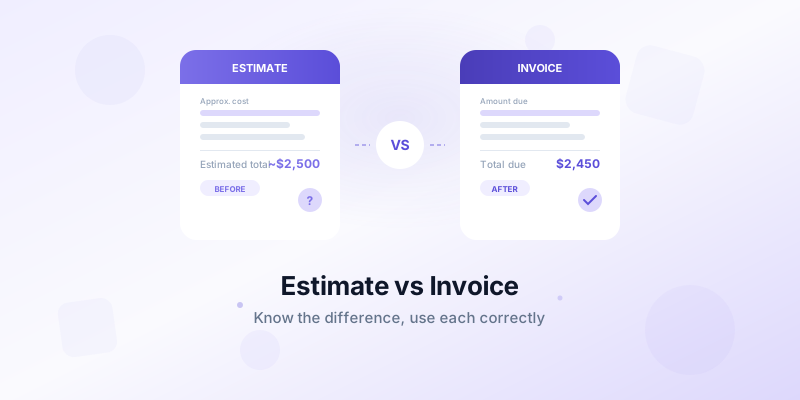
A new client asks for a price on a website redesign. Do you send them an estimate or an invoice? If you're unsure, you're not alone. Many freelancers and small business owners use these terms interchangeably — but they serve very different purposes, and mixing them up can cost you money or damage client trust.
Understanding the estimate vs invoice difference is fundamental to running a smooth billing process. An estimate sets expectations before work begins. An invoice requests payment after work is complete. Getting the timing and content right for each document keeps your projects organized and your cash flow healthy.
What Is an Estimate?
An estimate is a document you send to a potential client before starting work. It outlines the expected cost, scope, and timeline for a project or service. Think of it as a pricing proposal — it gives the client enough information to decide whether to move forward.
Key characteristics of an estimate:
- Not legally binding. An estimate is a projection, not a contract. The final cost may change based on actual time, materials, or scope adjustments.
- Sent before work begins. You create an estimate during the sales or proposal phase, before any deliverables are produced.
- Subject to change. If the project scope expands or material costs increase, you can update the estimate. Best practice is to communicate changes before they happen.
- Helps clients budget. Your estimate gives the client a realistic picture of what they'll spend, so they can plan accordingly.
A typical estimate includes your business details, the client's information, an itemized list of services or products, estimated costs for each, an estimated total, and a validity period (how long the quote is good for).
For example, a graphic designer might send an estimate that reads: "Logo design package — approximately $1,500-$2,000, including 3 concept options, 2 revision rounds, and final files in all formats. Valid for 30 days." The client can accept, negotiate, or decline without any obligation.
What Is an Invoice?
An invoice is a formal payment request you send after delivering goods or completing services. It states the exact amount owed, the payment due date, and the terms for payment. Unlike an estimate, an invoice carries legal weight — it's an official record that the client owes you money.
Key characteristics of an invoice:
- Legally binding. An invoice documents a completed transaction and can be used as evidence in payment disputes.
- Sent after work is done. You issue an invoice once you've delivered the agreed-upon work or reached a billing milestone.
- States exact amounts. No ranges or approximations. Every line item reflects the actual work performed and the agreed price.
- Includes payment terms. Your invoice specifies when payment is due, accepted methods, and any late fees. For a deep dive on this topic, read our guide on invoice payment terms.
A complete invoice includes everything an estimate has, plus a unique invoice number, the exact due date, payment terms, and clear payment instructions.
Key Differences Between Estimates and Invoices
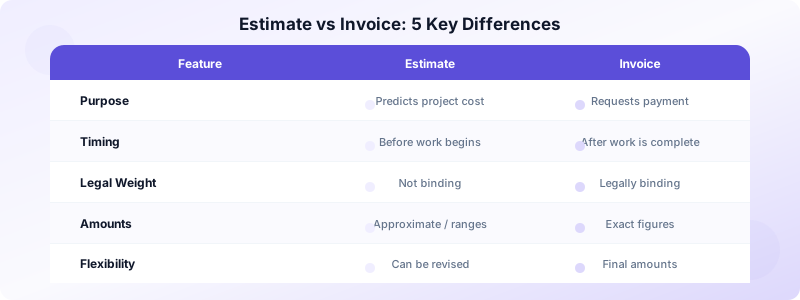
While estimates and invoices share a similar structure, they differ in five important ways.
Purpose. An estimate predicts what a project will cost. An invoice confirms what the client owes. One starts a conversation; the other closes it.
Timing. Estimates come before work begins. Invoices come after work is completed (or at agreed milestones). Sending an invoice before delivery — unless it's a deposit request — is a red flag for clients.
Legal weight. An estimate doesn't obligate the client to pay. An invoice does. If a client refuses to pay a valid invoice, you have legal grounds to pursue the debt.
Flexibility. Estimate amounts can change as project details evolve. Invoice amounts are final and reflect the actual work delivered. If the scope changed significantly, discuss it with the client before invoicing — don't surprise them with a number that doesn't match the original estimate.
Detail level. Estimates can use ranges ("$2,000 - $2,500") or approximate hours. Invoices require exact figures: specific hours worked, exact rates, and precise totals.
When to Use an Estimate vs an Invoice
Knowing when to send each document prevents confusion and keeps your client relationships professional.
Send an estimate when:
- A new client asks "How much will this cost?" before committing to a project
- The project scope isn't fully defined yet, and costs depend on variables like time or materials
- You're competing against other service providers for a job — your estimate is essentially a bid
- The project is large enough that the client needs to get internal approval before proceeding
- You want to set clear expectations about pricing before any work begins
Send an invoice when:
- You've completed the agreed-upon work and it's time to collect payment
- You've reached a billing milestone (for example, completing phase 1 of a 3-phase project)
- You're requesting a deposit or upfront payment before starting work
- You're billing for recurring services on a monthly or weekly schedule
Real-world example: A contractor receives a request to renovate a kitchen. They send an estimate with line items for demolition, plumbing, electrical, cabinets, and countertops — totaling approximately $18,000-$22,000. The client approves. After completing the work, the contractor sends an invoice for $20,450 reflecting the actual materials used and hours worked.
Milestone billing tip: For large projects, use both documents together. Send the estimate before work starts, then invoice at each milestone (25% complete, 50% complete, etc.). This keeps cash flowing throughout the project and reduces the risk of a single large unpaid invoice at the end.
How to Convert an Estimate to an Invoice
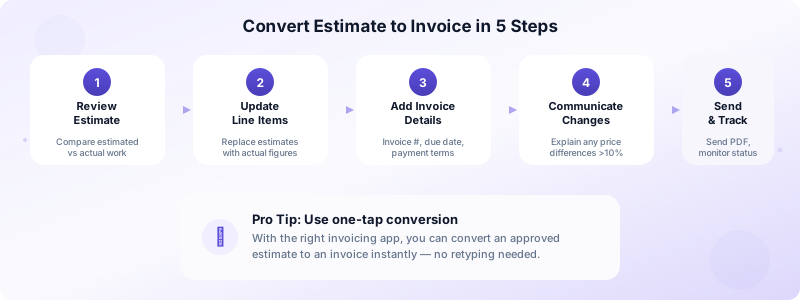
Once the client approves your estimate and you complete the work, converting it to an invoice should be straightforward. Here's how to do it right.
Step 1: Review the original estimate. Compare what you estimated against what you actually delivered. Note any scope changes, additional work, or price adjustments.
Step 2: Update line items. Replace estimated quantities and prices with actual figures. If you quoted 10 hours of design work but spent 12, update the line item. If you agreed on a fixed price, keep it as-is.
Step 3: Add invoice-specific details. Include a unique invoice number, the issue date, the payment due date, and your payment instructions. These elements turn an estimate into a billable document.
Step 4: Communicate any price changes. If the final amount differs from the estimate by more than 10%, reach out to the client before sending the invoice. Explain what changed and why. Transparency prevents disputes.
Step 5: Send and track. Send the invoice as a PDF, and mark it in your system so you can track whether it's been viewed, paid, or is overdue.
With Invoices Customers, you can convert an estimate to an invoice with a single tap. The app transfers all your line items, client details, and pricing automatically — so you never retype information or miss a charge.
Manage Estimates and Invoices in One Place
Keeping your estimates and invoices organized is essential for creating professional invoices and maintaining healthy cash flow. When both documents live in the same system, you can track which estimates have been approved, which invoices are outstanding, and which clients need follow-up.
Here's what to look for in a good tool:
- Estimate creation with itemized pricing and professional formatting
- One-tap conversion from estimate to invoice when the client approves
- Client management to store contact details and project history
- Status tracking to monitor outstanding, overdue, and paid invoices
- PDF generation for polished documents you can send or print instantly
Invoices Customers handles both estimates and invoices from a single app on your iPhone. Create an estimate, send it to your client, and convert it to an invoice with one tap when the work is done. No account needed, no internet required, and all your data stays on your device.
Download Invoices Customers and manage your estimates and invoices in one place.
