
How to Invoice as a Freelancer: Step-by-Step
You landed your first freelance client, delivered great work, and now comes the part nobody taught you — actually getting paid. If you've never sent an invoice before, the process can feel intimidating. How much detail do you include? When do you send it? What if the client doesn't pay?
Learning how to invoice as a freelancer is a skill that directly impacts your income. Over 74% of independent professionals experience late payments, and many of those delays happen because freelancers don't have a clear invoicing process. This guide walks you through every step, from your first invoice to handling overdue payments.
When to Send Your First Freelance Invoice
Timing matters more than most freelancers realize. The general rule is simple: invoice as soon as the work is done.
After completing the project. This is the most common approach. You deliver the final files, the client confirms everything looks good, and you send the invoice immediately — ideally the same day.
At milestones for larger projects. If your project spans multiple weeks, don't wait until the end. Break it into phases and invoice at each milestone. A $6,000 website project might generate 3 invoices: $2,000 at wireframe approval, $2,000 at design completion, and $2,000 at launch.
Before starting (deposits). For new clients or projects over $2,000, request a 25-50% deposit upfront. This protects you from scope creep and non-payment. Send a deposit invoice with clear terms before you write a single line of code or create a single design.
On a regular schedule for retainers. If a client pays you monthly for ongoing services, pick a billing date (the 1st or 15th works well) and invoice on the same day every month. Consistency makes payment a habit for your client.
Step-by-Step: Invoicing a Client as a Freelancer
Here's the exact process to follow every time you invoice a client.
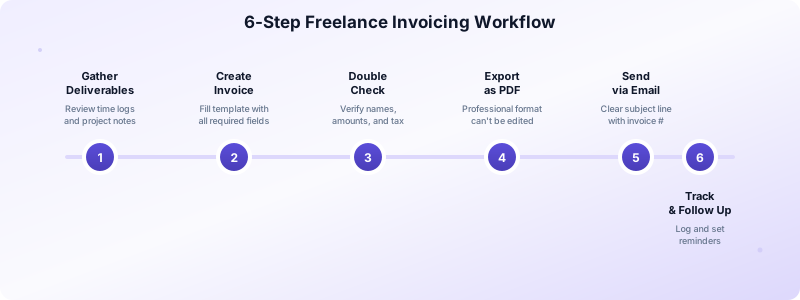
Step 1: Gather your deliverables. Before opening your invoicing tool, review what you completed. Check your time tracker, project notes, and any scope changes. Make sure nothing is missed.
Step 2: Create the invoice. Use your freelance invoice template with these required elements:
- Your name and contact info
- Client's name and billing address
- Unique invoice number (FI-001, FI-002)
- Date of issue
- Itemized services with hours, rates, and subtotals
- Tax (if applicable)
- Total amount due
- Payment due date
- Payment instructions
Step 3: Double-check everything. Verify the client name spelling, amounts, tax calculations, and your bank details. A single error can delay payment by weeks. Avoid common invoicing mistakes by reviewing every field.
Step 4: Export as PDF. Always send invoices as PDFs. They look professional, can't be accidentally modified, and display consistently on every device.
Step 5: Send with a clear subject line. Email the PDF with a subject like "Invoice #FI-012 from [Your Name] — Due April 15." Keep the email brief — one or two sentences confirming the work is complete and payment details are attached.
Step 6: Log and track. Record the invoice in your tracking system. Note the date sent, amount, and due date. Set a reminder to follow up if payment doesn't arrive on time.
Choosing the Right Payment Terms
Your payment terms define when the client must pay and what happens if they don't. As a freelancer, choose terms that protect your cash flow.
Net 15 is ideal for most freelancers. It gives clients enough time to process your invoice without stretching your cash flow thin. For clients who consistently pay on time, you can offer Net 30 as the relationship grows.
Due on Receipt for small projects. For quick jobs under $500, request immediate payment. The work is done, the amount is small — there's no reason for a 30-day wait.
Always include late fees. A 1.5% monthly fee on overdue balances discourages delays. State it clearly on your invoice and in your contract. Most clients will never trigger the fee, but knowing it exists motivates timely payment.
Offer early payment discounts selectively. A "2% off if paid within 10 days" discount works well for large invoices where getting paid 20 days sooner significantly helps your cash flow.
Put terms in your contract. The best time to discuss payment terms is before work starts, not after. Include your standard terms in your freelance agreement so there are no surprises. When a client signs a contract with Net 15 terms, they expect to pay within 15 days — and they do.
What to Do When Clients Pay Late
Even with clear terms, some clients will pay late. Here's how to handle it professionally without damaging the relationship.
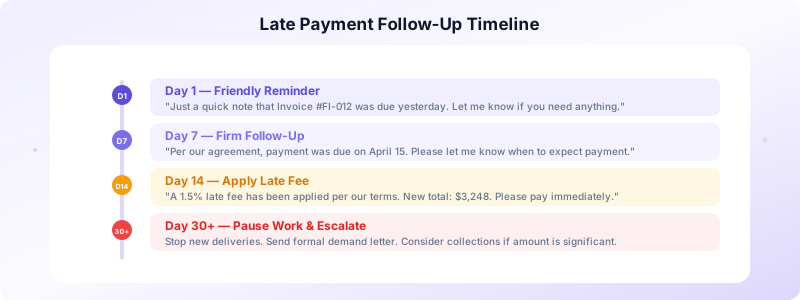
Day 1 after due date: Send a friendly reminder. Keep it light: "Hi [Name], just a quick note that Invoice #FI-012 was due yesterday. Let me know if you have any questions or need the payment details again."
Day 7: Send a firmer follow-up. Reference the original terms: "Per our agreement, payment for Invoice #FI-012 ($3,200) was due on April 15. Please let me know when I can expect payment."
Day 14: Apply the late fee. If your terms include a late fee, send an updated invoice with the fee applied. Notify the client: "A 1.5% late fee has been applied per our payment terms. The new total is $3,248."
Day 30+: Pause future work. If a client is 30+ days overdue, stop delivering new work until the outstanding balance is resolved. Be professional but firm. Your time has value.
Last resort: Formal demand. For significant amounts, send a formal demand letter. This usually prompts payment before you need to consider collections or legal action.
Tools That Make Freelance Invoicing Painless
The right invoicing tool turns a 20-minute task into a 60-second one. Instead of fiddling with spreadsheets, you fill in the project details and hit send.
Invoices Customers is designed for freelancers who want speed without complexity. Create invoices on your iPhone, store client details for instant reuse, and generate polished PDFs in seconds. Track which invoices are outstanding, overdue, or paid — all without creating an account or connecting to the internet.
What makes it perfect for freelancers:
- No sign-up required — start invoicing in seconds
- Works offline — bill clients from anywhere
- One-tap estimate-to-invoice conversion
- Client database keeps all your contacts organized
- All data stays on your device — completely private
Download Invoices Customers and make invoicing the easiest part of your freelance business.
