
What Is E-Invoicing? A Small Business Guide
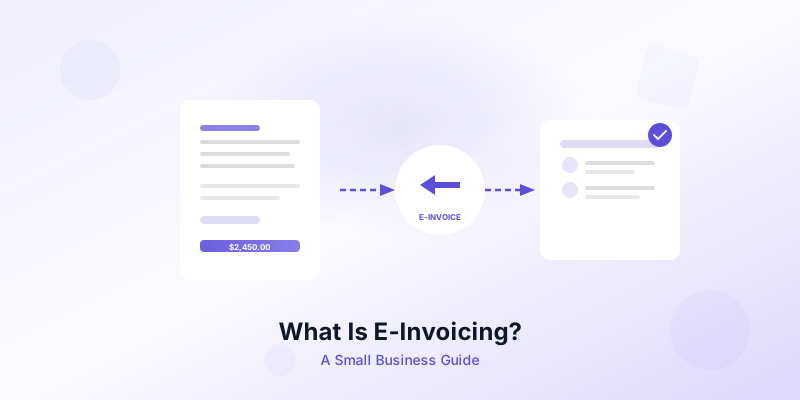
You email a PDF invoice to your client. They download it, manually re-type the line items into their accounting system, and eventually schedule a payment. Two weeks pass before you see the money. Now imagine the same invoice arriving as structured data that flows straight into your client's system, triggers approval, and initiates payment — all without anyone re-keying a single number. That is the promise of e-invoicing, and small businesses worldwide are adopting it right now.
Whether you are a freelancer sending five invoices a month or a growing business handling hundreds, understanding what e-invoicing means for your operations puts you ahead of the curve. This guide breaks down the concept, the benefits, and the practical steps to get started.
What Exactly Is E-Invoicing?
E-invoicing — short for electronic invoicing — is the exchange of invoice data in a structured, machine-readable digital format between a seller's and a buyer's financial systems. The key word is "structured." A PDF attachment in an email is a digital document, but it is not an e-invoice. A true e-invoice uses a standardized data format (like UBL or Peppol BIS) so both the sending and receiving software can read, validate, and process the information automatically.
Think of it this way: a PDF is like handing someone a printed page they still need to read and interpret. An e-invoice is like sending data directly into their spreadsheet, already sorted into the right columns.
Common e-invoicing standards include Peppol (used widely across Europe, Asia-Pacific, and now piloted in the U.S.), ZATCA in Saudi Arabia, and FatturaPA in Italy. Each standard defines the exact fields required — seller details, buyer details, line items, tax amounts, and payment instructions — so every system that speaks the same format understands the invoice instantly.
E-Invoicing vs PDF Invoicing vs Paper Invoicing
Understanding the differences helps you see why structured digital invoicing is gaining ground fast.
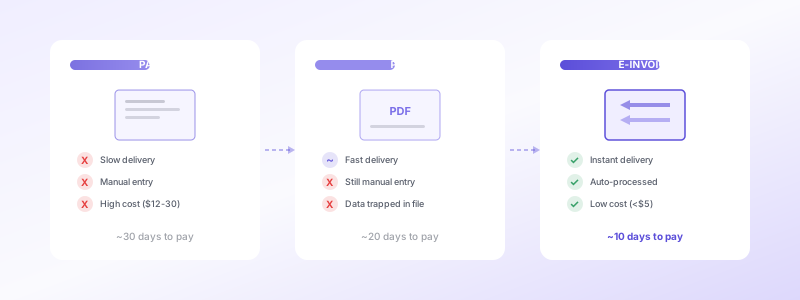
Paper invoicing involves printing, mailing, and manually processing physical documents. It is slow, error-prone, and increasingly impractical for businesses that operate across locations or borders. Postage costs, lost mail, and filing cabinet storage make this the most expensive method per invoice.
PDF invoicing is a step up. You create an invoice digitally and send it by email. The client receives it quickly, but the data is trapped inside the document. Someone still needs to open the file, read the amounts, and enter them into an accounting tool. Errors happen during that manual step.
E-invoicing removes the manual step entirely. The invoice data moves from your system into your client's system in a format both sides understand. Validation happens automatically — if a required field is missing or a tax calculation is wrong, the system flags it before the invoice is even delivered.
The practical result? Fewer errors, faster processing, and quicker payments. For a small business watching cash flow closely, those differences matter every single month.
Why E-Invoicing Matters for Small Businesses
You might think e-invoicing is only relevant for large corporations dealing with tax authorities. In reality, small businesses often benefit the most because they feel cash flow gaps more acutely.
Faster payments. When your invoice arrives as structured data, your client's system can process and approve it in hours instead of days. Studies show that e-invoices get paid an average of 10 days faster than paper or PDF invoices. For a freelancer waiting on a single payment to cover next month's rent, that speed is transformational.
Fewer errors and disputes. Manual data entry introduces mistakes — a wrong digit, a missed line item, a transposed tax rate. Each error triggers a back-and-forth that delays payment further. E-invoices validate data automatically, catching problems at the source.
Lower processing costs. Industry research estimates that processing a paper invoice costs between $12 and $30, while an e-invoice costs under $5. For a small business sending 50 invoices per month, the savings add up quickly.
Better compliance. More countries are mandating e-invoicing for B2B transactions. France, Italy, Spain, Poland, and Malaysia already have requirements in place or taking effect in 2026. Even in the United States, where no federal mandate exists yet, the Business Payment Coalition and the Federal Reserve have completed pilot testing for a Peppol-based e-invoicing network. Getting comfortable with digital invoicing now means you will not scramble when requirements arrive.
Stronger client relationships. Clients with modern accounting systems prefer receiving structured invoices because it reduces their workload. Offering e-invoicing shows you respect their processes and operate professionally. For more ways to build trust through your invoicing, check out our guide on how to create professional invoices.
How to Get Started with E-Invoicing
Transitioning to e-invoicing does not require an enterprise budget or a dedicated IT team. Here is a practical roadmap for small businesses.
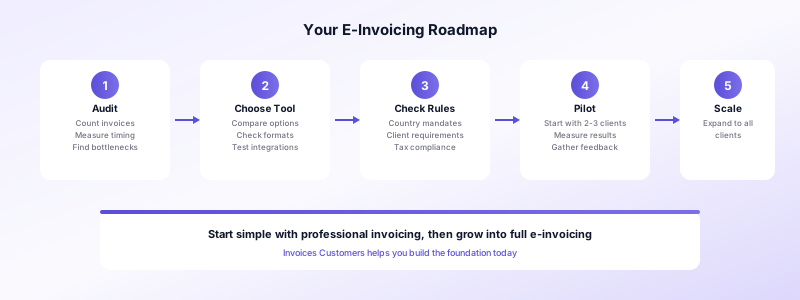
1. Audit your current process. Count how many invoices you send per month, how you send them (mail, email, app), and how long payment typically takes. This baseline tells you where e-invoicing will deliver the biggest improvement.
2. Choose the right tool. You need invoicing software that supports structured digital formats. Some tools generate invoices that can be sent through e-invoicing networks, while others focus on PDF generation. If you want to start simple, Invoices Customers lets you create professional invoices on your iPhone and generate polished PDFs in seconds — a solid foundation you can build on as your needs grow. Learn more about invoice automation for small business.
3. Understand your obligations. Check whether your country or your clients' countries require e-invoicing. Even if you are based in the U.S. and face no mandate today, clients in Europe may prefer or require structured invoices. Our overview of tax invoice requirements by country covers the essentials.
4. Start with willing clients. You do not need to switch every client at once. Identify a few who use accounting software that accepts e-invoices, and pilot the process with them. Measure the time-to-payment difference.
5. Scale gradually. As you see results, expand to more clients. Keep your existing invoicing workflow as a fallback for clients who are not ready for structured data.
Common Questions About E-Invoicing
Is e-invoicing mandatory in the United States? Not yet. There is no federal e-invoicing mandate for B2B transactions. However, pilot programs are underway, and businesses that trade internationally may already need to comply with partner countries' requirements.
Does e-invoicing replace my current invoicing app? Not necessarily. Many invoicing tools are adding e-invoicing capabilities, so you may be able to upgrade rather than switch. In the meantime, using an app like Invoices Customers to create clear, itemized invoices with proper tax details ensures your data is ready for structured formats when you make the transition.
Is e-invoicing safe? E-invoicing networks use encryption and authentication to verify both sender and receiver. This is actually more secure than emailing a PDF, which can be intercepted or spoofed.
What does it cost? Costs vary by provider. Some e-invoicing platforms charge per invoice (typically $0.10 to $1.00), while others include it in a monthly subscription. For small businesses, the cost is almost always less than the time saved on manual processing.
Can I use e-invoicing for international clients? Yes — this is one of its strongest use cases. The Peppol network connects businesses across more than 30 countries, allowing you to send compliant invoices without navigating each country's format requirements individually.
Take the First Step Today
E-invoicing is not a distant technology trend — it is a practical tool that small businesses are using right now to get paid faster, reduce errors, and stay compliant. You do not need to overhaul your entire workflow overnight. Start by understanding the concept, reviewing your current process, and choosing tools that set you up for the future.
If you are ready to upgrade your invoicing, download Invoices Customers and start creating professional, detailed invoices on your iPhone today. Whether you are sending PDFs now or preparing for full e-invoicing, having clean, structured invoice data is the foundation everything else builds on.
