
What to Include on an Invoice: Complete Checklist
You just sent an invoice, and two days later the client emails back: "Can you resend this with your tax ID?" or "What's your payment information?" Every missing detail adds days to your payment timeline. Knowing exactly what to include on an invoice eliminates these back-and-forth exchanges and gets money into your account faster.
Whether you're billing your first client or your hundredth, this checklist ensures every invoice you send is complete, professional, and payment-ready.
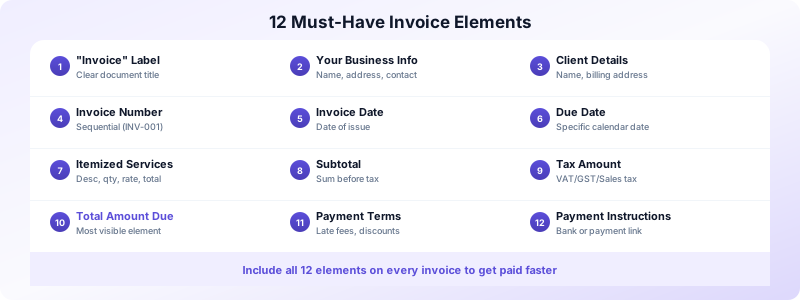
The 12 Must-Have Invoice Elements
These elements belong on every invoice, regardless of your industry, location, or client size. Miss any of them, and you risk payment delays or compliance issues.
1. The word "Invoice." It sounds obvious, but label your document clearly. Some clients receive dozens of PDFs daily — quotes, receipts, statements. Make yours unmistakable.
2. Your business details. Include your full legal business name (or your name if you're a sole proprietor), address, phone number, and email. This identifies you and gives the client a way to reach you with questions.
3. Client's billing details. The client's name (or company name), billing address, and a contact person if applicable. Verify this information before sending — a wrong name or address is a common invoicing mistake that causes delays.
4. Unique invoice number. Use sequential numbering like INV-001, INV-002, or a system that includes the date (2026-03-001). This is legally required in many countries and essential for your bookkeeping.
5. Invoice date. The date you issue the invoice. This is the starting point for calculating when payment is due.
6. Payment due date. A specific calendar date — not just "Net 30." Writing "Due by April 21, 2026" creates a concrete deadline that sticks in the client's mind. Read more about setting the right payment terms.
7. Itemized list of services or products. Each item on its own line with a clear description, quantity, unit price, and line total. Specificity prevents disputes.
8. Subtotal. The sum of all line items before tax and discounts.
9. Tax amount. If you collect sales tax, VAT, or GST, show it as a separate line. Include your tax registration number if required by your jurisdiction.
10. Total amount due. The final number the client needs to pay, displayed prominently. This should be the most visible element on your invoice.
11. Payment terms. Late fee policy, early payment discounts (if offered), and any other conditions. Keep these clear and concise.
12. Payment instructions. How to pay — bank account details, PayPal address, payment link, or accepted methods. The easier you make it, the faster you get paid.
Legal Requirements by Country
Different countries have different rules about what to include on an invoice. Here are the basics for major markets.
United States. No federal law mandates a specific invoice format, but you need your business name, client details, an invoice number, and an itemized list. If you charge sales tax, include your state tax ID.
United Kingdom. VAT-registered businesses must include their VAT number, the VAT amount, and a breakdown of VAT-inclusive and VAT-exclusive totals. Sequential invoice numbering is required.
European Union. EU VAT invoices require the seller's and buyer's VAT numbers, a sequential invoice number, the supply date, itemized goods or services, and the applicable VAT rate per item.
Australia. Tax invoices must include your ABN (Australian Business Number), the GST amount, and whether prices are GST-inclusive or exclusive.
Canada. If you're a GST/HST registrant, include your business number and the tax breakdown on every invoice.
When in doubt, check your local tax authority's website for the specific requirements in your jurisdiction. Including extra details never hurts — missing required ones can trigger compliance issues.
Optional Elements That Speed Up Payment
Beyond the essentials, these optional additions can encourage faster payment and strengthen your client relationships.
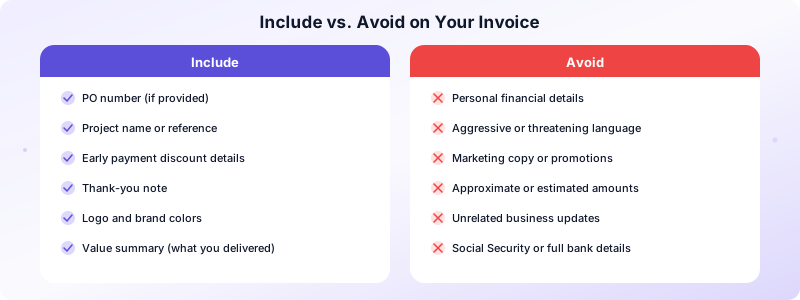
A purchase order (PO) number. If your client provided a PO number when approving the work, include it on the invoice. Many corporate accounting departments won't process an invoice without a matching PO.
Project name or reference. Linking the invoice to a specific project helps the client's accounting team match payments to budgets. Especially useful for clients who run multiple projects simultaneously.
Early payment discount details. "2% discount if paid within 10 days" can motivate faster payment on large invoices. Display the discounted amount alongside the full amount so the client sees the savings.
A thank-you note. A brief "Thank you for your business" adds a personal touch. Some freelancers include a one-line summary of the value delivered, reminding the client why the investment was worth it.
Your logo and branding. While not required, branded invoices look more professional and are harder to ignore in a stack of paperwork.
What NOT to Include on an Invoice
Knowing what to leave off is just as important as knowing what to include on an invoice.
- Personal financial details beyond what's needed. Include your bank account for payment but don't share your personal Social Security number or full bank statements.
- Aggressive language. "PAY NOW OR ELSE" damages relationships. Keep your tone professional and factual.
- Irrelevant information. Don't pad your invoice with marketing copy, upcoming promotions, or unrelated business updates. The invoice has one job: get you paid.
- Estimates or approximate amounts. Invoices contain final, exact figures. If amounts may change, you should be sending an estimate instead.
Your Complete Invoice Checklist
Use this checklist before sending every invoice to make sure nothing is missing.
- Document labeled "Invoice"
- Your business name, address, and contact info
- Client's name, company, and billing address
- Unique sequential invoice number
- Invoice issue date
- Specific payment due date
- Itemized services with descriptions, quantities, and rates
- Subtotal before tax
- Tax amount and registration number (if applicable)
- Total amount due (prominently displayed)
- Payment terms and late fee policy
- Payment instructions (bank details or payment link)
Creating invoices that cover all these elements takes minutes with the right tool. Invoices Customers includes every required field by default, so you never forget a detail. Build your invoice, generate a professional PDF, and send it — all from your iPhone, with no account required.
Download Invoices Customers and send complete, professional invoices every time.
