
Estimate Software: How to Pick the Right Tool for Your Business
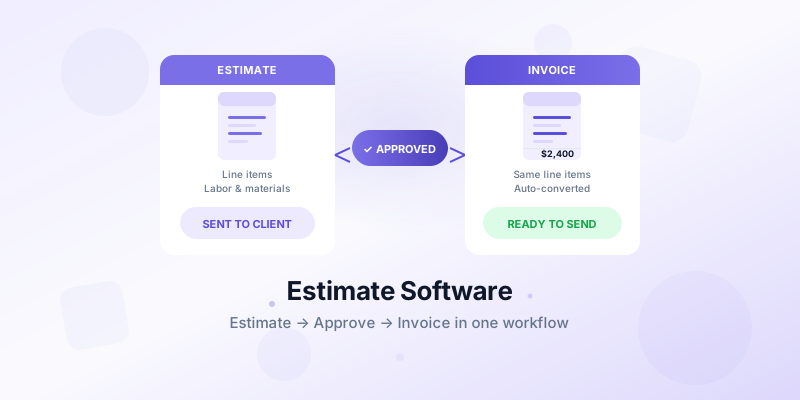
Estimate software can be the difference between winning jobs at a profit and winning jobs that cost you money. Underbid by 8% and you're working for free. Overbid and the client picks your competitor. For small businesses and contractors, accurate estimates aren't optional — they're the foundation of everything.
This guide covers what to look for in estimate software, common mistakes that sink small businesses, and how your estimating workflow connects to invoicing.
What Good Estimate Software Actually Does
At its core, estimate software helps you calculate what a job will cost before you commit to doing it. But the best tools go further — they let you send polished estimate documents, track client approvals, and convert approved estimates directly into invoices.
The key functions to look for:
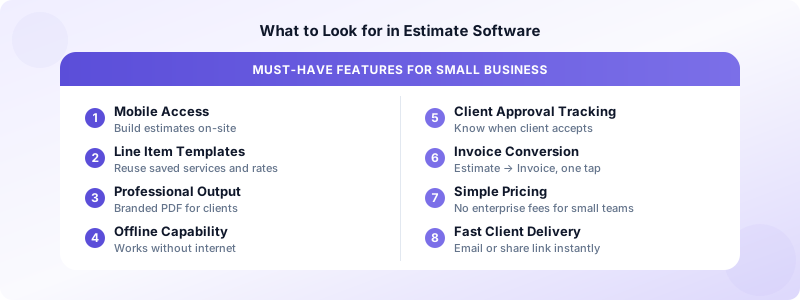
Cost calculation: Build itemized estimates with materials, labor, and overhead. Good software stores your commonly-used line items so you can build a new estimate in minutes, not hours.
Professional output: Clients receive a formatted document with your branding — not a raw spreadsheet. This signals professionalism before a single project begins.
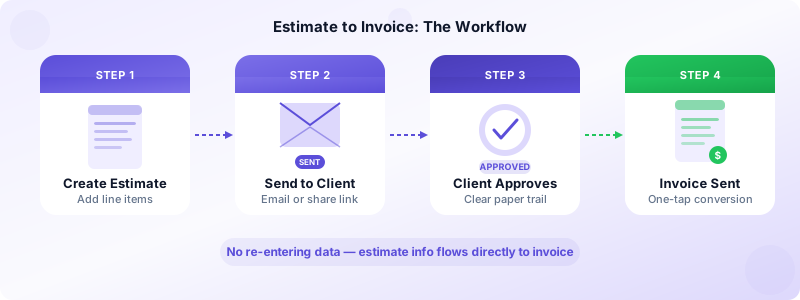
Client approval tracking: Know when a client views and accepts your estimate. This creates a clear paper trail if the scope changes later.
Estimate-to-invoice conversion: Convert an accepted estimate into an invoice with one action. No retyping the same line items — the data flows automatically.
Revision history: Track changes when clients request modifications. You want a record of what was in version 1 versus version 3.
For many small businesses and freelancers, a simple app that handles estimates and invoices together covers everything they need without enterprise-level complexity.
Features That Actually Matter for Small Business
Most estimate software is built for large construction firms. If you run a small business — a 1-15 person operation — you don't need 90% of those features. Here's what actually matters at your scale:
Mobile access. You're often on a job site or at a client's location when you need to build an estimate. Software that requires a desktop kills your workflow. Test the mobile experience before committing — open it on your phone and try building a sample estimate.
Simple line item management. You should be able to add, remove, and reorder line items quickly. Overly complex cost databases slow you down when speed matters.
Quick customization. Adjust prices, quantities, and descriptions for each job without starting from scratch. Your saved templates should be starting points, not rigid forms.
Fast client delivery. Send the estimate by email or share a link — directly from the app. Printing and scanning is not a workflow.
Offline capability. Estimate software that requires internet to function fails exactly when you need it: at a rural job site or in a basement with no signal.
Estimate Software vs. Invoice Software: Do You Need Both?
Many small businesses discover they need both estimating and invoicing, but don't want to pay for or manage two separate tools.
For businesses that mostly bill at a fixed price per project, a single tool that handles both estimates and invoices is usually sufficient. You build the estimate, the client approves it, and you convert it to an invoice at the end of the job.
For businesses with more complex billing — materials tracking, subcontractor costs, change orders — dedicated construction estimating software may be worth the investment. These tools handle takeoffs, cost databases, and project budgets in ways a general invoice app can't.
If you're a freelancer, consultant, or service business, you probably don't need construction-grade estimating. A professional invoice and estimate app covers every use case: create an estimate, get approval, and convert to an invoice when the job is done.
Invoices Customers handles exactly this workflow — create a professional estimate, send it to your client, and convert it to an invoice with one tap. No subscription required, and all data stays on your device.
To understand how estimates and invoices relate, see our guide on the difference between estimates and invoices.
Common Mistakes When Choosing Estimate Software
Buying too much software. Enterprise platforms built for billion-dollar contractors have hundreds of features you'll never use. Overly complex software slows your team down and creates a learning curve that nobody wants. If you run a crew of 1-15 people, start with something simple and upgrade only when you outgrow it.
Not testing the mobile app. Many contractors evaluate software on a desktop in the office. Everything looks clean on a big screen. Then they try using it on-site with spotty cell service and the app barely works. Always test the mobile experience before you commit.
Ignoring the invoicing workflow. If your estimate software can't connect to your invoicing system, you're re-entering data twice. That's time wasted and errors introduced. Look for tools that integrate these two steps.
Choosing by feature count instead of fit. A longer feature list doesn't mean a better tool. The right estimate software is the one your team will actually use consistently. Ease of use beats complexity every time at the small business scale.
How to Structure Your Estimates to Win More Jobs
The content of your estimate matters as much as the software you use to create it. Here are the elements that make estimates clear and persuasive.
Break it down. Itemized estimates are more trusted than lump-sum totals. When clients can see what they're paying for, they're less likely to negotiate the total down.
Include a clear expiry date. "This estimate is valid for 30 days" protects you from clients who accept a quote three months later when material costs have risen.
Spell out what's not included. List exclusions explicitly. "This estimate does not include electrical work or permits" prevents disputes when the client assumes more was covered.
Add your payment terms. State your deposit requirement and payment schedule in the estimate itself. When the client approves the estimate, they've implicitly agreed to the terms.
For guidance on creating estimates that convert, see our post on how to create an estimate for services.
Estimate Software for Different Business Types
The right estimate software depends on your industry and workflow.
Construction and trades: Look for takeoff tools, material cost databases, and job costing. Tools like Buildxact or Joist are built for this. They're more expensive but handle the complexity of materials pricing.
Service businesses (cleaning, landscaping, personal training): A general estimate and invoice app is usually sufficient. Build a template with your standard services and rates, customize per client, and send.
Freelancers and consultants: The simplest tools work best. You need to describe services clearly, set a price, and get approval. An invoice app with estimate functionality covers everything.
Retail and product businesses: Estimate software is less critical here — standard pricing handles most transactions. Use it for custom orders or bulk quotes.
Whatever your industry, the goal of every estimate is the same: give the client enough information to say yes, with enough clarity that there are no surprises when the invoice arrives.
Start Estimating Accurately Today
Good estimate software doesn't win you jobs — your pricing and reputation do that. But it makes the estimation process faster, more consistent, and more professional. Clients who receive a polished, itemized estimate respond differently than those who receive a quick text message with a number.
Download Invoices Customers and create your first professional estimate in minutes. Convert it to an invoice with one tap when the job is approved — no account needed, no subscription, all data on your device.
