
How to Create an Estimate for Services
You quoted a client off the top of your head, finished the project, and then realized you undercharged by $800. Sound familiar? When you skip a proper estimate, you leave money on the table and set vague expectations that lead to disputes later.
A well-written estimate for services does three things: it shows the client exactly what they are paying for, it protects your profit margins, and it creates a paper trail you can reference if the scope changes. Whether you run a landscaping crew, a consulting practice, or a one-person design studio, the process is the same. Here is how to create an estimate for services that wins work and keeps your business profitable.
Why Service Estimates Matter More Than You Think
Skipping a formal estimate might feel like you are saving time, but it costs you in ways that are hard to see at first. Without a written estimate, clients fill in the blanks with their own assumptions. They expect more deliverables, a faster timeline, or a lower final bill. When reality does not match those assumptions, you end up in awkward conversations that damage the relationship.
A clear estimate also forces you to think through the project before you start. Breaking work into line items reveals hidden costs — travel time, materials, subcontractor fees, or revisions — that a quick verbal quote would miss. Contractors who estimate carefully earn more per project because they account for every expense upfront instead of absorbing surprise costs later.
There is a legal angle too. A signed estimate creates documentation that both parties agreed to a scope and price range. If a client disputes your invoice down the road, you can point back to the estimate and show exactly what was included. For a deeper look at how estimates and invoices work together, check out our guide on estimate vs invoice differences.
What Every Service Estimate Must Include
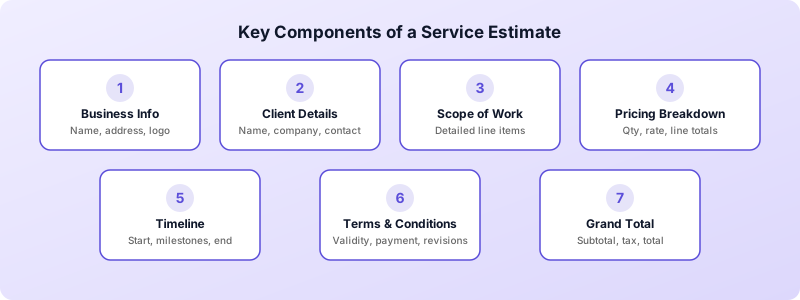
A professional estimate is more than a number on a napkin. It needs specific elements so the client can evaluate it and you can convert it into an invoice later without confusion.
Your business information. Include your business name, address, phone number, and email at the top. If you have a logo, add it. This is the first impression a potential client gets of your professionalism.
Client details. List the client's name, company (if applicable), and contact information. Getting this right now saves you from chasing corrections when it is time to invoice.
Estimate number and date. Number your estimates sequentially so you can reference them easily. The date tells the client when the pricing was calculated, which matters if material costs fluctuate.
Detailed scope of work. This is the most important section. List every service you will provide as a separate line item. Be specific. Instead of writing "website redesign," break it into "homepage design," "5 interior page templates," "mobile responsive testing," and "content migration for 20 pages." Specificity prevents scope creep and gives the client confidence that you understand their needs.
Line item pricing. Next to each service, show the quantity, unit price, and line total. For hourly work, list the estimated hours and your rate. For fixed-price items, show the flat fee. Transparency here builds trust — clients want to see how you arrived at the total, not just the final number.
Timeline. Include an estimated start date, key milestones, and a projected completion date. Clients use this information to plan around your work, and it sets realistic expectations from the start.
Terms and conditions. Specify how long the estimate is valid (30 days is standard), your payment terms, and any conditions that could change the price. For example, "Additional revisions beyond two rounds will be billed at $95 per hour."
Subtotal, taxes, and grand total. Show the math clearly. List the subtotal, any applicable taxes, and the final amount. If you are adding a contingency buffer of 5 to 10 percent for unexpected costs, label it separately so the client understands what it covers.
Step-by-Step: Building Your Estimate From Scratch
Follow this process every time you create an estimate for services. It works whether you are bidding on a $500 consulting engagement or a $50,000 construction project.
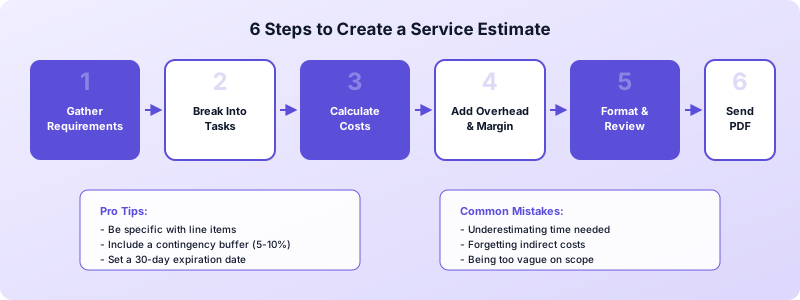
Step 1: Gather project requirements. Before you write anything, talk to the client. Ask what they need, when they need it, and what their budget looks like. The more specific their answers, the more accurate your estimate will be. If the client is vague, ask follow-up questions. A landscaping client who says "redo the backyard" needs to clarify whether that means new sod, a patio, irrigation, or all three.
Step 2: Break the project into tasks. List every task required to complete the work. Include preparation, execution, and wrap-up activities. A painter, for example, should list surface prep, priming, two coats of paint, trim work, and cleanup as separate items. This level of detail catches costs that a lump-sum approach would miss.
Step 3: Calculate costs for each task. Assign a price to every line item. For labor, multiply your hourly rate by estimated hours. For materials, check current supplier pricing. For subcontractor work, get quotes before including them in your estimate. Do not guess — inaccurate numbers erode your margins or scare away clients.
Step 4: Add overhead and profit margin. Your direct costs are not your only costs. Factor in business expenses like insurance, fuel, software subscriptions, and equipment wear. Then add your profit margin. Many service businesses target a 15 to 25 percent margin on top of all costs. If that math puts you well above competitors, look for efficiency gains rather than cutting your margin.
Step 5: Format and review. Organize everything into a clean, professional document. Double-check your math, verify the client's name and project details, and read the scope description out loud to catch unclear language. A polished estimate signals that you run a serious operation.
Step 6: Send it as a PDF. Always send estimates as PDFs rather than editable documents. A PDF cannot be accidentally altered, and it looks professional on every device. If you are working from your phone, apps like Invoices Customers let you build estimates, generate PDFs, and send them directly — no laptop required.
Common Estimate Mistakes That Cost You Money
Even experienced business owners fall into these traps. Recognizing them helps you write tighter estimates from day one.
Underestimating time. This is the most common mistake in service businesses. You assume a task will take four hours, but it takes six. Multiply that across ten projects a month and you are giving away significant revenue. Track your actual time on a few projects to build realistic benchmarks, then use those numbers for future estimates.
Forgetting indirect costs. Travel time, parking fees, permit applications, disposal fees, and administrative hours all eat into your profit. List them as separate line items or build them into your overhead calculation. Either way, they need to be covered.
Being too vague on scope. Writing "marketing consulting — $3,000" tells the client nothing about what they are getting. How many meetings? How many deliverables? What is the revision policy? Vague scopes invite scope creep, where clients expect more than you planned to deliver.
Not setting an expiration date. Material costs change. Your availability shifts. An estimate you sent three months ago may no longer be accurate. Always include a validity period — 30 days is standard for most service businesses — so clients cannot hold you to outdated pricing.
Skipping the follow-up. You send the estimate and hear nothing. A week passes. Two weeks. Many freelancers and contractors let estimates die because they feel uncomfortable following up. But a simple check-in email three to five days after sending the estimate shows professionalism and often closes the deal. Construction professionals can find more tips in our construction estimate template guide.
From Estimate to Invoice: Closing the Loop
An estimate is only the beginning of the billing cycle. Once the client approves it and you complete the work, you need to convert that estimate into an invoice. A smooth conversion process means faster payments and fewer errors.
The key is keeping your estimate data organized so you do not have to retype everything. When the project wraps up, pull up the original estimate, update any quantities or hours that changed during the work, add invoice-specific fields like an invoice number and payment due date, and send the final bill. For a detailed walkthrough of this process, see our guide on how to convert an estimate to an invoice.
This is where having the right tool makes all the difference. Invoices Customers lets you create professional estimates on your iPhone, store client details, and convert approved estimates to invoices with a single tap. Every line item, client address, and price carries over automatically — no retyping, no missed charges.
Here is what makes the process seamless:
- Estimate creation with detailed line items, quantities, and pricing
- Client management keeps names, addresses, and contact info organized
- One-tap conversion turns approved estimates into invoices instantly
- Professional PDFs you can send or print directly from your phone
- Offline access so you can create estimates at a client meeting or job site with no internet
You do not need an account or signup. Your data stays on your device, and you can start creating estimates in seconds.
Download Invoices Customers from the App Store and start sending professional estimates that win more work and get you paid faster.
