
How to Set Up Invoicing for a New Freelance Business
Getting invoicing right from day one saves you from awkward money conversations, late payments, and tax headaches later. This guide covers everything a new freelancer needs to set up a proper invoicing system — from choosing a tool to writing your first invoice number.
Step 1: Choose Your Invoicing Tool
The right tool depends on your volume and complexity:
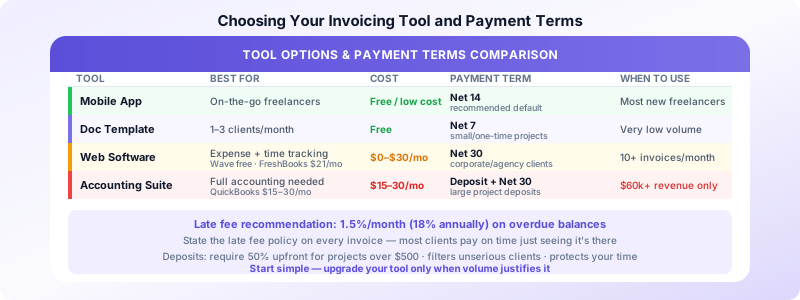
Mobile invoicing app (recommended for most new freelancers) If you work on the go or prefer a phone-first workflow, a mobile invoicing app lets you create and send invoices from anywhere in minutes. Good for service businesses with straightforward billing. Invoices Customers creates professional invoices from your iPhone in under 2 minutes — no subscription, no setup.
Spreadsheet or document template Free and simple. Works for freelancers billing 1–3 clients per month who don't mind manual tracking. Limitation: you have to manage numbering and follow-up manually.
Web-based invoicing software Wave (free), FreshBooks ($21/month), QuickBooks ($15–30/month). Worth it if you need expense tracking, time tracking, or integration with accounting software. Overkill for most new freelancers under $50k/year.
The key question: How many invoices will you send per month? If it's fewer than 10, start simple. You can always upgrade.
Step 2: Set Up Your Invoice Template
Whether you use an app, a template, or software, your invoice needs consistent branding and structure. Set up these fields once so every invoice looks professional:
Your information (pre-fill and never change):
- Your name or business name
- Your address (city and state minimum)
- Your email address
- Your phone number (optional but recommended)
Fields you fill in per invoice:
- Client name and address
- Invoice number
- Invoice date
- Payment due date
- Line items (description, quantity/hours, rate, total)
- Subtotal, tax (if applicable), total due
- Payment instructions
Take 15 minutes to set this up correctly once. Every invoice you send after that takes under 5 minutes.
Step 3: Establish Your Invoice Numbering System
Every invoice needs a unique, sequential number. This is not just good practice — it's required for clean records and easy reference when following up on payments.
Simple numbering systems that work:
- Year-sequence: INV-2026-001, INV-2026-002 — restarts each year, shows the year at a glance
- Running total: INV-001, INV-002 — simpler, never resets
- Client-based: SMITH-001, JONES-001 — useful if you want to track by client
Pick one and stick with it. Never reuse a number, even if an invoice is cancelled — mark it void instead.
Start at 001, not 100. Starting at a high number to appear more established is unnecessary. Clients rarely look at invoice numbers beyond confirming they match what they received.
Step 4: Define Your Payment Terms
Payment terms set expectations upfront and reduce late payments significantly. Decide before your first invoice:
When payment is due:
- Net 7 — payment due within 7 days. Good for small projects and one-time services.
- Net 14 — recommended for most new freelancers. Fast enough to maintain cash flow, reasonable for clients.
- Net 30 — standard in corporate/agency work. Expect to wait. Only use if the client requires it.
- Due on receipt — technically means immediately; some clients interpret this loosely.
Deposit policy: For projects over $500, consider requiring a 50% deposit before starting. This protects you from clients who disappear after work is delivered and filters out unserious inquiries. State your deposit policy in your proposal or contract, not just on the invoice.
Late fees: Optional but worth defining. A common structure: 1.5% per month (18% annually) on overdue balances. Include the late fee policy on your invoices. Whether you enforce it is up to you — having it stated often encourages on-time payment without needing to collect it.
Step 5: Set Up Your Invoice Delivery Process
How you send invoices affects how quickly you get paid:
Send invoices immediately. The moment work is complete (or at the milestone you agreed on), send the invoice. Waiting days to invoice signals that payment isn't urgent to you — clients pick up on this.
Email the invoice as a PDF. Include a brief, professional note in the email body:
Subject: Invoice #INV-2026-001 — [Project Name]
Hi [Name], please find attached invoice #INV-2026-001 for [brief description], totaling $[amount], due [date]. Payment instructions are included on the invoice. Let me know if you have any questions.
Reference the invoice number in the subject line. When clients search their email for your invoice, they need to find it quickly.
Confirm receipt for large invoices. For invoices over $1,000, a quick follow-up ("Just checking this arrived okay") is standard practice and gives you an opening to address any questions before the due date.
Step 6: Create a Follow-Up System
Late payments are common for new freelancers. Most are not intentional — they're the result of invoices getting lost in inboxes or forgotten. A simple follow-up process:
- Day 1 after due date: Friendly reminder email. "Just following up on invoice #001, due [date]. Please let me know if you have any questions."
- Day 7: Second reminder, slightly more direct. "This invoice is now [X] days overdue. Please advise on expected payment date."
- Day 14+: Phone call or more formal written notice.
Set a recurring calendar reminder for the day after each invoice's due date. This takes one minute to set up and prevents invoices from slipping through.
For a complete follow-up guide, see our post on following up on unpaid invoices.
Step 7: Prepare for Taxes from Day One
Invoicing and taxes are linked. Set up these habits now:
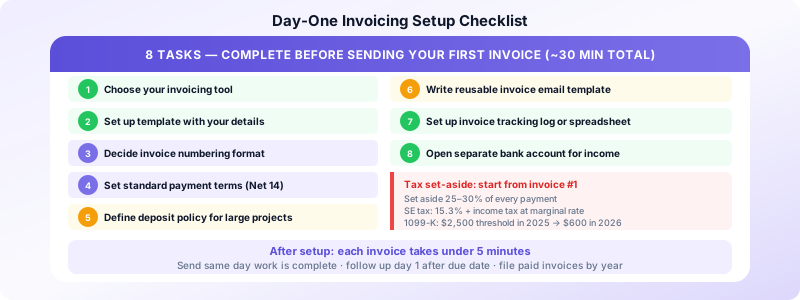
Set aside 25–30% of every payment for taxes. As a self-employed person, you owe self-employment tax (15.3%) plus income tax at your marginal rate. Not setting aside money is how freelancers end up with large unexpected tax bills.
Track income by invoice. Keep a simple log: invoice number, client, amount, date sent, date paid. This is your income record for Schedule C.
Know your 1099-K threshold. If clients pay you via payment apps (PayPal, Venmo, etc.), those platforms will issue a 1099-K once you exceed $2,500 in 2025 (dropping to $600 in 2026). This doesn't change your tax obligation — all freelance income is taxable regardless of whether you receive a 1099.
For more on invoicing for taxes and record-keeping, see our guide on invoice record keeping best practices.
Your Day-One Setup Checklist
Complete this before sending your first invoice:
- Choose your invoicing tool (app, template, or software)
- Set up your invoice template with your name, address, and contact details
- Decide on your invoice numbering format (e.g., INV-2026-001)
- Set your standard payment terms (Net 14 recommended)
- Decide on your deposit policy for larger projects
- Write a standard invoice email template you can reuse
- Set up a folder or spreadsheet to track invoices sent and paid
- Open a separate bank account for business income (optional but strongly recommended)
This setup takes about 30 minutes total. After that, each invoice takes 5 minutes or less.
The Bottom Line
A professional invoicing system isn't complicated — it's consistent. Pick a tool you'll actually use, set clear payment terms, send invoices the same day work is complete, and follow up systematically. The freelancers who get paid fastest are the ones who make invoicing a habit, not an afterthought.
Sources:
