
How to Follow Up on Unpaid Invoices

You delivered the work, sent the invoice, and waited. The due date came and went. Now you're stuck wondering how to follow up on unpaid invoices without sounding desperate or damaging the relationship. This is one of the most common — and most stressful — challenges freelancers and small business owners face.
The good news: a structured follow-up process fixes this. When you know exactly what to say and when to say it, you remove the guesswork and recover payments faster. Here's your complete guide to following up on unpaid invoices, from the first gentle nudge to final escalation.
Why You Need a Follow-Up System
Most unpaid invoices aren't the result of bad intentions. Clients forget, lose track of emails, or get caught in internal approval chains. Without a system, you're stuck deciding case by case whether to send a reminder, what tone to use, and how long to wait.
A follow-up system solves all of this. You create a timeline once, and then you follow it every time an invoice goes unpaid. This approach has three benefits:
You act faster. When the steps are predefined, you send your first reminder the day after the due date — not two weeks later when you finally notice.
You stay professional. Each message is templated and tested. You don't write emotional emails at 11 PM because you're frustrated about cash flow.
You get paid more often. Businesses that follow up within the first week of a missed payment collect over 90% of outstanding invoices. Wait 90 days, and that number drops below 50%.
If you're already struggling with late payments, start by reviewing your payment terms to make sure they're clear and enforceable before you build your follow-up process.
The Proven Follow-Up Timeline
Timing matters more than wording. Here's a day-by-day timeline you can start using today.
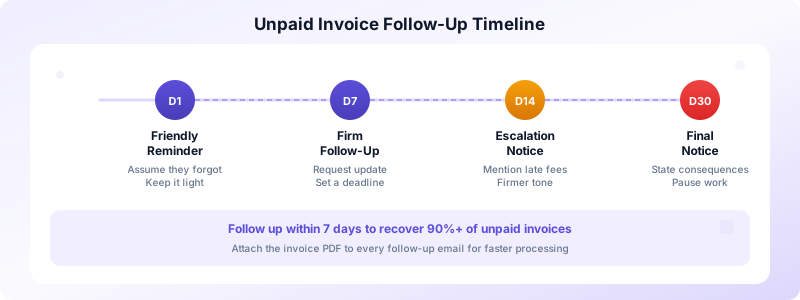
Day 1: Friendly Reminder
Send a brief, polite email the day after the due date. Keep it light — assume they forgot.
Subject: Quick reminder — Invoice #1042 was due yesterday
Body: Hi [Name], just a quick note that Invoice #1042 for $2,500 was due on March 15. I've attached a copy for your convenience. Please let me know if you have any questions or if payment is already on the way. Thanks!
Day 7: Firm Follow-Up
If you haven't heard back, send a second message. This one is still professional but more direct.
Subject: Following up — Invoice #1042 is 7 days overdue
Body: Hi [Name], I wanted to follow up on Invoice #1042 for $2,500, which was due on March 15. I haven't received payment or a response to my previous reminder. Could you provide an update on the expected payment date? I'd appreciate hearing back by Friday.
Day 14: Escalation Notice
Two weeks without payment or communication warrants a firmer tone. Mention your late fee policy if you have one.
Subject: Overdue Invoice #1042 — Action needed
Body: Hi [Name], Invoice #1042 for $2,500 is now 14 days past due. Per our agreement, a late fee of 1.5% per month applies to overdue balances. Please arrange payment within the next 5 business days. If there's a problem with the invoice, let me know so we can resolve it.
Day 30: Final Notice
At 30 days, your tone shifts to formal. State the consequences clearly.
Subject: Final notice — Invoice #1042, 30 days overdue
Body: Hi [Name], this is my final notice regarding Invoice #1042 for $2,500 plus $37.50 in accrued late fees. The total outstanding amount is $2,537.50. If I don't receive payment by [date], I will need to pause all current work and explore further collection options. Please contact me immediately to resolve this.
For more ready-to-use email scripts, see our full collection of overdue invoice email templates.
How to Write Follow-Up Messages That Work
The templates above give you a starting point. Here are the principles that make any follow-up message effective.
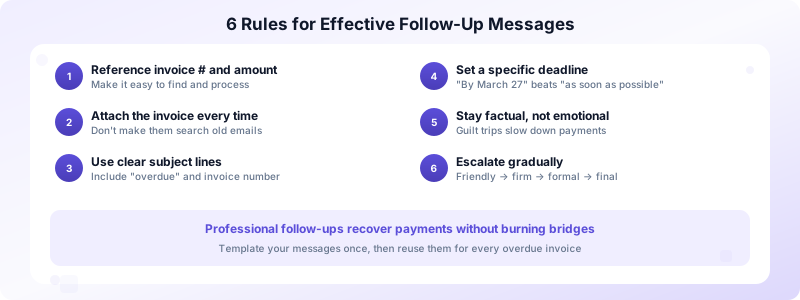
Always reference the invoice number and amount. Make it easy for the client to find and process your invoice. Include the original due date and the current number of days overdue.
Attach the invoice every time. Don't make them dig through old emails. Attach the PDF to every follow-up. With Invoices Customers, you can generate and resend professional PDF invoices directly from your phone in seconds.
Use a clear subject line. Your email competes with dozens of others in their inbox. Include the invoice number and the word "overdue" so it stands out and gets prioritized.
Set a specific response deadline. "Please pay soon" is vague. "Please confirm payment by Friday, March 27" gives them a concrete date to act on.
Stay factual, not emotional. Guilt trips and frustration don't speed up payments. Stick to the facts: what's owed, when it was due, and what happens next.
Escalate gradually. Each message should be slightly more direct than the last. The progression from friendly reminder to final notice gives the client multiple chances to respond before things get serious.
What to Do When Follow-Ups Don't Work
Sometimes even four well-crafted emails don't produce a check. Here's your escalation path when standard follow-ups fail.
Pick up the phone. After two unanswered emails, call the client directly. A 5-minute phone call often resolves what weeks of emails could not. Ask if there's a payment issue and try to negotiate a partial payment or payment plan.
Send a formal demand letter. A written letter on your business letterhead, sent by certified mail, signals that you're serious. State the total amount owed (including late fees), a final payment deadline, and the specific actions you'll take if payment isn't received.
Pause current work. If you're still doing work for this client, stop. You have no obligation to keep delivering when previous invoices remain unpaid. Communicate this clearly and in writing.
Consider a collections agency or small claims court. For invoices over $500, small claims court is a viable option in most states. For larger amounts, a collections agency typically charges 25-50% of the recovered amount. Both options should be last resorts.
Write it off and move on. For smaller amounts, the time and stress of aggressive collection may not be worth it. Document the loss for your taxes, add stricter late payment fees to future contracts, and focus your energy on clients who pay reliably.
Prevent Unpaid Invoices Before They Happen
The best follow-up is the one you never have to send. Build these habits into your invoicing process to reduce overdue payments dramatically.
Set clear payment terms upfront. Include due dates, accepted payment methods, and late fee policies in your contract and on every invoice. Clients who agree to terms before work begins are far more likely to honor them.
Invoice immediately after delivering work. The longer you wait, the less urgency the client feels. Send your invoice the same day you complete the project. Invoices Customers makes this easy — create and send a polished invoice from your iPhone in under a minute, even on the job site.
Request deposits for large projects. For any project over $1,000, ask for 25-50% upfront. This reduces your risk and confirms the client is serious about paying.
Track invoice status religiously. You can't follow up on what you don't track. Use Invoices Customers to monitor which invoices are outstanding, overdue, or paid. Status tracking keeps you on top of every dollar owed.
Build relationships, not just transactions. Clients who like working with you prioritize your invoices. Communicate clearly, deliver quality work, and treat the billing process as part of your professional relationship.
Knowing how to follow up on unpaid invoices is a skill every business owner needs. Start with clear payment terms, build a consistent timeline, and use templates that escalate gradually. With the right system in place, you'll spend less time chasing payments and more time doing the work you love. Download Invoices Customers to create professional invoices, track payment status, and stay on top of every outstanding dollar — all from your phone.
