
Invoice Management System for a One-Person Business
A one-person business doesn't need enterprise billing software. It needs a system that's simple enough to actually use, reliable enough to not lose track of invoices, and complete enough to satisfy the IRS when tax time arrives.
Most solopreneurs either over-engineer this (buying software with features they'll never use) or under-engineer it (a folder of PDFs and hope). This guide covers the practical middle ground: exactly what you need to track, how to organize it, and which tools are worth your time.
What "Invoice Management" Actually Means for a Solopreneur
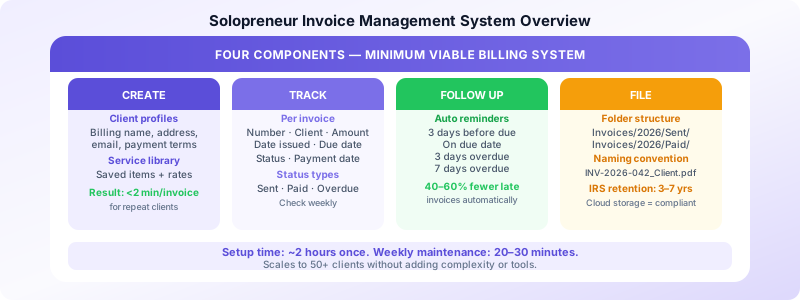
For a one-person business, invoice management has four components:
- Creating invoices — generating accurate invoices quickly from client and service data
- Tracking status — knowing which invoices are outstanding, paid, or overdue at any moment
- Following up — prompting clients to pay without manual effort
- Filing for records — storing invoices in an organized, retrievable format for tax purposes
That's it. Every tool and process you add should serve one of these four functions. If it doesn't, it's overhead.
The Minimum Viable Invoice System
The simplest functional system for a one-person business:
Tool: A mobile invoicing app with client profiles, invoice numbering, and status tracking Folder: One cloud folder — Invoices/2026/Sent and Invoices/2026/Paid Habit: 20–30 minutes on Friday to send the week's invoices and check status
This handles the full invoice lifecycle without spreadsheets, complex software, or subscription fees. For most solopreneurs billing under 30 clients per month, this is sufficient indefinitely.
What to Track
For each invoice, you need to track:
- Invoice number — unique, sequential (INV-2026-001, INV-2026-002...)
- Client name — who it's billed to
- Amount — total due
- Date issued — when you sent it
- Due date — when payment is expected
- Status — Sent, Paid, Overdue, or Cancelled
- Payment date — when payment was actually received (for Paid invoices)
This is your accounts receivable ledger. You don't need accounting software to maintain it — a simple list in your invoicing app or a single spreadsheet tab handles this for most one-person businesses.
Setting Up Your Client Library
The highest-leverage setup task is saving every active client as a profile in your invoicing app. Each profile should include:
- Legal billing name
- Billing address
- Primary contact name and email
- Default payment terms (Net 7, Net 14, Net 30 — whatever you use for this client)
- Any notes (PO number required, billing goes to finance@company.com, etc.)
Once a client is saved, every invoice to them pre-fills automatically. You select their name, add line items, and send. No retyping, no address errors, no wondering which email goes to accounts payable.
Setup time: 5 minutes per client. Do it once before you send their first invoice, not after.
Pair this with a service item library — saved descriptions and rates for your recurring services — and invoice creation time drops to under 2 minutes per invoice for repeat work.
The Invoice Status Dashboard
You need to know at any moment:
- What's currently outstanding (sent but not yet paid)?
- What's overdue (past due date, still unpaid)?
- What was paid this month?
Most invoicing apps show this as a dashboard. If you're using a spreadsheet, a simple filter on the Status column gives you the same view.
Check this once a week — ideally during your batch invoicing session — and act on anything overdue. An invoice that's 3 days past due needs a reminder. An invoice that's 14 days past due needs a direct email or call. An invoice that's 30+ days past due needs escalation.
Automating Follow-Up
Manual follow-up is the biggest time sink in invoice management for solopreneurs. Chasing payments takes time, feels uncomfortable, and gets deprioritized when you're busy — which is exactly when you can least afford delayed payment.
The solution is automated payment reminders. Configure a sequence once:
- 3 days before due date: reminder
- On due date: "due today" notice
- 3 days overdue: first overdue notice
- 7 days overdue: second notice with late fee reminder
Once configured, these send automatically. You only intervene if a client responds or remains unpaid after the full sequence. This alone reduces overdue invoices by 40–60% for most freelancers without any manual effort.
For the full automation setup, see our guide on invoice workflow automation for small businesses.
Filing and Record-Keeping
Every invoice you send should be stored in an organized, retrievable format. For a one-person business, the simplest approach:
Business Records/
├── Invoices/
│   ├── 2026/
│   │   ├── Sent/    ← invoices awaiting payment
│   │   └── Paid/   ← invoices with payment confirmed
│   └── 2025/
Move invoices from Sent to Paid when payment clears. At any moment, the Sent folder shows your outstanding receivables. The Paid folder is your income archive.
File naming: INV-2026-042_ClientName_Description.pdf
The IRS requires business records to be kept for at least 3 years (up to 7 in certain situations). Digital files in cloud storage satisfy this requirement — you don't need paper copies.
Choosing the Right Tool
For a one-person business, the ideal invoicing tool has:
- Client profiles with saved billing information
- Service item library for pre-filling line items
- Invoice status tracking (Sent/Paid/Overdue)
- Automated reminders for overdue invoices
- Mobile access — you're often not at a desk
You don't need: complex accounting modules, payroll, multi-user access, inventory management, or a subscription that costs more than the time it saves.
Invoices Customers is built for exactly this use case — a one-person business that needs clean, professional invoices, organized client records, and status tracking without monthly fees or a learning curve. It runs on iPhone, stores all your client and service data, and handles the full invoice lifecycle from creation to payment confirmation.
The Weekly Billing Routine
The system only works with a consistent routine. Here's the minimum viable weekly habit for a solopreneur:
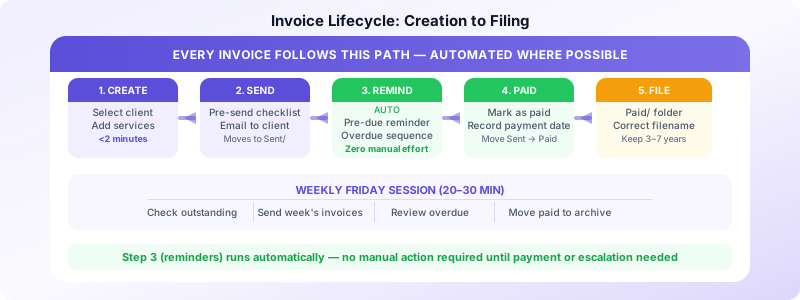
Every Friday afternoon (20–30 minutes):
- Open your invoicing app — check what's outstanding
- Create and send invoices for all work completed this week
- Review anything overdue — trigger manual follow-up if automated reminders haven't resolved it
- Move any paid invoices from Sent to Paid in your folder
- Note total outstanding balance (optional but useful for cash flow awareness)
This single weekly session handles everything. No daily billing interruptions, no end-of-month scramble, no forgotten invoices.
When to Add More Complexity
The system described above handles most one-person businesses indefinitely. Add complexity only when you hit a specific bottleneck:
Add expense tracking when you start deducting significant business expenses and need organized receipts for tax time. See our guide on how to organize invoices and receipts.
Add time tracking integration when you bill primarily by the hour and manually logging time is creating errors or taking too long.
Add accounting software when you need profit/loss reporting, need to track cost of goods sold, or have an accountant requesting structured financial data.
For most solopreneurs billing flat-rate services to a manageable client roster, none of these additions are necessary in the first few years.
Sources:
