
Switch from Paper to Digital Invoicing in 5 Steps
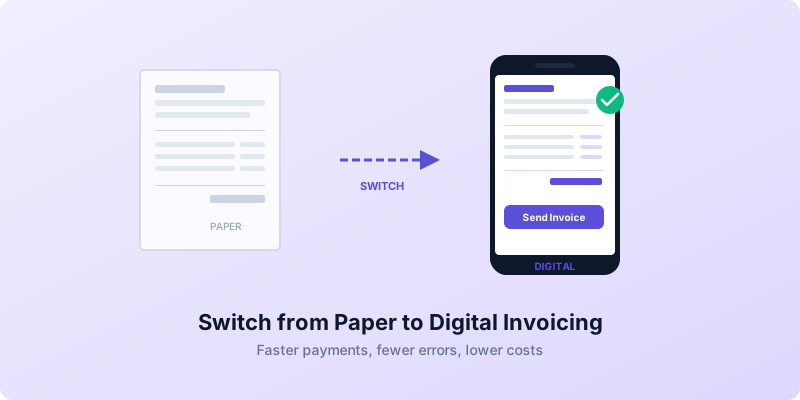
You have a filing cabinet full of invoice copies, a desk covered in carbon-copy pads, and a nagging feeling that there has to be a better way. There is. Learning how to switch from paper to digital invoicing is one of the highest-impact changes a small business can make — and it takes far less time than you think.
Businesses that move to digital invoicing cut processing costs by 60 to 80 percent and get paid days faster. Paper invoices cost an average of $12 to $30 each when you factor in printing, postage, and manual handling. A digital invoice costs almost nothing to create and deliver.
This guide walks you through how to switch from paper to digital invoicing in five clear steps.
Why Paper Invoicing Holds Your Business Back
Paper invoicing feels familiar, but it quietly drains your time, money, and patience. Once you see the hidden costs, you will wonder why you did not switch sooner.
It is slow. A paper invoice has to be printed, stuffed in an envelope, stamped, and mailed. That process alone adds three to five business days before your client even sees the bill. Digital invoices arrive in seconds.
It is expensive. Paper, ink, envelopes, and postage add up quickly when you send dozens of invoices per month. Studies show that manual invoice processing runs roughly 15 days on average, compared to about 3 days for largely digital workflows.
It is error-prone. Handwritten or manually typed invoices invite typos, wrong totals, and missing details. Up to 25 percent of accounts payable resources go toward sorting out data-entry and processing issues. Those are the kinds of invoicing mistakes that delay payments and frustrate clients.
It is hard to track. Paper invoices sit in filing cabinets. Digital invoices are searchable, sortable, and always available — which matters enormously at tax time or when a client questions a bill.
Step 1: Audit Your Current Invoicing Process
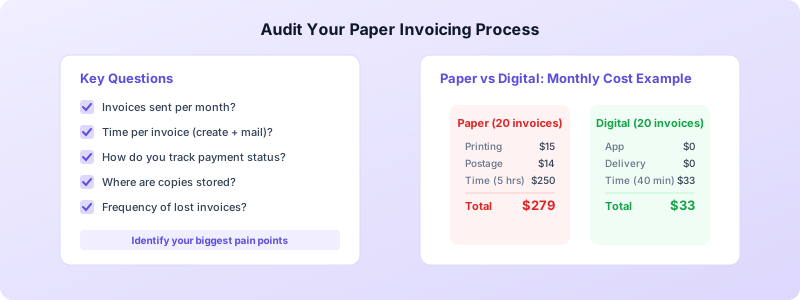
Before you change anything, take 30 minutes to map what you currently do. This audit reveals exactly where paper is costing you time and where digital will make the biggest difference.
Start by answering these questions:
- How many invoices do you send per month?
- How long does it take to create, print, and mail one invoice?
- How do you currently track which invoices are paid, overdue, or outstanding?
- Where do you store copies of sent invoices?
- How often do you deal with lost invoices or payment disputes?
Write your answers down. If you send 20 invoices per month and each one takes 15 minutes to create and mail, that is five hours per month — more than half a workday — just on billing. Digital invoicing can cut that to under an hour.
Also note any recurring pain points. Maybe clients regularly say they never received your invoice (mail gets lost). Maybe you struggle to follow up on overdue payments because you cannot quickly see what is outstanding. These pain points become your priority targets.
Step 2: Choose the Right Digital Invoicing Tool
You do not need expensive software or a background in accounting to go digital. The right tool should be simple, fast, and built for how you actually work.
Here is what to look for:
Professional PDF output. Your digital invoices should look as polished as anything a large company sends. Clean formatting, your business details prominently displayed, and a clear total due.
Client management built in. The tool should save your client list so you never re-enter addresses, emails, or tax details. Pick a client from a list, and their information fills in automatically.
Offline access. If you work on job sites, at markets, or in areas with spotty internet, you need an app that works without a connection. You should never be stuck waiting for Wi-Fi to send an invoice.
No account or subscription required to start. Avoid tools that lock basic features behind paywalls. You want to test the workflow before committing.
Status tracking. Good invoicing tools let you see at a glance which invoices are outstanding, paid, or overdue — replacing the mental tracking or spreadsheet gymnastics paper invoicing demands.
Invoices Customers checks every one of these boxes. It is a free invoicing app for iPhone that creates professional PDFs, stores client details locally on your device, and works entirely offline. There is no account to create and no data leaves your phone. For small business owners making the switch from paper, it is the fastest path to a fully digital workflow.
Step 3: Set Up Your Digital Invoicing Workflow
With your tool chosen, spend one focused session getting everything configured. This upfront setup is what makes every future invoice take minutes instead of the lengthy paper process.
Enter your business information. Add your business name, address, phone, email, and any tax registration numbers. This auto-fills on every future invoice.
Import your client list. Go through your existing records — paper files, spreadsheets, phone contacts — and add each client to your digital tool. Include billing addresses, email addresses, and any client-specific details like purchase order requirements.
Set your default payment terms. Choose your standard terms (Net 15, Net 30, or due on receipt) and make them the default. You can override them for individual clients, but a sensible default eliminates a decision every time you invoice.
Create line item templates. If you regularly bill for the same services, save them as reusable line items. A landscaper might save "Weekly Lawn Maintenance" at $75. A consultant might save "Strategy Session — 1 Hour" at $200. Templates eliminate repetitive typing and ensure consistency.
Establish a numbering system. Digital tools handle invoice numbering automatically, but decide on your format now. Sequential numbers like INV-001, INV-002 work for most businesses and keep your records clean for tax purposes.
This setup takes 30 to 60 minutes. After that, creating and sending an invoice takes two minutes or less.
Step 4: Migrate Gradually with a Hybrid Approach
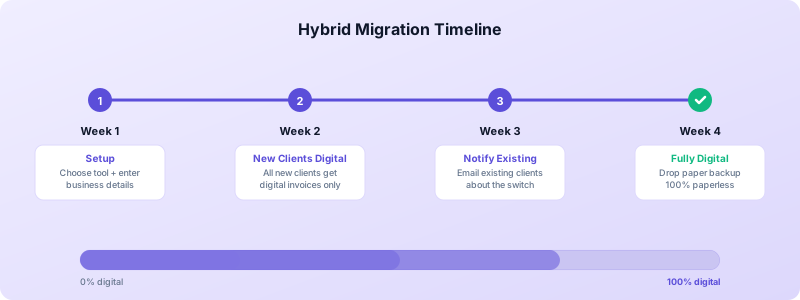
You do not have to go fully digital overnight. A hybrid approach lets you transition at a pace that works for you and your clients.
Start with new clients. Every new client from today forward gets digital invoices only. This is the easiest win because there is no change to manage — they have never received a paper invoice from you, so digital is simply how you operate.
Notify existing clients. Send a brief email or include a note with your next paper invoice: "Starting next month, we will be sending invoices by email for faster delivery. You will receive a professional PDF directly to your inbox." Most clients prefer this. It is easier for their records, too.
Handle holdouts gracefully. A small number of clients may prefer paper. Keep sending them paper while you convert everyone else. Over time, even resistant clients come around when they see how much faster digital invoices are.
Run parallel systems for one month. During your first month, send digital invoices as your primary method but keep your paper records as a backup. After that month, you will likely find the paper backup unnecessary.
Transfer historical records selectively. You do not need to digitize every old invoice. Focus on the current year and any outstanding invoices. For older records, keep the paper files as archives but do all new work digitally.
Step 5: Build Habits and Never Look Back
The switch to digital invoicing only sticks if you build it into your routine. These habits ensure you never drift back to paper.
Invoice immediately. The biggest advantage of digital invoicing is speed. When you finish a job, send the invoice right then — from your phone if needed. If you are new to mobile billing, our guide on sending invoices from your phone walks you through the full process.
Review your dashboard weekly. Spend five minutes every Monday checking your invoice statuses. Which invoices are paid? Which are overdue? Digital tools surface this information instantly, so you can follow up on late payments before they become problems.
Back up your data. Digital records are only as safe as your backup strategy. Use your phone's built-in backup features to ensure your invoice data is protected.
Track your savings. After your first full month of digital invoicing, calculate how much time and money you saved compared to your paper process. Seeing concrete numbers reinforces the switch and motivates you to optimize further.
Switching from paper to digital invoicing is not a massive technology project. It is a practical improvement that any small business owner can make in a single afternoon. The result: faster payments, fewer errors, lower costs, and hours reclaimed every month.
Ready to make the switch? Download Invoices Customers from the App Store, set up your business details, and send your first digital invoice today. The filing cabinet can finally retire.
