
Tax Season Invoicing Preparation Tips
Tax season exposes every invoicing gap from the previous year — missing records, unreconciled payments, mismatched 1099s. The freelancers and small business owners who sail through tax prep are the ones who keep clean invoice records year-round. But even if you didn't, there's a lot you can fix in the weeks before you file.
This guide covers what to prepare, what to verify, and the invoicing-related mistakes that cause real problems on your return.
What Your Invoices Are Used For at Tax Time
Your invoices serve as the primary source documentation for your Schedule C income. Specifically:
- Total gross income (Line 1 of Schedule C): The sum of all invoiced amounts actually paid to you during the tax year
- Income verification: Cross-referenced against 1099-NEC and 1099-K forms you receive from clients and payment processors
- Audit protection: If the IRS questions an income figure, your invoice is the supporting document
If you're self-employed with $400 or more in net earnings, you file Schedule C and Schedule SE (self-employment tax). Your invoices are the foundation of both.
Step 1: Compile Your Complete Invoice History
Pull every invoice you issued during the tax year. You need:
- Total invoices issued: All invoices sent, regardless of payment status
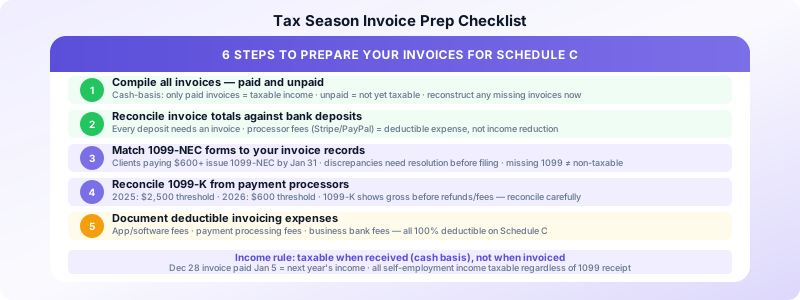
- Total invoices paid: Only income you actually received counts as taxable income (cash-basis accounting, which most sole proprietors use)
- Outstanding invoices: Not taxable yet under cash-basis accounting — but note them for your records
Create or update your income log:
| Invoice # | Client | Amount | Date Sent | Date Paid | Payment Method | |-----------|--------|--------|-----------|-----------|----------------|
This log is your Schedule C Line 1 source. Sum the "Date Paid" column for your gross income figure.
If you're missing invoices: Check your email sent folder, payment app history, and bank deposits. Every deposit needs a corresponding invoice — reconstruct any missing ones now.
Step 2: Reconcile Against Bank Deposits
Your invoice income log should match your bank statement deposits for the year. Discrepancies to investigate:
- Deposit with no invoice: Unreported income — create a retroactive invoice and include it in your income
- Invoice paid but deposit doesn't match: Currency conversion, processor fees, partial payment — document the difference
- Invoice marked paid but no deposit: Was this cash? Barter? Document the arrangement
Payment processor fees (Stripe, PayPal, Square) are a common source of confusion. If a client paid $1,000 but you received $970 after fees, your gross income is $1,000 — the $30 in fees is a deductible business expense, not a reduction in income.
Step 3: Match Your 1099s to Your Invoice Records
Clients who paid you $600 or more during the year should issue a 1099-NEC by January 31. When yours arrive:
Verify each 1099-NEC:
- Does the amount match your invoice records for that client?
- Is your name and tax ID (SSN or EIN) correct?
- Is the address current?
Common discrepancies:
- Client includes payments for two calendar years (paid in December for a November invoice) — use your actual receipt date for cash-basis reporting
- 1099 shows a higher amount than your records — contact the client for clarification before filing
- 1099 is missing — you still must report the income; the absence of a 1099 doesn't make income non-taxable
1099-K from payment processors: If you received payments via PayPal, Venmo, Stripe, or similar apps, you may receive a 1099-K. For 2025, the threshold is $2,500 in transactions (dropping to $600 in 2026). The 1099-K shows gross payments before refunds and fees — reconcile carefully against your actual net income.
Step 4: Identify Deductible Business Expenses
Your invoices cover the income side of Schedule C. The expense side requires its own documentation — but invoicing-related expenses are directly deductible:
- Invoicing software or app subscriptions: 100% deductible as a business expense
- Payment processing fees: Stripe, PayPal, Square fees are deductible
- Bank fees on your business account: Deductible
- Home office (if applicable): Proportional deduction for a dedicated workspace
Other common deductions for invoice-based service businesses:
- Professional development (courses, books, software)
- Business phone (percentage used for business)
- Health insurance premiums (self-employed deduction on Schedule 1, not Schedule C)
- Retirement contributions (SEP-IRA, solo 401k)
Keep receipts for all of these. The IRS can request documentation up to 3 years after filing (6 years for substantial underreporting).
Step 5: Calculate Your Self-Employment Tax
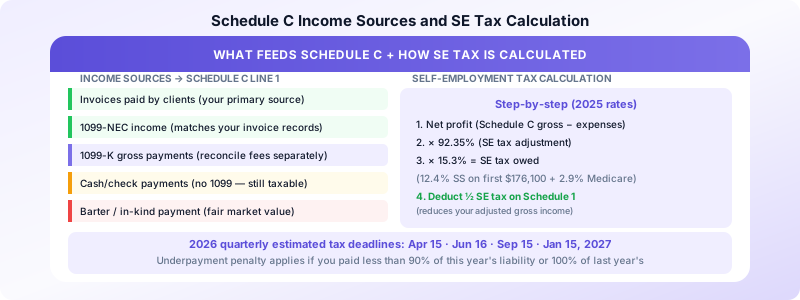
Self-employment tax (Schedule SE) is 15.3% on the first $176,100 of net self-employment income in 2025 (12.4% Social Security + 2.9% Medicare), plus 2.9% Medicare on amounts above that. This is in addition to income tax at your marginal rate.
The calculation:
- Net profit from Schedule C (gross income minus deductible expenses)
- Multiply by 92.35% (the SE tax adjustment)
- Multiply that result by 15.3%
You can deduct half of your SE tax from your gross income on Schedule 1 — this partially offsets the burden.
If you made quarterly estimated payments, verify your total payments for the year. Underpayment penalties apply if you paid less than 90% of this year's tax liability or less than 100% of last year's liability (whichever is smaller).
Step 6: Prepare Your Records Package
Organize these documents before meeting with a tax professional or opening your filing software:
Income records:
- Complete invoice log (or export from invoicing app)
- All 1099-NEC forms received
- All 1099-K forms received
- Bank statements showing deposits
Expense records:
- Receipts for all deductible expenses
- Mileage log (if claiming vehicle expenses)
- Home office measurements (if applicable)
Prior year reference:
- Prior year Schedule C (for comparison)
- Prior year estimated tax payment records
Common Invoicing Tax Mistakes to Avoid
1. Reporting invoice date instead of payment date. Under cash-basis accounting (the default for most sole proprietors), income is taxable when received, not when invoiced. An invoice sent December 28 but paid January 5 is next year's income.
2. Not reporting income without a 1099. All self-employment income is taxable regardless of whether you received a 1099. If a client paid you $400 in cash, it's taxable. If a client paid you $599 by check (below the 1099 threshold), it's taxable.
3. Confusing gross and net payment processor income. Your gross income is what clients paid you — not what you received after fees. Fees are a separate deduction.
4. Missing the quarterly estimated tax deadlines. For 2026 tax year: April 15, June 16, September 15, and January 15, 2027. Missing these results in an underpayment penalty, even if you pay the full amount when you file.
5. Failing to keep invoices for the audit window. Keep all invoices and supporting documentation for at least 3 years after the filing date (6 years if you have a complex return or significant self-employment income).
For a complete record-keeping system, see our guide on invoice record keeping best practices. For the year-end process that feeds into tax prep, see our year-end invoice review checklist.
Invoices Customers keeps your full invoice history organized on your iPhone — so when tax season arrives, your income documentation is already in one place. No subscription, no setup overhead.
Sources:
