
Best Invoicing Apps for iPhone in 2026
Choosing the best invoicing apps for iPhone can save you hours every week and get you paid faster. Whether you are a freelancer juggling multiple clients, a contractor billing from job sites, or a small business owner who needs polished invoices on the go, the right app turns your phone into a portable billing office.
But with dozens of options on the App Store, how do you pick the one that actually fits your workflow? This guide breaks down what matters most, compares the top contenders, and helps you make a decision you will not regret.
What to Look for in an iPhone Invoice App
Before you download anything, know what separates a great invoicing app from a mediocre one. Not every app that claims to handle invoices actually does it well.
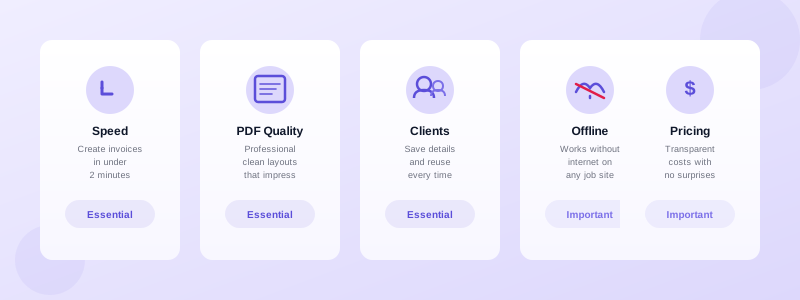
Speed matters most. You want to create and send a professional invoice in under two minutes. If the app forces you through five screens and a login wall just to bill a client, it will collect dust on your home screen. The best apps let you tap, fill, and send — done.
PDF quality is non-negotiable. Your invoice is a reflection of your business. The app should generate clean, well-formatted PDFs that look professional whether your client opens them on a laptop or prints them out. Blurry logos, misaligned columns, or amateur layouts undermine the trust you have built.
Client management saves repetitive work. Storing client names, addresses, emails, and tax details means you select a client from a list rather than typing everything from scratch each time. Over a year, this alone saves hours of data entry.
Offline access keeps you productive. Many freelancers and contractors work in locations with spotty internet — basements, rural job sites, warehouses. An app that requires a constant connection lets you down exactly when you need it most.
Transparent pricing avoids surprises. Some apps lure you in with a free download, then gate essential features behind monthly subscriptions. Know what you get for free and what costs extra before you commit.
Top Invoicing Apps for iPhone Compared
Here is a closer look at the apps worth your attention in 2026. Each one takes a slightly different approach, so the best pick depends on your priorities.
Invoices Customers
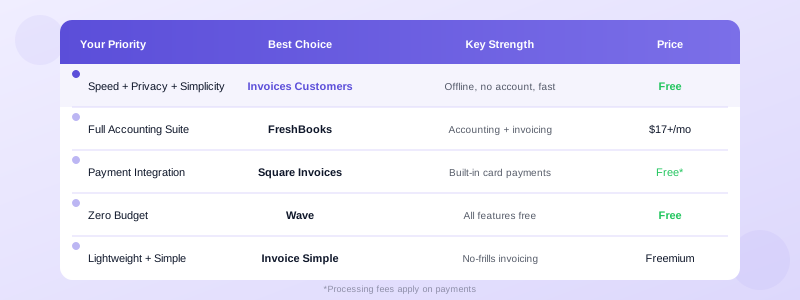
Invoices Customers is built for entrepreneurs who want fast, professional invoicing without complexity. You create invoices and estimates, store client details, generate polished PDFs, and send them directly — all from your iPhone. There is no account to create, no sign-up wall, and no data collection. Everything stays on your device, and the app works fully offline.
What sets it apart is the speed. You go from opening the app to sending a PDF invoice in under a minute once your clients and line items are saved. The estimate-to-invoice conversion feature is a single tap, which contractors and service providers find invaluable. For anyone who has read our guide on how to send an invoice from your phone, this app is the natural next step.
Best for: Freelancers, contractors, and small business owners who want simplicity, privacy, and speed.
FreshBooks
FreshBooks offers a full accounting suite with invoicing as one component. You get time tracking, expense management, and reporting alongside your invoices. The iPhone app mirrors most desktop features, and the invoice templates are customizable.
The trade-off is complexity and cost. FreshBooks requires a monthly subscription starting around $17 per month, and the learning curve is steeper than simpler apps. If you need full-featured accounting rather than focused invoicing, it is a solid choice.
Best for: Small businesses that need accounting, invoicing, and expense tracking in one platform.
Invoice Simple
Invoice Simple focuses on doing one thing well — creating invoices quickly. The interface is clean, you can add a logo and signature, and sending PDF invoices takes just a few taps. It also supports estimates and receipts.
The free tier is limited, and you will need the premium plan for features like recurring invoices and payment tracking. But for pure simplicity, it earns its reputation.
Best for: Solo entrepreneurs who want a no-frills invoice maker.
Square Invoices
Square Invoices ties directly into the Square payment ecosystem. If you already accept Square payments, adding invoicing creates a seamless experience. Clients can pay directly from the invoice via card, and you get real-time payment notifications.
The downside is the payment processing fee, and the app works best when you are fully within the Square ecosystem. Stand-alone invoicing is possible but less compelling without the payment integration.
Best for: Service businesses already using Square for payments.
Wave
Wave stands out because its invoicing features are completely free — no premium tier, no feature gates. You get unlimited invoices, client management, and basic reporting. The catch is that Wave makes money through payment processing fees when clients pay online.
The iPhone app covers the basics, though it is not as polished or fast as dedicated invoicing apps. If budget is your primary concern, Wave is hard to beat.
Best for: Budget-conscious freelancers who prioritize free access over speed.
How to Choose the Right App for Your Workflow
The best invoicing app is the one you actually use consistently. Here is a quick decision framework.
Choose Invoices Customers if you want the fastest path from job completion to invoice sent. No subscriptions, no accounts, no data shared with third parties. You own your data and work offline anywhere. If you follow professional invoicing best practices, this app makes it effortless to put them into action.
Choose FreshBooks or QuickBooks if you need a full accounting suite and are willing to pay a monthly fee for it. These tools go beyond invoicing into bookkeeping, tax prep, and financial reporting.
Choose Square Invoices if payment processing integration matters more than invoicing features. The strength is in the payment flow, not the invoice creation experience.
Choose Wave if you need free invoicing and can tolerate a slightly less polished mobile experience. It covers the basics without costing a cent.
Choose Invoice Simple if you want a lightweight tool somewhere between Wave and FreshBooks in terms of features and price.
Features That Actually Matter vs Marketing Fluff
App Store listings love to highlight long feature lists. But when you invoice clients week after week, only a handful of features actually affect your daily experience.
Invoice creation speed determines whether you invoice immediately after finishing work or procrastinate for days. Fast apps pay for themselves. Slow apps cost you money through delayed billing.
PDF output quality affects how clients perceive you. A clean, professional invoice builds trust. A sloppy one raises doubts — even if your work was flawless.
Client and item storage eliminates repetitive typing. After your initial setup, creating the next invoice for the same client should take seconds, not minutes.
Status tracking tells you which invoices are outstanding, overdue, or paid without checking your bank account or email. This is essential for managing cash flow and following up on late payments.
Estimate-to-invoice conversion matters if you send estimates or quotes before starting work. Converting an approved estimate into a final invoice with one tap prevents errors and saves time. Our guide on freelance invoice templates covers what your invoice should include once you make that conversion.
Features like AI-powered analytics, team collaboration dashboards, and multi-currency support sound impressive but rarely matter for the solo freelancer or small contractor. Focus on what you will use daily.
Start Sending Professional Invoices Today
You do not need to spend weeks evaluating apps. Pick one, set up your business details and client list, and send your first invoice today. The sooner you establish a consistent invoicing workflow, the healthier your cash flow becomes.
If you want to get started in under a minute with zero setup friction, download Invoices Customers from the App Store. It is free to start, works offline, and keeps your data private. Create your first professional iPhone invoice right now — your future self will thank you for not waiting.
