
Freelance Invoicing Software: How to Choose
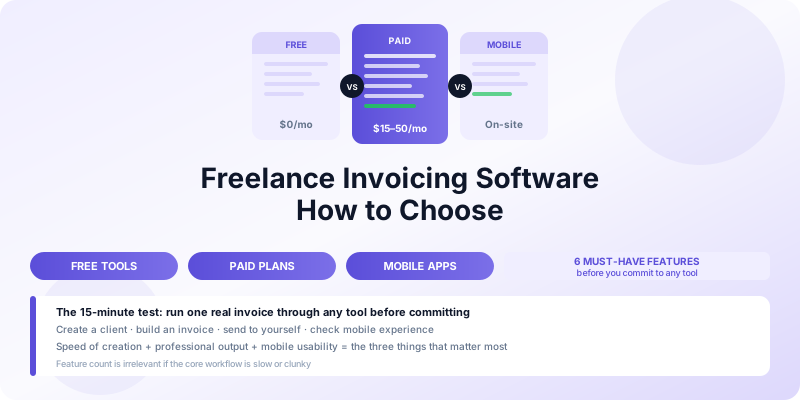
Freelance invoicing software ranges from free tools with basic templates to full-featured platforms charging $30 or more per month. Most freelancers starting out reach for whatever is free and familiar. That works until it does not — until you need a feature the tool lacks, or you realize you are manually doing something the right tool would handle automatically.
This guide walks through the key categories, what genuinely matters for a one-person or two-person business, and how to evaluate your options without paying for features you will never use.
What Freelance Invoicing Software Actually Needs to Do
Before comparing tools, be clear about what you need. Most freelancers require:
- Create professional invoices — clean templates with your branding, the client's details, itemized services, and payment terms
- Send invoices — by email, as PDF, or via a payment link
- Track payment status — know which invoices are paid, unpaid, and overdue
- Store client and service data — so you are not retyping details every time
- Number invoices sequentially — automatically, so your records stay organized
- Follow up on overdue invoices — either manually or with automated reminders
Everything beyond this list — expense tracking, time tracking, project management, payroll integration — is useful for some freelancers and unnecessary overhead for others. Do not pay for a complex tool if your actual need is the six items above.
The Main Categories of Invoicing Software
Free Invoice Generators
Free tools let you create and download a PDF invoice with no account required. You fill in a form, download the invoice, and send it yourself by email.
These work for very occasional invoicing — one or two clients, simple projects. They fall short quickly because there is no storage, no payment tracking, no client database, and no automation. Every invoice starts from scratch.
Good for: freelancers with fewer than five invoices per year.
Free Subscription Software
Several platforms offer free plans with a real account: Wave, Invoice Ninja, and similar tools let you store clients, track invoices, and manage a basic accounts receivable ledger at no monthly cost.
Free plan limitations typically include a cap on clients, limited reporting, no automated reminders, and payment processing fees if you accept online payments through the platform (usually 2.9% + $0.30 per transaction or similar).
Good for: freelancers with 5–50 clients who need organized records but minimal automation.
Paid Invoicing Platforms
Platforms like FreshBooks, QuickBooks, and similar tools add automation, deeper reporting, time tracking, project management, expense tracking, and accounting integration. Monthly costs range from roughly $15 to $50 for a single-user freelance plan.
These make sense when invoicing is high-volume (50+ invoices per month), when you have multiple revenue streams to reconcile, or when your accountant requires data in a specific format.
Good for: freelancers doing $5,000+ per month in billable work who want to minimize administrative time.
Mobile-First Invoicing Apps
Mobile invoicing apps prioritize the experience of creating and sending invoices from your phone. The key advantage is timing: you can invoice immediately after completing work, before you leave the client's location.
For tradespeople, consultants, photographers, and anyone else who does work on-site, a mobile app often fits the workflow better than a desktop platform. See mobile invoicing app benefits for a detailed breakdown of what mobile-first invoicing changes in practice.
Good for: any freelancer who does work outside a fixed office and wants to invoice on the spot.
Key Features to Compare
Invoice Templates and Branding
Every tool offers templates. What varies is how much you can customize them. At minimum, you need to add your logo, choose your color scheme, and control the layout of line items. Tools that force a generic template reduce the professional impression your invoices create.
Check: can you add a logo? Can you control the font and header color? Does the output look professional on both screen and print?
Client and Item Storage
Re-entering client details and service line items on every invoice is a significant time sink. Good software stores both. You select the client, the stored address populates automatically. You select a saved service item, the description and rate fill in.
This storage also keeps your client records in one place — useful for reviewing billing history, pulling up contact details, or generating a statement.
Automatic Invoice Numbering
Invoice numbers must be sequential and unique for accounting purposes. Any tool that makes you choose your own number — or worse, does not include one — creates record-keeping risk. The software should assign the next number automatically when you create a new invoice.
Payment Acceptance
Some tools let clients pay directly from the invoice via credit card or bank transfer. This is valuable because it removes friction: the client does not need to set up a bank transfer, write a check, or navigate a payment portal. They click, enter payment details, and you receive notification.
The tradeoff is cost. Payment processing fees (typically 2.5–3% per transaction) add up. On a $3,000 invoice, a 3% fee costs $90. Decide whether the speed of payment justifies that cost for your typical invoice amounts.
Automated Reminders
Manual follow-up on overdue invoices works, but it requires you to track due dates and remember to send the reminder. Automated reminders handle this without attention from you: the software sends a reminder two days before the due date, one on the due date, and follow-ups at intervals you set.
This feature alone can be worth the cost of a paid tool if you regularly have multiple invoices outstanding. See how to follow up on unpaid invoices for the full strategy including what to say when automation has not worked.
Mobile Access
Any serious invoicing tool should work on a phone. A mobile app (not just a mobile-optimized website) gives you the ability to create and send invoices from anywhere, receive payment notifications in real time, and check outstanding balances without opening a laptop.
If the tool you are evaluating has a poor mobile experience, factor that into your decision — especially if you work away from a desk regularly.
Data Export
At tax time, you need your invoicing records in a usable format. The minimum is a CSV or spreadsheet export of all invoices and payments. Better tools export to accounting software formats (QuickBooks, Xero) or generate income summaries directly.
If you are a sole proprietor preparing your own Schedule C, a simple CSV export of the year's invoices is sufficient. If you work with an accountant, ask what format they prefer before choosing a tool.
How to Evaluate Without Wasting Time
The most reliable way to evaluate invoicing software is to run one real invoice through it. Sign up, create a client, build an invoice for an actual project, and send it to yourself. This takes 15 minutes and reveals more than reading any comparison article:
- How long did it actually take?
- Does the output look professional?
- Is the mobile app usable?
- Were there any steps that felt clunky?
Most paid tools offer a free trial. Use the trial for a real billing cycle, not a test environment.
A Framework for Deciding
If you invoice fewer than 10 times per month and your clients pay reliably, a free tool with good templates is probably sufficient. The investment in a paid tool does not pay off.
If you invoice 10–50 times per month, have multiple clients with different payment patterns, or regularly deal with overdue invoices, a paid tool with automation saves you time that is worth more than the monthly cost.
If you are primarily mobile and do field work, prioritize a polished mobile app over a feature-rich desktop platform. The ability to invoice on-site — and have clients pay immediately — has more cash flow impact than any reporting dashboard.
The Invoices Customers app for iPhone is built specifically for freelancers and small businesses who want a clean, fast invoicing experience from their phone. It handles the core workflow — create, send, track, follow up — without the overhead of a full accounting platform.
What Not to Optimize For
Do not choose invoicing software based on the number of features it lists. Feature count is irrelevant if the core workflow is slow or clunky. Choose based on how long it takes to create and send one invoice in a realistic scenario, whether the output looks professional, and whether it works where you actually work.
Also avoid over-investing early. A $40/month invoicing platform might be right for you at $15,000/month in revenue. At $3,000/month, the administrative overhead of managing the platform may not be worth the cost. Start simple and upgrade when a specific limitation is costing you time or money.
For a complete look at what every invoice should contain regardless of which tool you use, see what to include on an invoice.
