
Invoice Branding Tips for a Professional Look
Your invoice is often the last impression a client gets before deciding how fast to pay you. A generic, unbranded invoice feels disposable. A branded one signals that you run a real business, and these invoice branding tips will help you create a professional look that earns trust and speeds up payment.
Research from the Accounting and Finance Association shows that professionally designed invoices can reduce payment time by 10 to 30 days. That is not a cosmetic upgrade. It is a cash flow strategy.
Why Invoice Branding Matters for Your Business
Every document you send carries your reputation. An invoice with a logo, consistent colors, and clean layout tells clients you pay attention to details. One without those elements tells them the opposite.
Branded invoices also reduce confusion. When a client receives dozens of bills each month, your branded invoice stands out in their inbox and their accounting system. Instant recognition means faster processing and fewer "I didn't see your invoice" excuses.
Think of your invoice as a micro-touchpoint in your client relationship. It reinforces who you are, what you delivered, and why the experience was worth the price. Freelancers who invest in creating professional invoices consistently report stronger client retention rates than those who send bare-bones bills.
Invoice Branding Tips: The Essential Elements
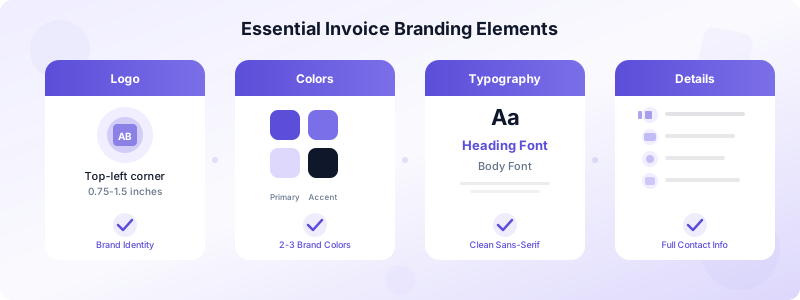
Start with your logo. Place it in the top-left or top-right corner, sized between 0.75 and 1.5 inches wide. A logo that is too large overwhelms the document. One that is too small gets ignored.
Next, choose two to three brand colors and apply them to headers, accent lines, and your business name. If your brand palette includes a primary blue and a secondary gold, use the blue for section headings and the gold for a thin accent bar below your logo.
Typography matters more than most people realize. Pick one professional font for headings and one for body text. Sans-serif fonts like Inter, Helvetica, or Open Sans read cleanly on screens and in print. Avoid decorative fonts that sacrifice readability for style.
Include your full business information: company name, address, phone number, email, and website. This is not optional. It looks professional, and it gives clients every possible way to reach you with questions. For a complete checklist of required fields, check our guide on what to include on an invoice.
Invoice Design Tips That Build Client Trust
White space is your best friend. A cluttered invoice feels overwhelming and difficult to parse. Leave generous margins, separate sections with clear spacing, and resist the urge to fill every inch of the page.
Use a clear visual hierarchy. Your business name and logo sit at the top. The invoice number, date, and client details come next. Line items occupy the middle. The total and payment terms anchor the bottom. When each section has a predictable location, clients process the information faster.
Align your line items in a clean table format. Each row should show the item description, quantity, unit price, and line total. Columns should be evenly spaced, and totals should be right-aligned. A study by PaySimple found that invoices with clearly formatted line items get paid 15% faster than those with paragraph-style descriptions.
Add a personal note at the bottom. A simple "Thank you for your business" or a project-specific comment shows that the invoice was not auto-generated and forgotten. Clients notice these details, and they associate them with businesses that care.
Consider a professional invoice template that matches your brand. A well-designed template ensures consistency across every bill you send, whether it is your first or your five hundredth. Invoices Customers lets you build branded invoices directly on your iPhone with your logo, colors, and business details baked in, so every document looks polished without extra effort.
Common Invoice Branding Mistakes to Avoid
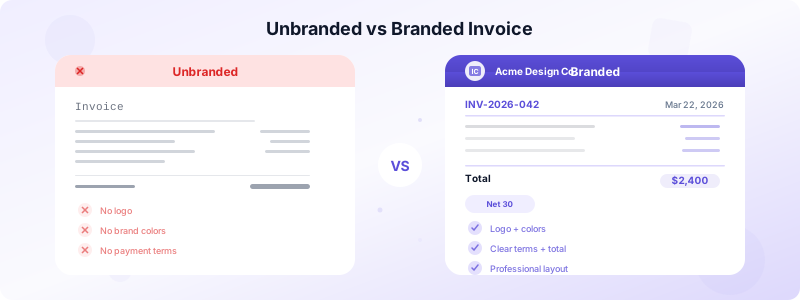
Using a different layout every time confuses clients and makes your business look disorganized. Pick one template and stick with it. Consistency builds recognition, and recognition builds trust.
Skipping your invoice number is a branding and compliance mistake rolled into one. Sequential, formatted invoice numbers like INV-2026-042 look professional and keep your records audit-ready. Omitting them signals that you are not tracking your finances carefully, which erodes client confidence.
Overloading the invoice with graphics or decorative elements backfires. Your invoice is a financial document, not a marketing flyer. One logo, two to three brand colors, and clean typography are enough. Anything beyond that distracts from the critical information: what is owed, when it is due, and how to pay.
Forgetting to include payment terms is another common error. Clients cannot pay on time if they do not know when "on time" is. State your terms clearly: Net 15, Net 30, or due on receipt. Review our list of invoicing mistakes to avoid to make sure your branded invoices are error-free.
Sending invoices as editable Word documents instead of PDFs undermines your professional image. PDFs preserve your formatting across every device, look consistent everywhere, and cannot be accidentally modified by the recipient.
Using generic email subject lines is a subtle branding miss. Instead of "Invoice attached," write "Invoice #INV-2026-042 from Acme Design Co." The recipient sees your brand name before they even open the file.
Create Branded Invoices in Minutes
You do not need a graphic designer to brand your invoices. Start with these five steps and you will have a polished, professional invoice template ready in under ten minutes.
First, gather your assets: logo file, brand colors (hex codes), and your chosen fonts. Second, pick a clean template that supports customization. Third, upload your logo and apply your brand colors to headers and accents. Fourth, add your full business details and default payment terms. Fifth, save the template so every future invoice uses the same branded design.
Test your template by sending a sample invoice to yourself. Open it on your phone, your laptop, and print it. Make sure colors render correctly, text is readable, and the layout holds together on every format. A five-minute test now prevents embarrassing formatting issues later.
If you send invoices from your phone, Invoices Customers makes this even simpler. Add your logo and business details once, and the app applies your branding to every invoice and estimate automatically. You get a professional look without rebuilding the design each time.
These invoice branding tips add up to a professional look that clients notice and respect. A strong invoice brand communicates reliability, reduces payment friction, and turns a routine billing document into a trust-building touchpoint. Start with the elements above, build your branded template today, and watch how your client relationships improve.
Download Invoices Customers and create branded, professional invoices straight from your iPhone in seconds.
