
How to Create a Multi-Currency Invoice
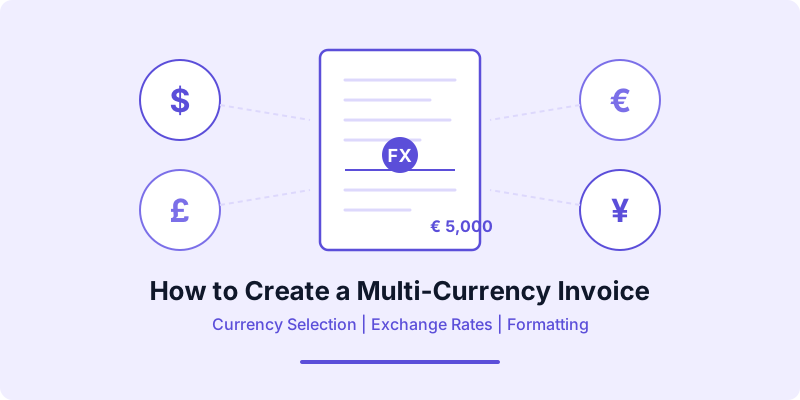
You finished a project for a client in Berlin, and now you need to send the invoice. Do you bill in euros or dollars? What exchange rate do you use? And how do you make sure the final number in your bank account matches what you expected? A multi-currency invoice answers all of these questions before they become problems.
If you work with international clients — or plan to — multi-currency invoicing is a skill you need. Getting it right means faster payments, fewer disputes, and cleaner bookkeeping at tax time. This guide walks you through every step, from choosing the right currency to locking in exchange rates and formatting your document for clarity.
Why Multi-Currency Invoicing Matters
When you bill a domestic client, the currency question never comes up. Both sides use the same money, and the amount on the invoice is the amount that lands in your account. International invoicing removes that simplicity.
Sending an invoice in your own currency shifts the exchange rate risk to your client. They see a number that might translate to a different amount in their local currency by the time they process the payment. Some clients push back, delay payment, or request an invoice in their own currency instead.
Sending a multi-currency invoice in your client's local currency solves this friction. The client sees a familiar number, processes it through their standard accounts payable workflow, and pays without extra steps. Beyond client convenience, multi-currency invoices help you stay organized — your records match your bank statements, and you can see exactly how much you billed in each currency versus what you actually received.
How to Choose the Right Invoice Currency
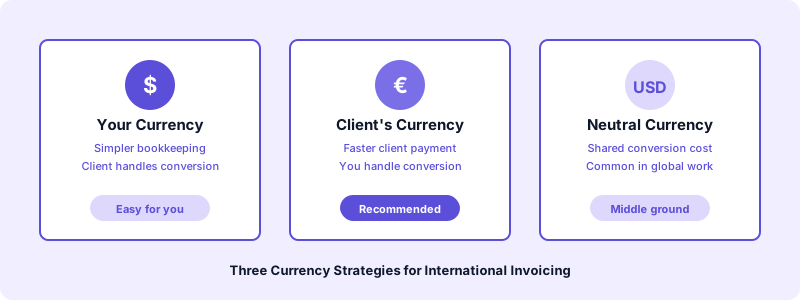
The currency you pick affects how quickly you get paid and how much you actually receive. Here are the three common approaches.
Bill in your own currency. This is the simplest option for your bookkeeping. Every invoice uses the same currency, making it easy to track revenue and file taxes. The downside is that your client handles the conversion, which can lead to payment delays.
Bill in the client's currency. This removes friction for the client and often speeds up payment. You need to convert the amount back to your home currency for your own records, but this is straightforward with a multi-currency bank account.
Bill in a neutral currency. If neither party uses a widely traded currency, a third option like USD or EUR can work as a middle ground. This is common in industries where international contracts are standard.
The best practice is to agree on the invoicing currency before you start work. Put it in your contract alongside your payment terms. If you need a refresher on structuring those, check our guide on how to write payment terms on an invoice.
Setting and Locking Exchange Rates
Exchange rates move every day. The rate when you send an invoice might differ from the rate when the client pays two weeks later. This gap creates uncertainty — and potential disputes.
Lock the rate on the invoice date. The most common approach is to use the exchange rate on the day you issue the invoice. State this rate clearly on the document so both parties agree on the conversion. For example, if you bill 5,000 EUR for a project and the rate on the invoice date is 1 EUR = 1.08 USD, note that on the invoice.
Use a contracted rate. For long-term clients or retainer agreements, you can agree on a fixed exchange rate for a set period — say, one quarter. This gives both sides predictability and eliminates the need to recalculate on every invoice.
Reference a reliable source. Always cite where you get your exchange rate. Common sources include the European Central Bank, the Federal Reserve, or financial data providers like XE or OANDA. Naming your source prevents disagreements about which rate applies.
Record the rate for your taxes. Tax authorities in most countries require you to convert foreign income back to your home currency. Keep a record of the exchange rate used on each invoice and the rate at the time of actual payment. The difference between these two creates a realized gain or loss that you may need to report.
What to Include on a Multi-Currency Invoice
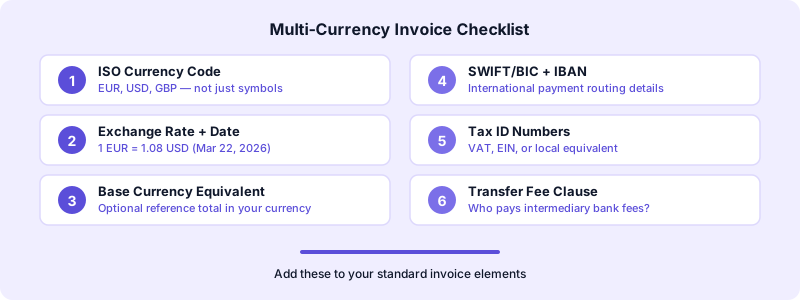
A multi-currency invoice contains all the standard elements of any professional invoice, plus a few additions specific to cross-border billing. If you need the full rundown of standard elements, see our checklist on what to include on an invoice.
Here are the multi-currency-specific details you should add:
Currency code and symbol. Use the three-letter ISO 4217 currency code (USD, EUR, GBP, JPY) alongside the currency symbol. This prevents any ambiguity — the dollar sign alone could mean USD, CAD, AUD, or several other currencies.
Exchange rate used. State the exact rate and the date it was taken. For example: "Exchange rate: 1 EUR = 1.08 USD (as of March 22, 2026, per ECB reference rate)."
Equivalent amount in your base currency. Some freelancers include a reference line showing the invoice total in their own currency. This is optional but helpful for your records and can reassure clients that the conversion is transparent.
Payment instructions for international transfers. Include your SWIFT/BIC code and IBAN (or the equivalent for your region). If you accept payments through platforms like Wise or PayPal, include those details as well. The easier you make it to pay, the faster payment arrives.
Tax identification numbers. For cross-border invoices, include both your tax ID and your client's if applicable. EU businesses need the VAT number. U.S. freelancers should include their EIN. Check the requirements for your client's country — our guide on invoicing international clients covers this in detail.
Beyond the content, small formatting choices make a big difference in how quickly a client processes your multi-currency invoice.
Place the currency code before every amount. Do not rely on a single currency mention at the top. Write "EUR 5,000.00" next to each line item and in the total. This is especially important when an invoice contains items in mixed currencies.
Use the correct decimal separator. In the United States, the decimal separator is a period (5,000.00). In Germany and many other European countries, it is a comma (5.000,00). Match the convention of the invoicing currency to avoid confusion.
Format dates consistently. Write the date in an internationally recognized format. ISO 8601 (2026-03-22) is the safest choice for cross-border documents because it eliminates the month-day ambiguity between American (03/22/2026) and European (22/03/2026) formats.
Include language considerations. If your client operates in a different language, consider adding bilingual labels for the total amount due, payment due date, and bank details. You do not need to translate the entire invoice, but bilingual labels for critical fields show professionalism.
How to Handle Exchange Rate Differences at Payment
Even with a locked rate on your invoice, the actual amount you receive may differ from what you billed. This is normal in multi-currency invoicing, and you need a system to track it.
Realized gains and losses. If you invoiced EUR 5,000 at a rate of 1.08 USD/EUR (expecting $5,400) but received payment when the rate was 1.10 (receiving $5,500), you have a realized gain of $100. Track these in a separate ledger or let your accounting software handle them automatically.
Short payments due to bank fees. International wire transfers often pass through intermediary banks that deduct fees. Decide upfront whether you absorb these fees or pass them to the client by adding a clause to your invoices.
Protecting yourself from big swings. For large invoices with long payment terms, consider requesting a deposit upfront. This locks in part of the payment at a known rate. You can easily create deposit invoices using Invoices Customers — just adjust the line items to reflect the deposit amount.
Simplify Multi-Currency Invoicing with the Right Tools
Creating multi-currency invoices by hand is tedious and error-prone. Manual currency conversions, formatting adjustments, and rate lookups add time to every invoice. The right tool eliminates this friction.
Invoices Customers makes it simple to create professional invoices with all the details your international clients expect. Add your line items, specify the currency, include your payment details, and generate a polished PDF in seconds. You can store each client's preferred currency and billing details so every future invoice is consistent.
Because Invoices Customers works offline and stores data locally on your device, you can create and send invoices from anywhere — even when you are traveling internationally without reliable internet. No account required, no data collection, and no learning curve.
Download Invoices Customers and start sending multi-currency invoices that get you paid faster.
Creating a multi-currency invoice does not need to be complicated. Agree on the currency before you start work. Lock the exchange rate on the invoice date and cite your source. Include the ISO currency code on every amount. Add international payment details so the client can pay without extra steps. And track your realized gains and losses for clean tax reporting. The more international clients you work with, the more natural this process becomes.
