
New Year Financial Goals: Invoicing Edition
The new year is the natural reset point for business habits. If slow payments, missing records, or invoice chaos cost you time or money last year, January is the moment to fix the system — before the year fills up with client work and the same problems recur.
These five invoicing goals are practical, achievable, and have a direct impact on cash flow. Most take under an hour to set up.
Goal 1: Cut Your Average Days to Payment
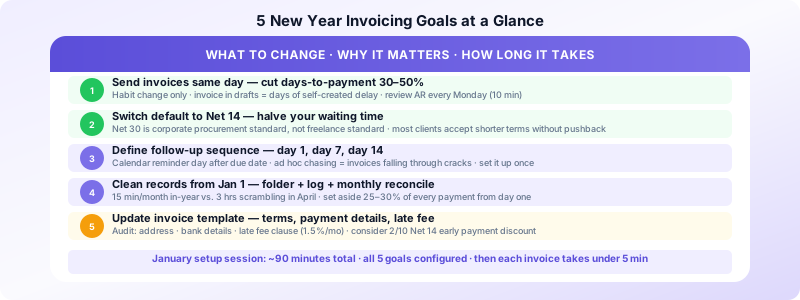
The average small business carries $17,500 in unpaid invoices at any given time, and nearly half are more than 30 days overdue. The single biggest lever on days-to-payment is how quickly you send invoices and follow up.
This year, commit to:
- Sending every invoice the same day work is complete or delivered
- Sending a payment reminder on day 1 after the due date (not day 7 or 10)
- Reviewing outstanding invoices every Monday morning — 10 minutes that prevents weeks of drift
Businesses that tighten their invoice-to-send time often cut days-to-payment by 30–50% without changing payment terms at all. The invoice sitting in your drafts folder for three days is a three-day delay you created yourself.
Measure it: Track your average days to payment at the end of each month. Start with your current baseline from last year. A healthy target for service businesses is 14–21 days average.
Goal 2: Shorten Your Default Payment Terms
If you defaulted to Net 30 last year because it felt like the "professional" standard, reconsider. Net 30 is standard for corporate procurement — it's not the default for freelancers and small service businesses.
Recommended defaults for the new year:
- Net 14 for most service work
- Net 7 for small, one-time projects
- Due on receipt for rush work or clients with history of late payment
- 50% deposit + Net 14 on balance for new clients and projects over $500
Net 14 instead of Net 30 cuts your wait time in half on every invoice. Over a year of billing, that's a significant improvement in how much cash you have available at any given time.
For existing clients on Net 30: You don't need to change terms abruptly. On your next proposal or engagement, state your new standard terms. Most clients accept shorter terms without pushback — they rarely push for Net 30 unless it's a corporate requirement.
Goal 3: Set Up a Consistent Follow-Up System
Chasing invoices ad hoc — remembering to follow up sometimes, forgetting other times — is the main reason late payments accumulate. A defined sequence eliminates the guesswork.
Recommended follow-up sequence:
- Day of invoice: Send with a brief, professional email noting the due date
- Day 1 after due date: Friendly reminder ("Just following up on invoice #001…")
- Day 7 overdue: Second reminder, more direct — ask for a confirmed payment date
- Day 14 overdue: Final notice, reference late fee, request payment or call
Set a calendar reminder on the day after each invoice's due date. It takes 30 seconds to schedule and prevents the invoice from falling into a black hole.
For a complete follow-up template and system, see our guide on following up on unpaid invoices.
Goal 4: Build Clean Records from January 1
If tax season was painful last year because you couldn't find invoices or reconcile income, fix the system in January — not in April.
Minimum viable record-keeping system:
- One folder per year for invoice files (cloud storage or local, doesn't matter)
- A simple log: invoice number, client, amount, date sent, date paid
- Monthly reconciliation against bank deposits (takes 15 minutes)
With this system running from January 1, your year-end review becomes a 20-minute confirmation. Without it, it's a 3-hour reconstruction.
Additional habits worth building:
- Archive paid invoices with payment date noted
- Keep a separate record of any cash or informal payments
- Note any disputed invoices and their resolution
Tax set-aside: Start the habit in January. Transfer 25–30% of every payment to a separate savings account immediately upon receipt. By Q1 estimated tax deadline (April 15), the money is already waiting. For the full record-keeping framework, see our guide on invoice record keeping best practices.
Goal 5: Review and Update Your Invoice Template
Your invoice template is a document clients see on every transaction. Outdated information, missing fields, or an unprofessional format creates friction — clients may delay payment waiting to clarify details, or pay the wrong account.
January template audit checklist:
- Your current address and contact email
- Correct payment account details (bank account, PayPal, etc.)
- Late fee clause (1.5%/month is standard — add it if it's not there)
- Explicit payment terms on every invoice (not just "due upon receipt")
- Sequential invoice numbering (if you've been numbering manually, check for gaps)
- Your EIN if clients request it for 1099 filing
While you're at it, verify your standard invoice email template. The subject line, body text, and payment instructions should all be current.
Consider an early payment discount: Offering 2% off for payment within 10 days (written as "2/10 Net 14") gives clients a financial incentive to pay quickly. Even clients who rarely take the discount pay attention to it. For clients where cash flow delays are the issue, a small discount can unlock payment that would otherwise sit for 30+ days.
Putting It Together: Your January Invoicing Setup Session
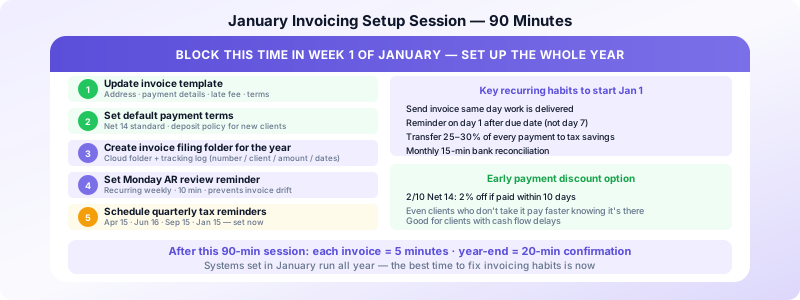
Block 90 minutes in the first week of January. In that session:
- Update your invoice template (address, payment details, late fee, terms)
- Set your default payment terms for the new year
- Create your invoice filing folder for the year
- Set up your invoice tracking log
- Schedule a recurring Monday morning reminder for your AR review
- Set a recurring calendar reminder: quarterly estimated tax dates (Apr 15, Jun 16, Sep 15, Jan 15)
After that 90-minute session, your invoicing system is set for the year. Every invoice you send after that is a 5-minute task.
For new freelancers setting up for the first time, see our complete guide on how to set up invoicing for a new freelance business. For managing everything from your iPhone, Invoices Customers creates professional invoices in under 2 minutes — no subscription, no setup overhead, designed for exactly this kind of simple, consistent invoicing practice.
Sources:
