
Recurring Invoice Setup Guide for Small Business
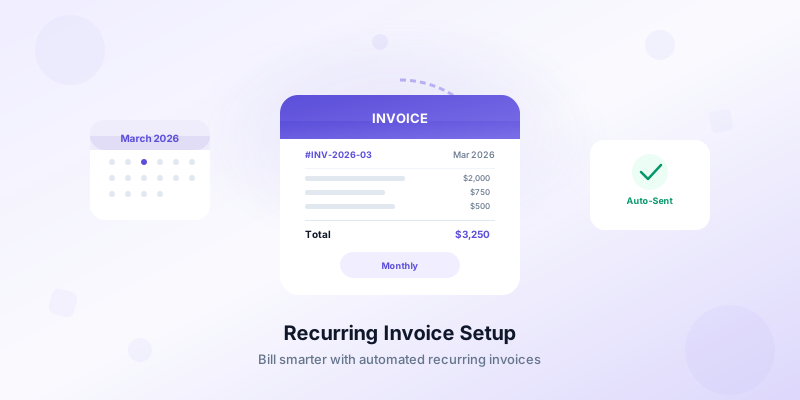
If you bill the same client the same amount on a regular schedule, you need a recurring invoice setup guide that actually works. Recurring invoices eliminate the repetitive task of creating a new document every week or month. They save you time, reduce billing errors, and help you get paid faster — all without rebuilding invoices from scratch.
Whether you manage three retainer clients or thirty, setting up recurring invoices correctly from the start prevents missed payments and awkward follow-ups. This guide covers everything you need to build a reliable recurring billing system for your business.
What Recurring Invoices Are and When to Use Them
A recurring invoice is a document that gets sent to the same client on a fixed schedule — weekly, biweekly, monthly, or quarterly — for the same amount or a predictable set of line items. Unlike one-off invoices, recurring invoices follow a pattern you define once and repeat automatically or semi-automatically.
Recurring invoices work best in these situations:
- Retainer agreements. A graphic designer charging $2,000 per month for ongoing brand work sends the same invoice every month.
- Subscription services. A marketing consultant providing a monthly SEO audit at a flat rate of $750.
- Maintenance contracts. A landscaping company billing $400 biweekly for regular property maintenance.
- Ongoing hourly work with a minimum. A virtual assistant billing a guaranteed 20 hours per week at $35 per hour.
If your billing relationship with a client involves predictable, repeated charges, recurring invoices save you from recreating the same document over and over. For a deeper look at what belongs on every invoice, see our guide on how to create professional invoices.
How to Set Up Your Recurring Invoice Step by Step
Setting up a recurring invoice takes a few minutes upfront but saves hours over the life of a client relationship. Here is the process broken into clear steps.
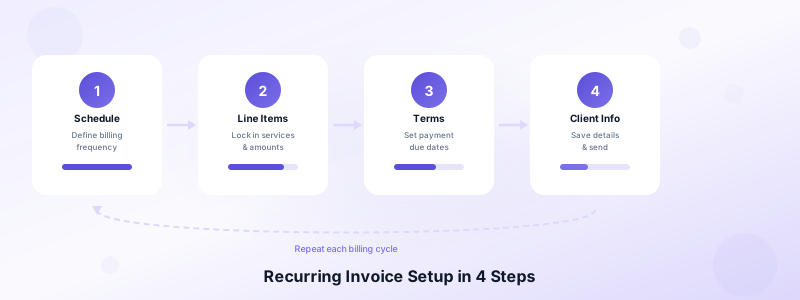
1. Define the billing schedule. Decide how often you will invoice the client: weekly, biweekly, monthly, or on a custom cycle. Match the schedule to your agreement. If your contract says "first of every month," your invoice should arrive on or before that date.
2. Lock in the line items. List every service or product that repeats. Be specific. Instead of "monthly services," write "Social media management — 12 posts, 3 platforms" or "Weekly office cleaning — 2,500 sq ft." Clear line items prevent disputes and speed up payment.
3. Set payment terms. Specify when payment is due after the invoice is sent. Net 15 and Net 30 are common choices. If you need guidance on choosing the right terms, check out our breakdown of invoice payment terms. Whatever you choose, include it on every recurring invoice so the client always knows the deadline.
4. Add client details once. Store your client's name, business name, billing address, email, and tax information so you can pull it up instantly for each cycle. Invoices Customers lets you save all client details on your iPhone, which means you never have to re-enter billing information when creating your next invoice.
5. Number your invoices sequentially. Each recurring invoice needs a unique number. Use a format like INV-2026-0301, INV-2026-0302, and so on. Sequential numbering keeps your records clean and makes it easy to reference specific invoices during client conversations.
6. Review before sending. Even with a recurring setup, give each invoice a 30-second review before it goes out. Confirm the amount, date, and client details are correct. A quick check catches errors that automated systems miss.
Best Practices for Managing Recurring Invoices
Setting up recurring invoices is the first step. Managing them well over time is what keeps your cash flow steady and your client relationships strong.
Send invoices on the same day every cycle. Consistency trains your clients to expect your invoice. If you always bill on the 1st, clients build that payment into their monthly routine. Random billing dates create confusion and delays.
Track payment status for every invoice. Know at a glance which recurring invoices are paid, outstanding, or overdue. If a client who normally pays within 5 days hasn't paid by day 10, that is a signal to follow up immediately. Invoices Customers provides status tracking — outstanding, overdue, and paid — so you can spot late payments before they snowball.
Adjust amounts when scope changes. Recurring invoices are not set-and-forget forever. When you raise your rate, add a service, or change the scope of work, update the recurring invoice template immediately. Send the client a brief note explaining the change before the next invoice goes out.
Keep a record of every sent invoice. Store copies of all recurring invoices, even if the amounts are identical. You need these records for tax season, for resolving disputes, and for understanding your revenue history. A PDF copy of each invoice is your best protection.
Include a brief description of the billing period. Add a line like "Services for March 2026" or "Week of March 16–22, 2026." This small detail helps clients match your invoice to the correct budget period and reduces back-and-forth questions.
Common Recurring Invoice Mistakes to Avoid
Even experienced business owners make these errors. Avoiding them keeps your billing professional and your payments on track.
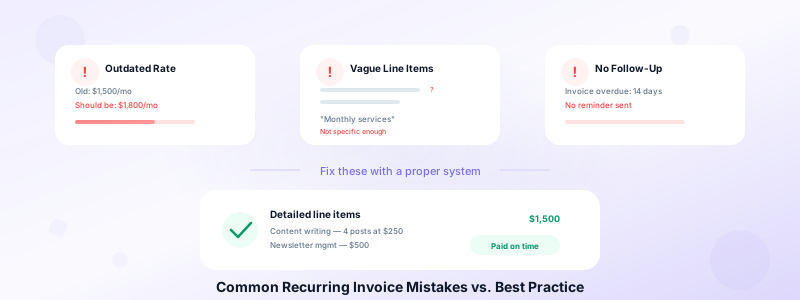
Forgetting to update amounts after a rate change. You agreed to a new rate three months ago, but the recurring invoice still shows the old amount. This costs you money every cycle. Set a reminder to review recurring invoice amounts quarterly.
Sending invoices without reviewing them. Automation is helpful, but blind trust in a template leads to mistakes. A client's address changes, a tax rate updates, or a project scope shifts. Always review before sending.
Not following up on late payments. Just because an invoice is recurring doesn't mean payment is guaranteed. If a client misses a payment, follow up within 3 days. The longer you wait, the harder it becomes to collect. For strategies on handling this, see our tips on managing client relationships.
Using vague line item descriptions. "Monthly services — $1,500" tells the client nothing. Break it down: "Content writing — 4 blog posts at $250 each" and "Newsletter management — $500." Detailed descriptions justify the total and reduce questions.
Skipping the contract or agreement. A recurring invoice without a written agreement is risky. Always have a signed contract or email confirmation that outlines the scope, rate, billing frequency, and payment terms before you start billing. The contract is your safety net if a client disputes a charge.
How to Handle Changes and Cancellations
Recurring billing relationships change. Clients scale up, scale down, pause projects, or end agreements. How you handle these transitions determines whether the client relationship survives.
For rate increases: Give clients at least 30 days notice before a price change takes effect. Send a brief, professional message explaining the new rate and the effective date. Then update your recurring invoice template so the next invoice reflects the change.
For scope additions: When a client adds services to an existing agreement, create a revised estimate or written confirmation before adding the line item to your recurring invoice. This protects both sides and creates a clear paper trail.
For pauses: If a client wants to pause recurring work, confirm the pause in writing and note the expected resume date. Stop sending invoices during the pause. Sending an invoice for services not rendered damages trust instantly.
For cancellations: Send a final invoice for any outstanding work, confirm the end date in writing, and close out the recurring billing cycle. Keep all records for at least three years for tax purposes.
Start Sending Recurring Invoices Today
A solid recurring invoice setup guide is only useful if you put it into practice. Pick your first recurring client, define the billing schedule, lock in your line items and payment terms, and send your first recurring invoice this week. The upfront effort takes 10 minutes. The time you save over the next year adds up to hours.
Recurring invoices work best when backed by a tool that stores your client details and lets you create professional invoices quickly. Download Invoices Customers to build and send polished recurring invoices from your iPhone — no account required, no learning curve, and all your data stays on your device.
