
Scope Creep Prevention for Freelancers: 6 Tactics
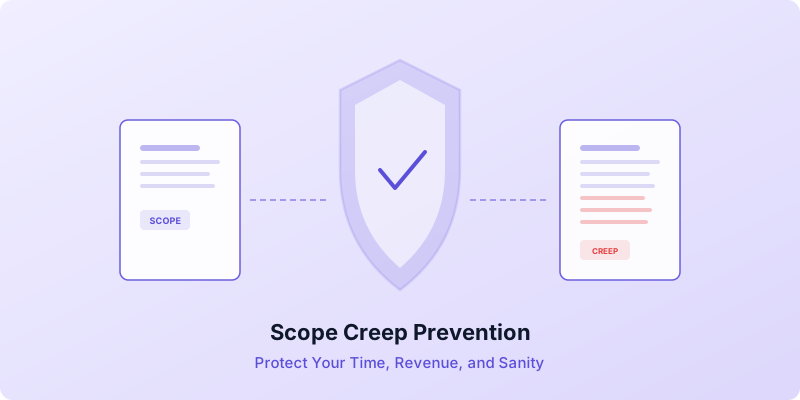
A client says four words that change everything: "Can you just quickly..." And before you know it, you are redesigning a page that was already approved, writing copy that was never in the agreement, or attending calls that were not part of the project. This is scope creep, and it is the single biggest threat to your income as a freelancer.
Scope creep happens when the work you deliver grows beyond what was originally agreed upon — without a matching increase in pay. It sneaks in through small, seemingly reasonable requests that pile up over weeks. You work more hours, earn less per hour, and end up resenting a project you were once excited about.
The good news is that scope creep prevention requires a system, not confrontation. These six tactics will help you protect your time, your revenue, and your client relationships.
Write a Scope-Proof Contract From the Start
Every scope creep problem is a contract problem in disguise. If your agreement says "build a website," the client can reasonably argue that almost anything web-related falls within that description. But if it says "build a 5-page website consisting of a homepage, about page, services page, portfolio page, and contact page — with two rounds of revisions," there is very little room for misinterpretation.
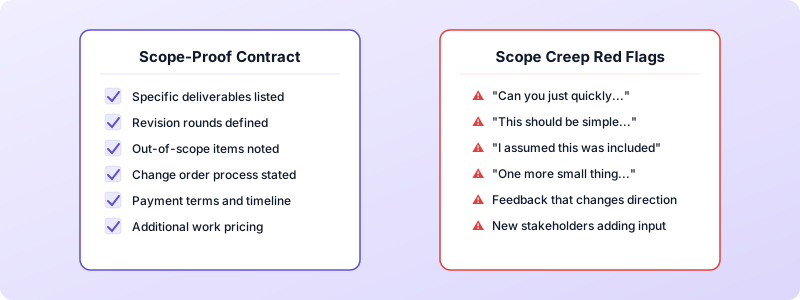
Your contract should include these elements to prevent scope creep:
- Specific deliverables. List every item you will produce, with quantities where possible.
- Defined revision rounds. State exactly how many revision rounds are included (two is a common standard) and what happens after they are used.
- Out-of-scope items. Explicitly note what the project does not include. This is just as important as listing what it does include.
- A change order clause. Explain what happens when the client requests work beyond the original scope: you will provide a written change order with the additional cost, and work begins only after approval.
- Payment terms and timeline. Tie payments to milestones so you are not waiting until the very end to get paid. For guidance on structuring this, see our guide to invoice payment terms.
A detailed contract does more than protect you legally. It sets expectations early and gives you something to point to when a conversation gets uncomfortable.
Use a Formal Change Request Process
Having a change order clause in your contract is step one. Actually using it consistently is what makes scope creep prevention work. Many freelancers include the clause but then absorb small extras because they feel awkward enforcing it. This is where the money disappears.
Here is a simple change request process you can implement immediately:
- Client makes a request that falls outside the original scope.
- You acknowledge the request positively. Try something like: "That is a great idea. Let me scope it out so we can add it properly."
- You send a written change order that describes the additional work, the cost, and any impact on the timeline.
- Client approves the change order in writing (email is fine).
- You do the work and invoice it separately or add it to the next milestone invoice.
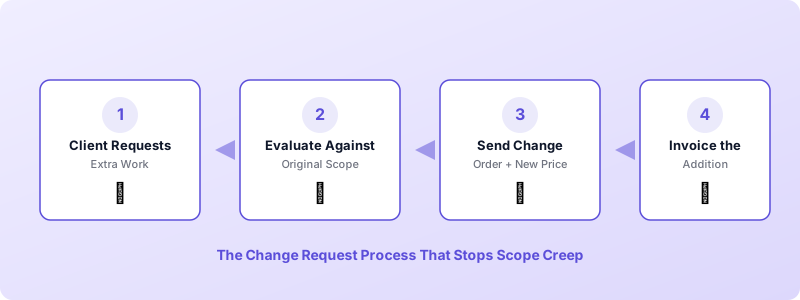
This process puts a price on every extra request — which causes clients to think carefully about whether the addition is truly necessary — and creates a paper trail that protects both sides.
When it is time to bill the extra work, Invoices Customers makes it easy to create a separate invoice for the addition — with clear line items that show exactly what was delivered and what it costs.
Get Written Approval at Every Milestone
Scope creep often explodes at the end of a project because the client sees the final deliverable for the first time and wants significant changes. You can prevent this by building approval checkpoints into your process.
Break your project into clear milestones and get the client to sign off on each one before you move to the next phase. For example, a web design project might have these milestones:
- Milestone 1: Wireframes and site structure approved.
- Milestone 2: Design mockups for the homepage approved.
- Milestone 3: Inner page designs approved.
- Milestone 4: Development complete and tested.
- Milestone 5: Final review and launch.
Once a milestone is approved, any changes to that deliverable go through your change request process. This keeps the project moving forward instead of spiraling in circles.
Milestone approvals also tie naturally into your invoicing schedule. When you have clear approval points, you can tie payments to each milestone — keeping your cash flow healthy and reducing the risk of months passing without payment. For more on this, read our guide to freelancer cash flow management.
Learn to Redirect Instead of Refuse
One reason freelancers struggle with scope creep prevention is that saying "no" feels like it will damage the relationship. The good news is that you rarely need to say no. You need to redirect.
When a client asks for something outside the original scope, do not say: "That is not included in the contract." Instead, say: "That is a great addition. Let me put together a quick estimate so we can add it to the project."
This approach works because it:
- Validates the client's idea. They feel heard and respected.
- Introduces a process. The request moves from casual conversation to formal documentation.
- Attaches a cost. Once clients see a dollar amount, many requests that seemed urgent suddenly become optional.
The redirect technique works especially well for phrases that signal scope creep: "Can you just quickly..." or "I assumed this was included" or "This should be simple." These are genuine misunderstandings about where the boundary lies. Your job is to clarify that boundary without making the client feel criticized.
Track Your Time on Every Task
You cannot measure scope creep if you are not tracking your time. Even if you bill on a project basis rather than hourly, time tracking reveals the truth about what a project actually costs you.
Start logging your time per task on every project. After a few projects, you will have data that shows:
- How long specific deliverables actually take versus how long you estimated.
- Which clients consistently create extra work that you absorb without billing.
- Where scope creep tends to happen most — during revisions, during communication, or during the final delivery phase.
This data helps you write more accurate estimates and gives you concrete evidence when you need to discuss additional charges. Telling a client "this project is taking longer than expected" is vague. Telling them "I have logged 12 hours on revisions, six hours beyond our agreement" is specific and defensible.
Track your time, then use those numbers to build accurate invoices. When you create professional invoices that reflect the actual work delivered, clients rarely push back — because the documentation speaks for itself.
Build Scope Protection Into Your Invoicing Workflow
Scope creep prevention does not end when the contract is signed. It continues through every invoice you send. Your invoicing process is your final line of defense — and it is also where many freelancers drop the ball.
Here is how to make your invoices work as scope protection tools:
- Itemize every line. Do not send invoices that say "Website project — $5,000." Break it down: homepage design, about page, revisions round one, revisions round two. Itemized invoices make clients less likely to assume additional work is included.
- Invoice change orders separately. When you complete extra work that was approved through your change request process, send a separate invoice or add clearly labeled line items. This reinforces the boundary between original scope and additions.
- Invoice promptly. The longer you wait to send an invoice after completing work, the more likely the client is to question the charges. Send invoices as soon as milestones are completed.
- Reference your agreement. Add a note to your invoice that references the original contract or estimate. This is especially useful for handling client disputes on invoices if they arise.
Invoices Customers lets you create detailed, itemized invoices with line items, quantities, and tax calculations — all from your phone. You can also convert an estimate directly into an invoice with one tap, which ensures nothing from the original agreement gets lost in translation. Download Invoices Customers and start protecting your scope today.
You do not need to implement all six tactics at once. Start with the one that addresses your biggest pain point. If you keep absorbing small extras, implement the change request process. If clients constantly change direction at the end, add milestone approvals. Each tactic builds on the others, and over time, scope creep stops being a recurring frustration and becomes a rare exception.
