
Invoice Templates: Pick the Right One and Get Paid Faster
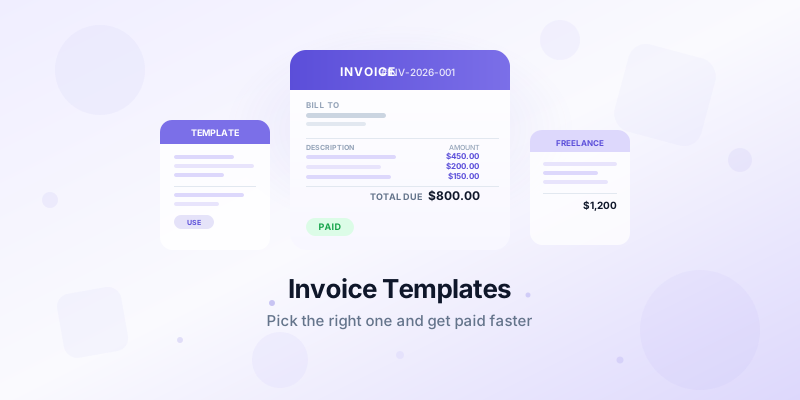
Finding the right invoice template saves you hours of formatting work and makes sure you never forget a critical field. Whether you're a freelancer, contractor, or small business owner, the best invoice templates let you plug in your details and send a polished document in minutes.
This guide covers the core elements every invoice template needs, which format works best for your situation, and how to customize templates so they represent your brand.
What Every Invoice Template Must Include
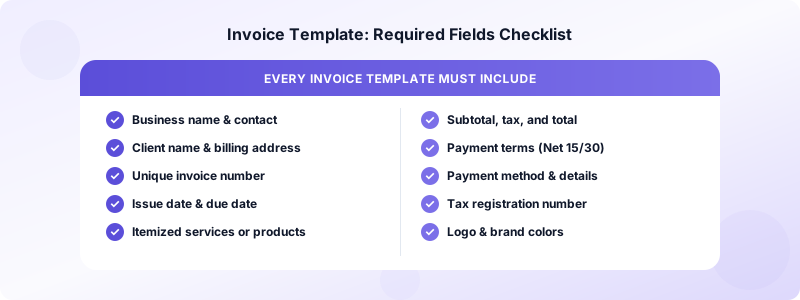
A strong invoice template is more than a blank document with your logo at the top. Before you send anything, confirm your template includes all of these fields.
Business information:
- Your full name or business name
- Address, phone number, and email
- Tax or business registration number (if applicable)
Client information:
- Client name and company
- Billing address
- Contact email
Invoice details:
- Unique invoice number (use a consistent format like INV-2026-001)
- Issue date and payment due date
- Clear description of products or services
- Quantity, unit price, and line totals
- Subtotal, tax rate, and total amount due
Payment instructions:
- Accepted payment methods
- Bank details or payment link
- Late fee policy (optional but effective)
Skipping any of these creates confusion, delays payment, and can cause problems at tax time. For a full breakdown, see our guide on what to include on an invoice.
Choosing the Right Invoice Template Format
Not all templates are equal. The format you choose affects how professional your invoices look and how easy they are to manage over time.
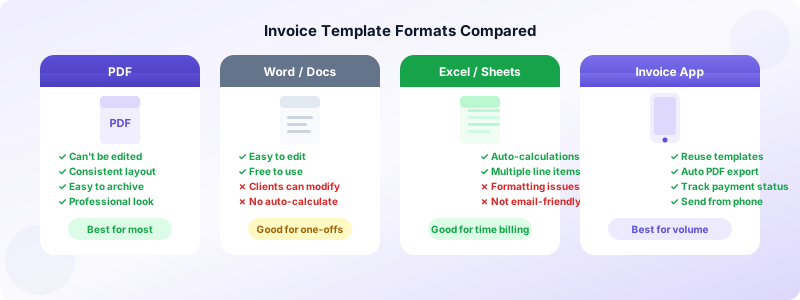
PDF templates are the safest choice for most businesses. PDFs display consistently on any device, can't be accidentally edited by clients, and are easy to archive. If you're emailing invoices, PDF is the standard.
Word and Google Docs templates are flexible and easy to edit, but clients can accidentally modify the content. They're fine for one-off projects but harder to track systematically.
Excel and Google Sheets templates work well if you're invoicing for time-based work with multiple line items. Built-in formulas do the math automatically, reducing errors.
App-generated invoices are the most efficient option for volume. Tools like Invoices Customers let you build a template once and reuse it for every client. You fill in the variable details — hours, items, project name — and the app generates a professional PDF you can send directly from your phone.
Industry-Specific Invoice Templates
The base template works across industries, but specific fields make certain templates better for particular business types.
Freelancers and consultants benefit from templates that include an hourly rate breakdown and project milestone sections. If you bill by project and time, your template should have separate rows for each deliverable.
Contractors and trades need templates with a clear description of labor and materials. Adding a section for deposit paid versus balance due keeps your cash flow visible.
Product-based businesses need quantity and unit price columns. If you sell physical goods, include shipping address and tax fields for the delivery location.
Service businesses (cleaning, landscaping, personal training) often do recurring work. Templates that include a service period — "April 1–April 30" — make it clear what billing cycle the invoice covers.
Whatever your industry, the goal is the same: give your client enough detail that they approve and pay the invoice without back-and-forth.
How to Customize Your Invoice Template
A template is a starting point, not a final product. Customization takes about 15 minutes and makes your invoices look professional from the first send.
1. Add your logo. Place it in the top left or center of the header. Keep it under 200px high so it doesn't dominate the page.
2. Match your brand colors. Use your primary color for the header bar and column headings. Subtle use of color signals professionalism without making the invoice hard to read.
3. Write a clear payment section. Don't bury your bank details in fine print. Put your preferred payment method in a visible spot near the total amount.
4. Add a thank-you note. A one-line note at the bottom — "Thank you for your business" — is a small touch that clients remember.
5. Set your default payment terms. Most small businesses use Net 15 or Net 30. Choose a term that fits your cash flow and build it into every template.
For more on making your invoices reflect your business identity, read our guide on invoice branding tips.
Saving and Reusing Your Template
The best invoice systems make reuse effortless. Here's how to set yourself up:
- Store a master template file that's never modified — duplicate it for each new invoice
- Name files consistently: ClientName-InvoiceNumber-Date.pdf
- Keep a running log of sent invoices with status (sent, paid, overdue)
If you're managing more than five active clients, manual templates start to slow you down. Invoices Customers stores your client details, remembers your line items, and generates a fresh PDF every time — no duplicating files or reformatting required. Your template is always ready.
For a full workflow that covers setup, sending, and follow-up, see the complete invoicing guide for small business.
Common Invoice Template Mistakes to Avoid
Even with a solid template, small errors can delay payments or confuse clients. Here are the most common mistakes and how to fix them.
Missing the payment due date. Vague language like "due upon receipt" rarely works. Give a specific date — "Due by April 15, 2026" — and clients are far more likely to pay on time. Studies show invoices with a specific due date get paid up to 1.5x faster than those without one.
Using a generic description. "Services rendered" tells a client nothing. Write "3-hour consultation call, April 3 — brand strategy planning" and they immediately know what they're paying for. Specific descriptions also protect you in a dispute.
Not including your payment method. Listing your bank details or payment link in a visible spot — not buried in a footnote — removes friction. If clients have to ask how to pay, they often delay.
Sending the same invoice number twice. This creates accounting headaches for you and your client. An invoice numbering system like INV-2026-001 prevents duplicates and makes searching your records simple.
Forgetting to add tax. If you're required to charge sales tax or VAT in your jurisdiction, it must appear on every invoice. Retroactively adding tax to a sent invoice is awkward and sometimes impossible. Build the tax field into your template from day one.
When to Create Multiple Templates
Most businesses benefit from having two or three template variations rather than one catch-all document.
Standard invoice template — your default for most client billing. Includes all required fields with your brand colors.
Quick-send template — a stripped-down version for simple one-item invoices. Useful for small jobs where you want to bill fast and move on.
Recurring invoice template — pre-filled with the client's details and monthly service description. You only change the date and invoice number each billing cycle.
Having these ready means you can pick the right template for the situation and send an invoice in under two minutes, rather than reformatting from scratch every time.
Start Using Your Invoice Template Today
A good invoice template does two things: it makes you look professional and it makes getting paid easier. Spend the time once to set it up correctly — add every required field, customize it with your brand, and save a clean master copy.
Once your invoice template is in place, sending takes less than five minutes. That speed means you can invoice immediately after completing work, which is the single biggest factor in getting paid on time. Freelancers who send invoices within 24 hours of completing a job get paid an average of two weeks faster than those who wait.
Download Invoices Customers and create your first professional invoice template in under two minutes.
