
Invoice vs Receipt: Key Differences Explained
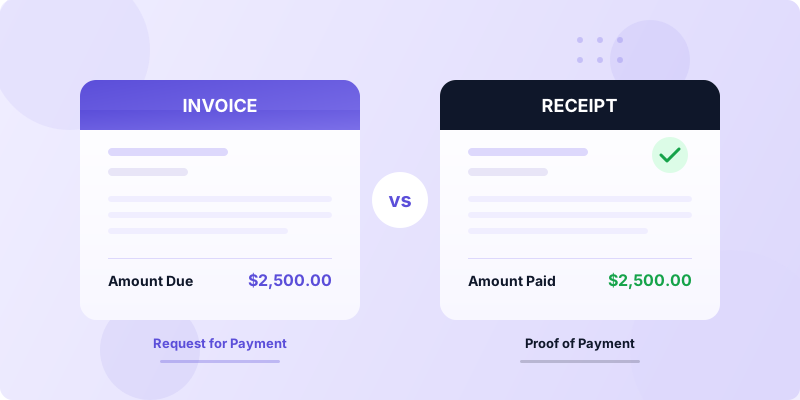
You finished a job, and now the client asks for "the paperwork." Do you send an invoice or a receipt? Understanding the invoice vs receipt difference prevents accounting mix-ups, keeps your records clean, and ensures you get paid without confusion. These two documents look similar, but they serve completely different purposes in every business transaction.
This guide breaks down exactly what each document does, when to use it, and how to manage both efficiently.
What Is an Invoice?
An invoice is a request for payment. You send it to a client before they pay you, and it tells them exactly how much they owe, what the charges are for, and when payment is due.
Think of an invoice as a formal "please pay me" document. A freelance designer finishes a logo project and sends an invoice for $2,500 with a due date of April 15. The client has not paid yet — the invoice initiates the payment process.
Every invoice should include your business details, the client's information, a unique invoice number, an itemized list of services or products, the total amount due, and your payment terms. If you need a full breakdown, check out the complete guide on what to include on an invoice.
Invoices also serve as legal records. They document what work was performed, the agreed-upon price, and the timeline. If a payment dispute arises six months later, your invoice is the evidence you need.
What Is a Receipt?
A receipt is proof of payment. You issue it after the client pays, and it confirms that the transaction is complete.
Using the same example: the designer's client pays the $2,500 on April 10. The designer then sends a receipt confirming that payment was received in full on that date. The receipt closes the loop that the invoice opened.
A receipt typically includes the date of payment, the amount paid, the payment method (bank transfer, credit card, cash), a reference to the original invoice number, and both parties' details. Receipts protect both you and your client — you have proof the payment arrived, and your client has proof they paid.
Key Differences Between Invoices and Receipts
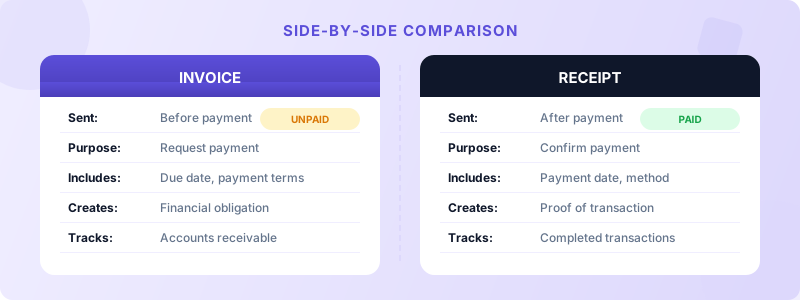
While invoices and receipts share some information, they differ in timing, purpose, and legal function. Here is a clear breakdown.
Timing. An invoice goes out before payment. A receipt goes out after payment. This is the most fundamental difference. If money has not changed hands yet, you need an invoice. If it has, you need a receipt.
Purpose. An invoice requests money. A receipt acknowledges that money was received. One starts the transaction; the other ends it.
Legal obligation. An invoice creates a financial obligation — the client now owes you the stated amount by the due date. A receipt carries no obligation. It simply records what already happened.
Who sends it. You (the seller or service provider) send both documents, but at different stages. Invoice first, receipt second.
Content differences. Invoices include payment terms, due dates, and late fee policies. Receipts include the payment date, payment method, and confirmation that the balance is zero.
Accounting role. Invoices track accounts receivable (money owed to you). Receipts track completed transactions and reconcile your books. Both are essential for clean financial records, especially during tax season.
A common mistake is treating a paid invoice as a receipt. Even if you mark an invoice as "paid," it is not the same as a formal receipt. Some clients — and some tax authorities — require a separate receipt document.
When to Use an Invoice vs a Receipt
Knowing when to send each document saves you from awkward client conversations and accounting headaches.
Send an invoice when:
- You complete work and need to bill the client
- You require a deposit before starting a project (this is sometimes called a proforma invoice or estimate)
- You bill on a recurring schedule (monthly retainers, subscriptions)
- You need to document the agreed price and scope of work
Send a receipt when:
- A client pays in full and requests confirmation
- You accept a cash or in-person payment
- A client needs proof of payment for their own tax records or expense reports
- You want to close out a transaction in your bookkeeping system
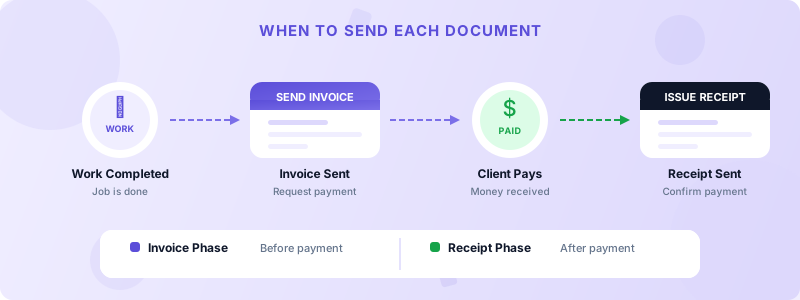
Real-world example. A contractor installs new kitchen cabinets. She sends an invoice for $8,400 with Net 30 terms. The homeowner pays via bank transfer two weeks later. The contractor then issues a receipt showing the $8,400 was received on that date. Both documents go into her records, and the homeowner keeps the receipt for a potential home improvement tax deduction.
Some businesses skip receipts entirely when payments happen electronically, since bank statements serve as proof. But issuing receipts is still a best practice — it shows professionalism and keeps your records airtight.
How to Manage Invoices and Receipts Efficiently
Tracking both invoices and receipts manually gets messy fast, especially as your client list grows. Here are practical steps to stay organized.
Use a consistent numbering system. Your invoices and receipts should both have unique numbers that you can cross-reference. When receipt #R-0045 references invoice #INV-0045, finding any transaction takes seconds instead of minutes.
Store everything digitally. Paper invoices and receipts get lost. Digital records are searchable, shareable, and backed up. Generate professional PDFs for every transaction so nothing falls through the cracks.
Send invoices immediately after completing work. The faster you invoice, the faster you get paid, and the sooner you can issue a receipt to close the transaction. Delays in invoicing lead to delays in payment — and gaps in your records.
Track invoice status. Know which invoices are outstanding, overdue, or paid at a glance. This tells you exactly which transactions still need receipts and which are fully documented.
Invoices Customers makes this entire workflow simple. You can create professional invoices on your iPhone, track their status from outstanding to paid, and keep all your client details organized in one place. When you need to create professional invoices on the go, having the right tool eliminates the guesswork.
Stop Confusing Invoices and Receipts
The invoice vs receipt difference comes down to one thing: timing. An invoice asks for payment before it happens. A receipt confirms payment after it happens. Send the wrong one at the wrong time, and you create confusion for your client and your bookkeeping.
Get this right, and your financial records stay clean, your clients stay happy, and tax season becomes far less stressful. Start by building a habit of sending invoices promptly and issuing receipts for every completed payment.
Ready to streamline your invoicing? Download Invoices Customers from the App Store and create your first professional invoice in seconds — no sign-up required.
